
24/7 Customer Support

Free returns

Same-day & Next-day Delivery

Quality Guaranteed

Unlock Your Welcome Offers: FREE Delivery | Up to 80% OFF | Free 30-day JoyPlus trial
Download the APP
Navigating the world of high-performance laptops can feel overwhelming. When your work depends on smooth video editing, fast rendering and seamless multitasking, choosing the right machine is critical. A standard laptop often struggles to keep up with the demands of creative software, leading to frustrating delays and compromised productivity.
This guide is designed to cut through the technical jargon and marketing clutter. As a Joybuy Product Recommendation Officer, my role is to help you understand the key features that matter for creative work. We will explore what makes a great creator laptop and highlight a few standout models available in the UK to help you make an informed decision.
Before diving into specific models, let's break down the core components that directly impact performance for creative tasks. Focusing on these three areas will help you identify a laptop that truly meets your needs.
These three components work together to power your creative workflow.
A high-quality display is non-negotiable for any serious content creator. It's not just about size; it's about accuracy and clarity.
The right ports can save you from a life of dongles and adapters. For professional laptops in the UK, a versatile selection of ports is a key feature. Consider what your daily workflow requires. Do you need to connect external monitors, high-speed storage or cameras? Look for a combination of Thunderbolt 4 or USB-C ports for fast data transfer and display output, an HDMI port and the convenience of a built-in SD card reader.
Here are a few high-performance laptops that stand out for their ability to handle demanding creative workloads.
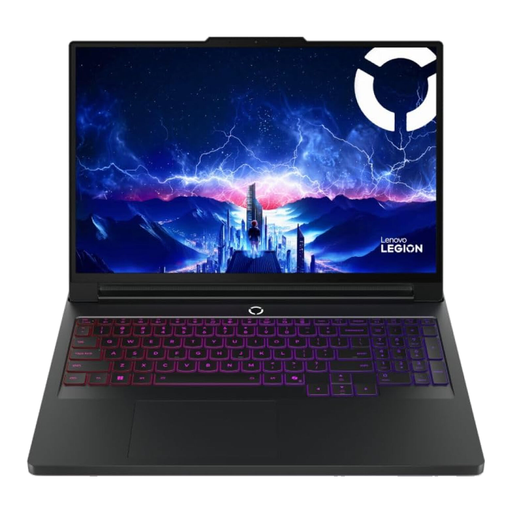
Why It Stands Out: Originally designed for gaming, the Legion Pro 7 packs the raw power that content creators crave. Its top-tier processor and GPU combination can handle the most intensive rendering and processing tasks without breaking a sweat. The high-refresh-rate OLED display is equally suited for colour-critical work and high-frame-rate entertainment.
Pros:
Who is it for? This machine is ideal for 3D artists, animators and video editors working with 4K or higher resolution footage who need maximum, uncompromising power.
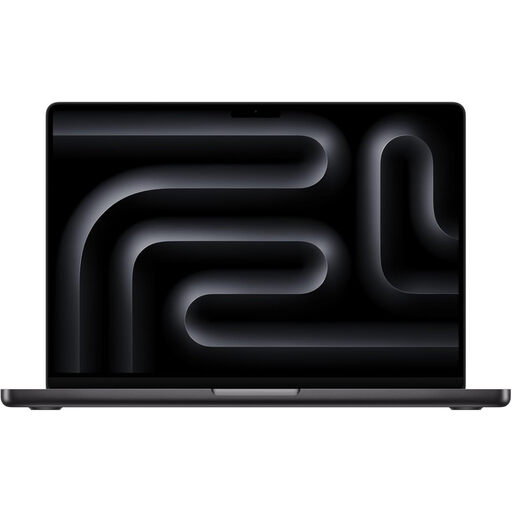
Why It Stands Out: The MacBook Pro continues to be a favourite among many creative professionals for its tightly integrated hardware and software. The M5 Pro chip delivers remarkable performance and power efficiency, while the Liquid Retina XDR display is one of the finest available on a laptop. Its build quality and optimised operating system provide a reliable and fluid user experience.
Pros:
Who is it for? A superb choice for graphic designers, photographers and video editors who are invested in the Apple ecosystem and value a combination of power, portability and display quality.

Why It Stands Out: The ASUS VivoBook Pro 15 offers a compelling balance of performance and value. It pairs a powerful AMD Ryzen 9 processor with a capable NVIDIA RTX 40-series GPU, making it a strong contender for many creative tasks. The 120Hz OLED display brings professional-grade visuals to a more accessible price point, making it a smart choice for those who need power without the top-end budget.
Pros:
Who is it for? An excellent option for students, 'prosumers' and freelance creators looking for a capable and portable creator laptop that delivers strong performance for its price.
Every creative's needs are different. If these recommendations aren't quite what you're looking for, there are many other powerful laptops for creative work to consider.
Explore our full range of professional notebooks to find the device that perfectly matches your workflow and budget. Browse More Professional Laptops
For general photo editing and 1080p video, 16GB of RAM is a solid starting point. If you work with 4K video, complex 3D models or large multi-layer design files, we recommend 32GB or more to ensure a smooth, lag-free experience.
Yes, often they are. Gaming laptops typically feature powerful GPUs, high-end CPUs and advanced cooling systems—all of which are beneficial for demanding creative software. Their high-refresh-rate screens are also a plus for video editing and animation.
This largely comes down to personal preference and the software you use. macOS is known for its streamlined user experience and optimisation with software like Final Cut Pro. Windows offers a much wider variety of hardware choices from different brands, greater customisation and broader software compatibility. Both platforms have a strong ecosystem of professional creative tools.