
24/7 Customer Support

Free returns

Same-day & Next-day Delivery

Quality Guaranteed
Download the APP
Categories
Hello, I'm Joy, your Product Recommendation Officer at Joybuy. My role is to help you navigate the crowded market of tech gadgets and find products that genuinely suit your needs. I understand that choosing a new monitor can be a complex task, with a dizzying array of specifications like refresh rates, resolutions and panel types to consider.
If you're searching for a curved gaming monitor, you're likely looking for a display that offers an immersive experience for entertainment while also providing the screen real estate and clarity needed for productivity. This guide is designed to cut through the marketing clutter, offering practical advice and highlighting a couple of noteworthy options that balance performance and features for both gaming and professional use.
Before we look at specific models, let's clarify some of the key technical terms you'll encounter. Understanding these will help you make a more informed decision.
The refresh rate, measured in Hertz (Hz), indicates how many times per second the image on the screen is updated. A standard monitor is typically 60Hz, but for gaming, a high refresh rate monitor is essential for smooth, fluid motion. Models with 144Hz, 165Hz or even a 180Hz monitor setting can provide a noticeable competitive advantage in fast-paced games by reducing motion blur. Paired with this is latency. A low latency monitor ensures that your inputs from a mouse or keyboard are reflected on-screen almost instantaneously, which is critical for both responsive gaming and efficient work.
Resolution determines the clarity and detail of the image. While Full HD (1920x1080) is a common standard, higher resolutions like WQHD (Wide Quad HD) offer significantly sharper visuals. For example, a 27 inch monitor at WQHD resolution provides a great balance of size and pixel density. For those who need more horizontal space for multitasking or a wider field of view in games, an ultrawide monitor (typically with a 21:9 aspect ratio) is an excellent choice, effectively replacing a dual-monitor setup and making it a versatile monitor for gaming and work.
The screen's panel technology affects its visual characteristics. A VA panel monitor is often noted for its high contrast ratios, which produce deep blacks and bright whites, making images appear more dynamic. This is particularly beneficial for watching films or playing atmospheric games. For creative professionals, colour accuracy is paramount. Look for monitors that specify a high percentage of a colour gamut, like sRGB, as this indicates the display's ability to reproduce a wide and accurate range of colours, a key feature for a monitor for video editing or graphic design.
Based on a combination of features, performance specifications and user needs, here are a couple of curved monitors worth considering.
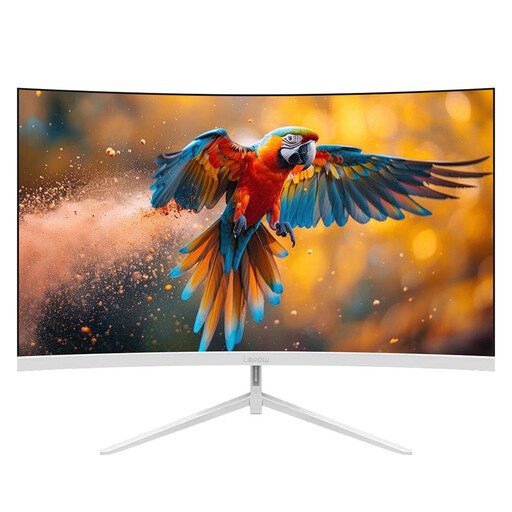
Why It Stands Out This Lepow monitor strikes a compelling balance between high-speed gaming performance and vibrant colour reproduction. Its 180Hz refresh rate is a standout feature at this price point, delivering exceptionally smooth visuals for competitive gaming. The curved FHD screen aims to provide an immersive viewing angle while helping to reduce eye strain during long sessions.
Pros
Who is it for? This monitor is an excellent option for gamers who prioritise high refresh rates for a competitive edge, as well as for users who want a vibrant and immersive display for general entertainment and creative hobbies.
Learn More about the Lepow 27-inch Monitor on Joybuy
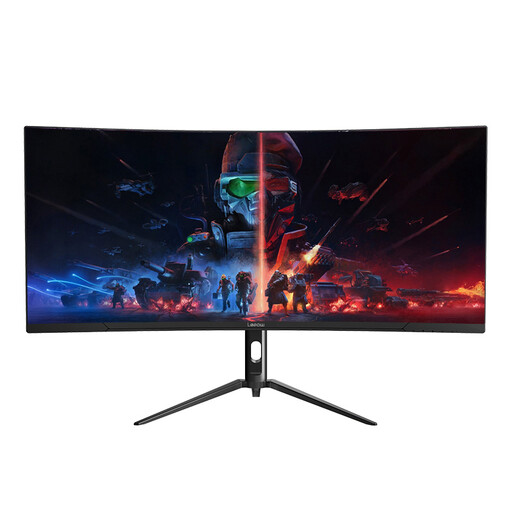
Why It Stands Out For those seeking the ultimate multitasking and immersive experience, this 34-inch ultrawide monitor is a strong contender. Its 21:9 aspect ratio and WQHD monitor resolution (3440x1440) provide an expansive digital canvas, perfect for managing multiple windows, editing video timelines or enjoying a panoramic gaming view.
Pros
Who is it for? This is geared towards power users, including content creators, programmers and avid gamers, who can take full advantage of the extra screen width for enhanced productivity and a deeply immersive entertainment experience.
Learn More about the Lepow 34-inch Ultrawide Monitor on Joybuy
A stunning visual display is just one part of an immersive desk setup. To match the high-quality picture with equally compelling audio, consider upgrading your sound system.
For a curated selection of audio solutions that can elevate your gaming, work and entertainment experience, feel free to explore our range of desktop computer speakers.
1. Is a curved monitor better for gaming and work? A curved monitor can enhance immersion in games and movies by wrapping the image around your peripheral vision. For work, the curve can help reduce eye strain and distortion at the edges of a large or ultrawide screen. However, it's largely a matter of personal preference. Some users, particularly those doing precise graphic design or architectural work, may prefer a flat screen to avoid any potential for subtle line distortion.
2. What is a good refresh rate for a gaming monitor in 2026? While 60Hz is the baseline, a refresh rate of 144Hz has become the popular standard for a smooth gaming experience. For competitive players, monitors offering 165Hz or 180Hz provide an even greater level of fluidity. Anything above 100Hz will offer a significant and noticeable improvement over a standard 60Hz display for both gaming and general desktop use.
3. Is a VA panel good for gaming? Yes, a VA panel monitor can be very good for gaming. VA (Vertical Alignment) panels are known for their superior contrast ratios, which result in deeper blacks and a more dynamic image. This is especially beneficial in dark, atmospheric games. While older VA panels sometimes had slower response times, modern versions have improved significantly, making them a solid all-around choice for gamers who also value picture quality for movies and other media.