
24/7 Customer Support

Free returns

Same-day & Next-day Delivery

Quality Guaranteed

Unlock Your Welcome Offers: FREE Delivery | Up to 80% OFF | Free 30-day JoyPlus trial
Download the APP
Tired of switching between windows on a small screen? Or perhaps your desk is a tangled mess of cables from a dual-monitor setup that never quite aligns properly. For many UK professionals, content creators and remote workers, a standard display is no longer enough to keep up with demanding workflows. A curved ultrawide monitor offers a streamlined solution, replacing clutter with a single, immersive canvas that can transform your productivity.
Navigating the market can be a challenge, with a wide array of specifications and features to consider. This guide is designed to cut through the clutter, offering practical advice to help you choose a display that fits your needs. We will explore key features and highlight a few standout models for your consideration.
Choosing the right multitasking monitor involves more than just screen size. Here are a few crucial factors to keep in mind for your home office monitor or professional workspace.
The primary appeal of an ultrawide is the expansive screen. A 34 inch ultrawide monitor with a WQHD (3440x1440) resolution is a popular choice, offering roughly 30% more horizontal space than a standard 16:9 display. This is ideal for viewing multiple documents side-by-side or managing a wide timeline in video editing software. For those who require the ultimate multitasking setup, a 49 inch super ultrawide monitor with a DQHD (5120x1440) resolution is equivalent to two 27-inch QHD monitors placed together, but without the distracting bezel in the centre.
A clean workspace promotes a clear mind. A monitor with USB-C power delivery is a game-changer for this, allowing you to transmit video, transfer data and charge your laptop with a single cable. Pay attention to the wattage; 65W is sufficient for most ultrabooks, while more powerful laptops may benefit from 90W or more. For users who work with both a personal and a work computer, a monitor with a KVM switch is an invaluable feature. It allows you to control both machines using just one keyboard and mouse, switching between them at the press of a button.
While a standard 60Hz refresh rate is fine for basic tasks, a 120Hz ultrawide monitor provides a noticeably smoother experience. Scrolling through web pages, moving windows and even simple cursor movements feel more fluid and responsive. This enhanced smoothness is not just for gaming; it reduces perceived motion blur and can make long hours of work feel less strenuous on the eyes.
Here are a few models that offer a compelling combination of features, performance and practicality for different types of users.
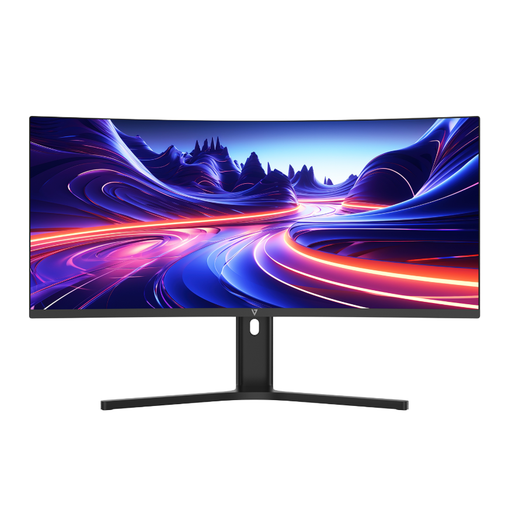
Why It Stands Out: The V7 L340WQ-HAS is a strong contender for anyone seeking a versatile ultrawide monitor for productivity. It balances a spacious 34-inch curved screen with essential modern features, making it an excellent all-around upgrade for a professional workspace. The combination of a sharp WQHD resolution, single-cable USB-C connectivity and an ergonomic stand covers all the key requirements for a comfortable and efficient workflow.
Pros:
Who is it for? This monitor is well-suited for professionals, remote workers and students who need a significant productivity boost. Its practical feature set makes it a great entry point into the world of ultrawide displays.
View Details for the V7 L340WQ-HAS 34" Monitor
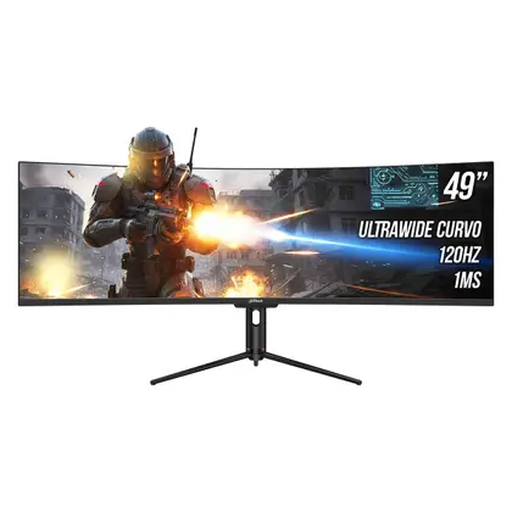
Why It Stands Out: For those who believe more is more, this 49 inch super ultrawide from Dahua delivers an unparalleled panoramic view. Its massive 32:9 aspect ratio and 5120x1440 resolution are equivalent to two 27-inch QHD monitors, providing an enormous digital canvas for the most demanding multitasking. Combined with a smooth 120Hz refresh rate, it is built for power users who need to see everything at once without compromise.
Pros:
Who is it for? This monitor is aimed at power users such as financial traders, software developers and video editors who can leverage its vast screen real estate to display multiple full-sized application windows simultaneously.
View Details for the Dahua 49" Super Ultra-Wide Monitor
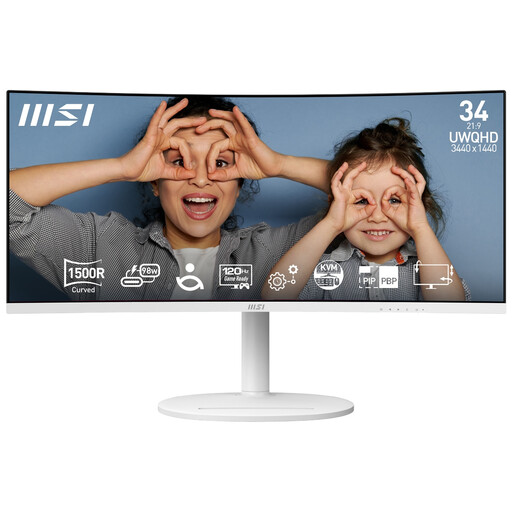
Why It Stands Out: The MSI Modern MD342CQPW blends high-performance features with a sophisticated, minimalist design. Its clean white finish makes it a stylish addition to any modern workspace. Beyond aesthetics, it is packed with productivity-enhancing technology, including a built-in KVM switch, a smooth 120Hz refresh rate and a powerful USB-C port that delivers up to 98W, making it a true single-cable docking solution for even power-hungry laptops.
Pros:
Who is it for? This monitor is an excellent choice for content creators, designers and prosumers who demand both top-tier functionality and a refined aesthetic for their home office monitor.
View Details for the MSI Modern MD342CQPW 34" Monitor
The right monitor is a personal choice, and the models above represent just a fraction of the available options. If you are looking for a different size, resolution or feature set, there is a display out there to match your specific requirements.
Explore our full range of Desktop screen monitor options to find the perfect fit for your setup.
Yes, for many users, it is a significant improvement. The extra horizontal space allows you to have multiple windows open and visible at once, reducing the need to constantly switch between applications. This is particularly beneficial for tasks like comparing spreadsheets, writing code while viewing documentation or editing video. The curve also helps keep the entire screen within your peripheral vision, which can reduce eye and neck strain.
A KVM (Keyboard, Video, Mouse) switch is a hardware device that allows you to control two or more computers from a single set of peripherals. When built into a monitor with a KVM switch, it lets you connect, for example, a work laptop and a personal desktop to the same display. You can then switch between controlling each computer with your keyboard and mouse without unplugging any cables, making it an ideal feature for a streamlined multitasking monitor setup.
Absolutely. While high refresh rates are often marketed for gaming, the benefits are noticeable in everyday use. A 120Hz ultrawide monitor makes general desktop navigation, scrolling through documents and web browsing feel much smoother and more responsive compared to a standard 60Hz display. This added fluidity can contribute to a more pleasant and less fatiguing user experience during long work sessions.