
24/7 Customer Support

Free returns

Same-day & Next-day Delivery

Quality Guaranteed

Unlock Your Welcome Offers: FREE Delivery | Up to 80% OFF | Free 30-day JoyPlus trial
Download the APP
If you spend your days working at a computer, you are likely familiar with the subtle but persistent ache that can develop in your wrist and forearm. This discomfort is often a result of holding a traditional mouse, which forces your arm into an unnatural, twisted position for hours on end. An ergonomic vertical mouse is designed to address this very issue.
By shifting your grip to a more neutral "handshake" position, these devices can help reduce muscle strain and improve comfort during long work sessions. This guide will walk you through the key features to consider and present a few carefully selected options to help you find a mouse that fits your workflow and supports your well-being.
Choosing the right mouse goes beyond just its shape. Here are a few practical points to consider before making a decision.
The choice between a wired and a wireless ergonomic mouse often comes down to personal preference and desk setup. Wireless models offer a cleaner, cable-free workspace and greater flexibility. They typically connect in one of two ways:
Many modern mice offer dual-mode connectivity, giving you the flexibility of both options.
The core benefit of a vertical mouse is its handshake grip mouse design. This keeps your forearm bones in a neutral, parallel alignment, reducing the twisting that can lead to strain. However, not all vertical mice are the same size. Some are specifically shaped for smaller or larger hands, so checking the product dimensions and design notes can ensure a comfortable fit. A mouse that is too large or small can negate some of the ergonomic benefits.
A good ergonomic mouse should enhance your productivity as well as your comfort. Look for features like:
We have analysed the market to identify models that offer a strong combination of ergonomic design, useful features and reliable performance.
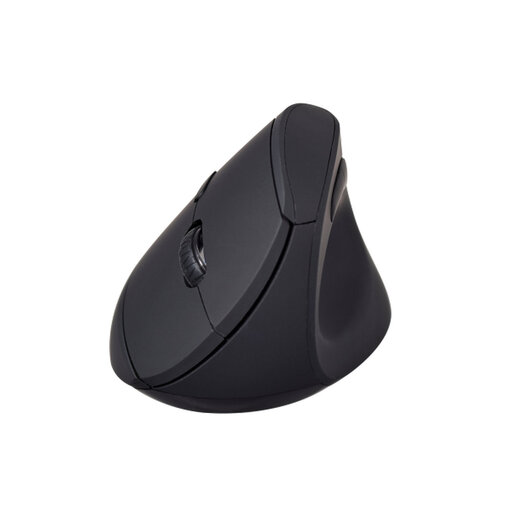
Why It Stands Out: The V7 MW500BT is a highly functional and accessible option that doesn't compromise on core ergonomic principles. It provides the flexibility of dual-mode wireless connectivity, allowing you to connect via Bluetooth or a 2.4GHz dongle, making it a versatile choice for various setups.
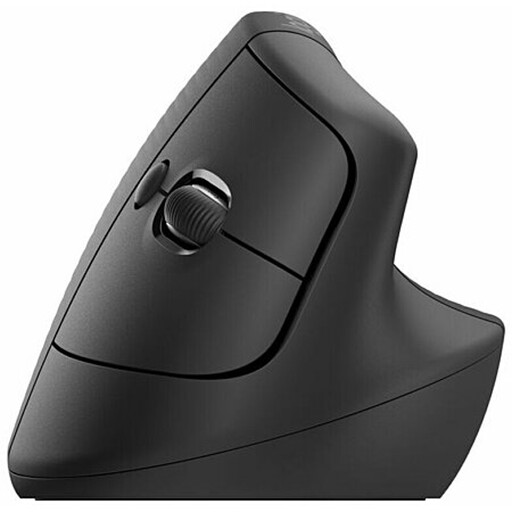
Why It Stands Out: The Logitech Lift is engineered specifically for users with small to medium-sized hands. Its 57-degree vertical angle is optimised to place your hand in a natural handshake posture, promoting better wrist and forearm alignment. The whisper-quiet clicks make it an excellent companion for shared or quiet office environments.
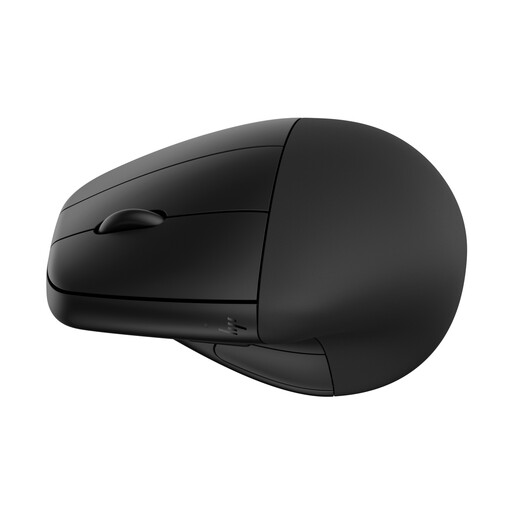
Why It Stands Out: The HP 920 stands apart with its unique detachable magnetic wrist rest, which provides an extra layer of support to reduce contact pressure with the desk. It also features a rechargeable battery with fast-charging capabilities, ensuring you are never out of power for long.
The models above represent some of the strong contenders available, but the ideal mouse is a personal choice. If you are looking for a different size, feature set or price point, there are many other options to consider.
Explore our complete range of ergonomic vertical computer mice to find the perfect match for your needs.
A vertical mouse is designed to be better for wrist posture. By promoting a neutral "handshake" grip, it prevents the inward twist of the forearm (pronation) that occurs with a standard mouse. This position can help reduce muscle activity and strain in the forearm and wrist, which is why many people searching for a vertical mouse for wrist pain or a mouse for carpal tunnel UK find them more comfortable for long-term use. It is not a medical treatment, but rather a tool for promoting a more natural posture.
There is typically a short adjustment period. For most users, it takes anywhere from a few days to a week to adapt their muscle memory to the new grip and button orientation. While it may feel slightly unusual at first, users often report that the initial learning curve is a small price to pay for the long-term improvement in comfort.
While you can perform general tasks and casual gaming with a vertical mouse, most are not designed for competitive, fast-paced gaming. They are primarily built for productivity and comfort, with features like adjustable DPI and programmable buttons that benefit office work. Serious gamers may find that the sensor and response times are not optimised for the rapid, high-precision movements required in many games.