
24/7 Customer Support

Free returns

Same-day & Next-day Delivery

Quality Guaranteed

Unlock Your Welcome Offers: FREE Delivery | Up to 80% OFF | Free 30-day JoyPlus trial
Download the APP
Spending hours at a computer is a daily reality for many of us in the UK, whether in a busy office, a quiet home study or a university library. With this comes the familiar discomfort: the subtle ache in the wrist, the strain in the forearm and the distracting, repetitive click-clack of a standard mouse. An ergonomic wireless mouse is designed to address these issues, offering a more comfortable, efficient and clutter-free way to work.
Navigating the market can be confusing, with countless models all promising superior comfort and performance. This guide is designed to cut through the clutter. As the Joybuy Product Recommendation Officer, my role is to provide clear, practical advice to help you find a mouse that genuinely fits your needs, improves your workflow and supports your well-being during long work sessions.
Before looking at specific models, it helps to understand the key features that will make the biggest difference to your daily use. Consider these factors to narrow down your options.
The core purpose of an ergonomic mouse is to reduce strain. Designs vary, but they generally fall into two categories:
A wireless setup declutters your desk, but how it connects matters.
Power is another consideration. Some models use standard AA or AAA batteries, while a rechargeable wireless mouse can be topped up via a USB cable, saving you money on batteries in the long run.
Where you work influences your choice. A silent wireless mouse uses technology that drastically reduces the sound of each click. This makes it a considerate choice for open-plan offices, libraries and quiet home environments. If you frequently move between locations, a lightweight and compact portable mouse for laptop use will be far more convenient than a larger, desk-focused model.
Based on these key considerations, we have selected a few standout options that cater to different user needs for comfort, quietness and portability.
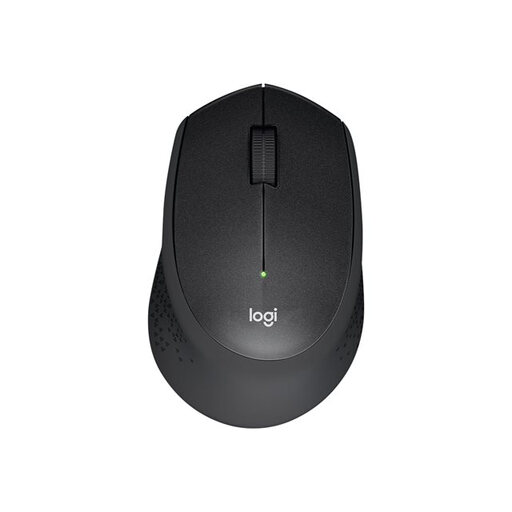
Why It Stands Out The Logitech M330 is an excellent all-rounder that focuses on one thing: quiet productivity. Its main feature is the SilentTouch technology, which reduces clicking noises by over 90% compared to a standard mouse. This makes it an ideal quiet office mouse. The comfortable, contoured shape with soft rubber grips is designed for all-day use, while the reliable 2.4GHz wireless connection and impressive 24-month battery life mean you can set it up and forget about it.
Pros
Who is it for? This mouse is a superb choice for professionals, students and anyone working in shared spaces like offices, libraries or co-working hubs. If your priority is eliminating noise without sacrificing comfort and reliability, the M330 is a practical and affordable option.
View the Logitech M330 Silent Plus on Joybuy
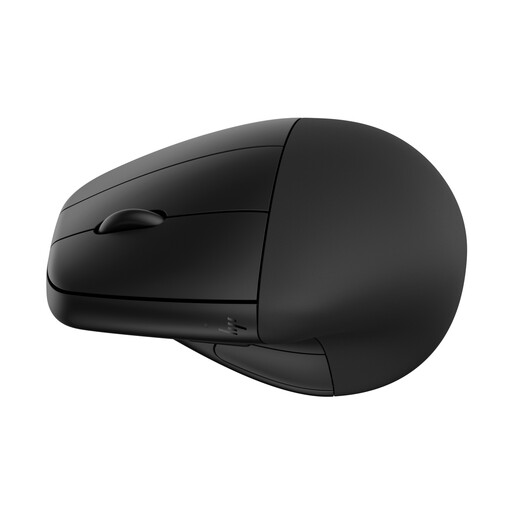
Why It Stands Out For those specifically looking to combat wrist and forearm strain, the HP 920 offers a dedicated ergonomic solution. This vertical mouse promotes a natural handshake posture to reduce muscle activity. It goes a step further with a detachable magnetic wrist rest for customisable support. It’s also packed with features for power users, including dual connectivity (Bluetooth and 2.4GHz), six customisable buttons and a rechargeable battery that can last up to four months. The fast-charging feature is particularly useful, providing three hours of use from just a one-minute charge.
Pros
Who is it for? This is a strong candidate for the best mouse for office work for users who spend the majority of their day at a desk and are concerned about repetitive strain. If you've experienced discomfort with traditional mice or want to proactively invest in your desk ergonomics, the HP 920 is a feature-rich choice.
View the HP 920 Ergonomic Mouse on Joybuy
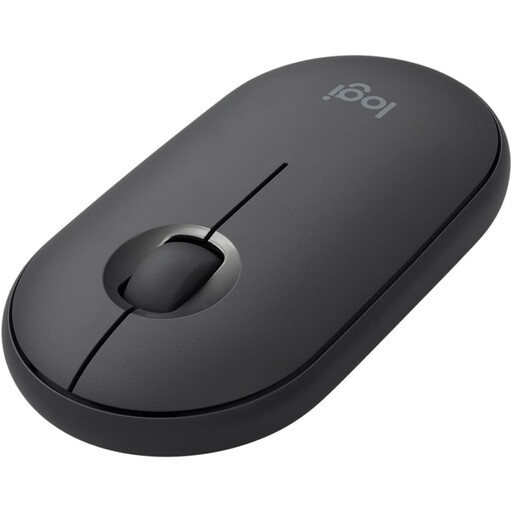
Why It Stands Out The Logitech Pebble proves that ergonomics can also mean portability and simplicity. Its slim, lightweight and minimalist design makes it the perfect portable mouse for laptop users. It slips easily into any bag without adding bulk. Like the M330, it features quiet-click technology, so you can work discreetly in a café or on a train. Its smooth, rounded shape is ambidextrous, making it comfortable for both left- and right-handed users who need a reliable mouse on the move.
Pros
Who is it for? The Pebble is for the modern mobile worker. If you value portability above all else and need a mouse that can travel with you without fuss, this is an excellent choice. It’s ideal for students, commuters and anyone with a flexible work style who needs a simple, stylish and quiet pointing device.
View the Logitech Pebble Mouse on Joybuy
Our recommendations cover a range of common needs, but the world of computer peripherals is vast. If you're looking for a different style, colour or feature set, we have a wider selection to explore.
Browse our full collection of USB computer mice to find the perfect match for your setup.
Is a vertical mouse better for wrist pain? A vertical mouse is designed to place your hand in a more neutral "handshake" posture. This can reduce the twisting of the forearm (pronation) that occurs with a standard mouse, which may help alleviate strain for some individuals. Comfort is subjective, but if you experience wrist discomfort, a vertical model is certainly worth considering.
What is the main difference between a Bluetooth and a 2.4GHz mouse? The primary difference is the connection method. A Bluetooth mouse connects directly to your computer's internal Bluetooth receiver, which is convenient and saves a USB port. A 2.4GHz mouse connects via a dedicated USB dongle, which can sometimes offer a more stable connection, especially in environments with a lot of wireless interference.
How long does a rechargeable wireless mouse battery last? Battery life varies significantly between models, from a few weeks to several months. For example, the HP 920 Ergonomic Mouse can last up to four months on a single charge. Factors like usage frequency and model-specific power-saving features will affect the actual duration. Most product descriptions will provide an estimated battery life to help you compare.