
24/7 Customer Support

Free returns

Same-day & Next-day Delivery

Quality Guaranteed

Unlock Your Welcome Offers: FREE Delivery | Up to 80% OFF | Free 30-day JoyPlus trial
Download the APP
Is your computer constantly flashing a 'Storage Almost Full' warning? Whether you're a student juggling assignments, a family archiving precious memories or a creative professional handling massive project files, running out of digital space is a common frustration. An external hard drive is a straightforward solution, providing the extra room you need for a reliable backup drive or simply as expanded external storage for your laptop.
Navigating the market can be confusing, with a wide array of types, capacities and features. This guide is designed to help you understand the key differences and identify a storage solution that fits your specific needs and budget.
Before looking at specific models, it's helpful to understand a few core concepts. Considering these points will make your decision much clearer.
The first major choice is between a traditional Hard Disk Drive (HDD) and a Solid-State Drive (SSD).
high capacity storage at a very affordable price per gigabyte. This makes them an excellent choice for archiving large amounts of data, like photo libraries, film collections or full system backups, where access speed isn't the top priority.fast external drive like a portable SSD is ideal if you plan to run software from it, edit videos directly on the drive or frequently move large files.Your next consideration is where you'll be using the drive.
desktop hard drive is designed to stay in one place. These units require their own power source from a wall socket, which allows them to offer the largest available capacities, such as a massive 22TB external hard drive. They are perfect for a home office or studio as a central backup station.portable hard drive is smaller, lighter and powered directly through the USB connection to your computer. This makes them the go-to option for working on the move, transferring files between locations or simply backing up a laptop without being tied to a desk. You can find high-capacity options like a 6TB portable hard drive that still fit easily in a bag.Most modern external drives use USB 3.0 (also known as USB 3.2 Gen 1) or faster standards like USB-C, which offer quick transfer speeds. It's always wise to check the ports on your computer to ensure compatibility, though most new drives are backward-compatible with older USB 2.0 ports, albeit at slower speeds.
Based on common user needs, from mass storage to on-the-go durability, here are some standout options to consider.
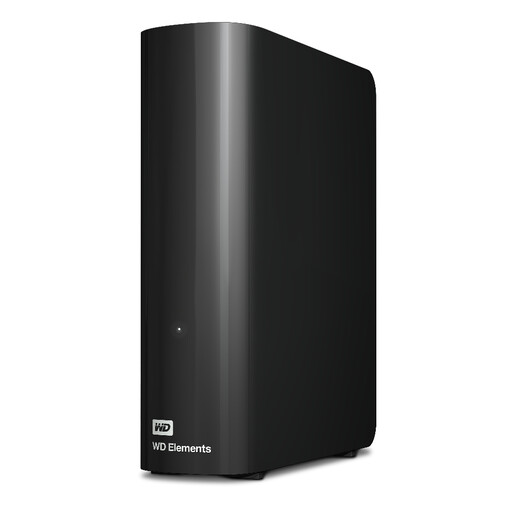
Why It Stands Out This desktop drive is all about maximum capacity. With an enormous 22TB of space, it's a digital warehouse for anyone who needs to archive vast amounts of data without worrying about running out of room. It offers a simple, no-fuss approach to storage: just plug it into the wall and your computer and you're ready to drag and drop files. The USB 3.2 Gen 1 interface ensures that even large file transfers are handled efficiently.
Pros
Who is it for? This is an ideal solution for data-heavy users, such as videographers archiving raw footage, small businesses needing a central backup device or families looking to consolidate decades of digital photos and home videos in one safe place.
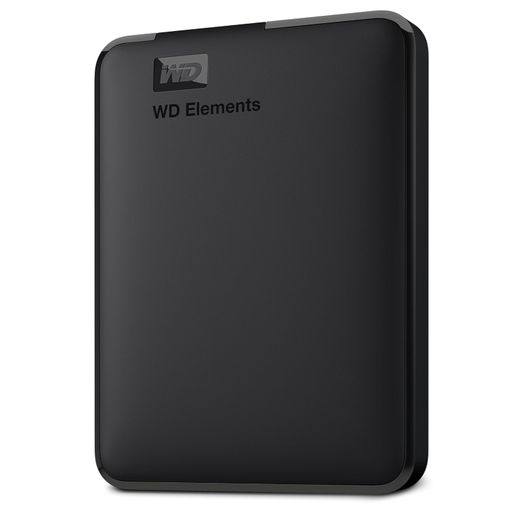
Why It Stands Out This drive hits a sweet spot between high capacity and portability. Packing a substantial 6TB into a compact frame that's powered solely by its USB connection, it gives you the freedom to carry huge files with you. It's a practical workhorse for those who need more than just a few gigabytes on the go. Furthermore, its enclosure is constructed with over 50% post-consumer recycled plastics, making it a more resource-conscious choice.
Pros
Who is it for? A great all-rounder for students with large project files, professionals who travel between office and home or anyone needing a high-capacity backup drive for their laptop without being tethered to a wall socket.
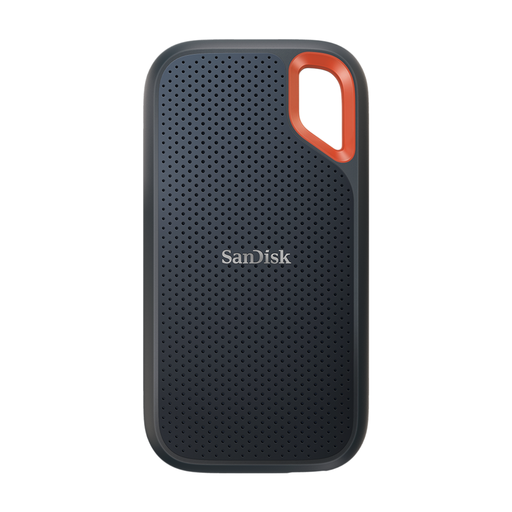
Why It Stands Out When speed and durability are non-negotiable, this rugged SSD delivers. Engineered for demanding workflows, it boasts incredible read speeds of up to 2000MB/s, allowing you to transfer and edit high-resolution photos and 4K videos directly from the drive with minimal lag. Its tough construction includes an IP65 rating for water and dust resistance and protection from drops of up to 3 metres. The built-in 256-bit AES hardware encryption also provides peace of mind for sensitive files.
Pros
Who is it for? This 1TB SSD is built for content creators, photographers and videographers who work on location. Its combination of speed and ruggedness makes it a reliable tool for transferring files quickly in the field and protecting work from accidental damage.
If these specific models don't quite match your requirements, whether you need a different capacity, a specific feature set or simply want to compare more models, a wider selection is available.
Explore our full range of external hard drives to find the perfect storage solution for you.
What is the main difference between an HDD and an SSD? An HDD (Hard Disk Drive) uses mechanical spinning platters to store data, making it more affordable for high-capacity storage but slower and more fragile. An SSD (Solid-State Drive) uses flash memory chips with no moving parts, resulting in much faster speeds, better durability and a smaller size, though typically at a higher cost per gigabyte.
How much external storage capacity do I really need? This depends entirely on your use case.
Do I need to format a new external hard drive? Most external drives come pre-formatted for either Windows (in a format called NTFS) or macOS (APFS or Mac OS Extended). A drive formatted for Windows will usually be readable on a Mac, but you won't be able to write files to it without reformatting. If you need to use the drive interchangeably between both operating systems, you can format it to a universal file system like exFAT using your computer's built-in disk utility application.