Who each route suits

Players who change position

If you alternate between holding a console, setting it on a table and using a TV, consider the viewing angle and battery range as well as the available play modes. Nintendo lists all three modes for Switch OLED; Valve describes Steam Deck OLED as a portable option.

Steam-library owners

If the puzzle games you want are already in your Steam library, a handheld PC-style route may appeal. Valve shows compatibility ratings for individual games on Steam Deck, so check each title rather than assuming library access means a suitable handheld experience.

TV-first digital-library players

If you usually play on a TV or monitor and are happy to acquire games digitally, check whether your preferred titles are on Xbox or PlayStation. Microsoft describes Xbox Series S as all-digital, while Sony states that PS5 Digital Edition has no disc drive.

What matters for long puzzle sessions

Nintendo Switch OLED

Consider it when: You want to switch between handheld, tabletop and TV play during a session.

Trade-off: Nintendo’s portable battery estimate varies by game, and the games you want still need to be available on Switch.

Steam Deck OLED

Consider it when: Portable access to an existing Steam library is central to your choice.

Trade-off: Check each game’s Deck compatibility rating and allow for content-dependent battery life.

Xbox Series S

Consider it when: You play on a TV and want access to Xbox digital games and Quick Resume.

Trade-off: Microsoft’s all-digital Series S cannot use your game discs.

PS5 Digital Edition

Consider it when: Your intended puzzle games are on PlayStation and you mainly use a TV.

Trade-off: Sony’s Digital Edition has no disc drive; buying and downloading games requires a PlayStation account and internet connection.

Concern What to check Who this matters to
Playing position Decide whether you will hold the screen, use a tabletop stand or sit at a TV; check the viewing angle for your usual position. I want to change where I sit without ending the game, so handheld, tabletop and TV options matter to me. Around 33% of consumers put playing-position flexibility first.
Game-library access Check several intended titles on the relevant platform; for Steam Deck, review each game’s compatibility rating. My choice starts with the puzzle games I already own or plan to play, not just the console itself. Library access comes first for around 27% of consumers.
Portable runtime Compare game-dependent battery ranges with your unplugged session and check where you can charge. When I play away from a socket, I need to know whether I can finish without interrupting the session. Around 20% of consumers prioritise portable runtime and charging continuity.
Game format and storage Decide whether you need discs; check the chosen model’s storage and requirements for digital purchases. I want to keep using discs or make room for downloaded games, so the buying format matters before I commit. Format and storage are the primary concern for around 20% of consumers.

Common buying mistakes

  • Choosing hardware before checking the games

    A puzzle game’s availability on one platform does not establish that it is available on another. Steam Deck also presents a compatibility rating for individual games.

    Make a short list of the titles you intend to play, check their platform pages and review each Steam Deck rating where relevant.

  • Treating the upper battery figure as a promise

    Nintendo and Valve give ranges that depend on the game or content, so the upper figure may not match your session.

    Plan an unplugged session without relying on the top of the range, and check that any charging arrangement uses a compatible adapter.

  • Buying a digital-only console for a disc collection

    Microsoft’s Xbox Series S is all-digital, and Sony’s PS5 Digital Edition has no disc drive. Neither model will play a game from a disc.

    Decide whether buying, borrowing or lending physical games matters to you before choosing either model.

  • Assuming a stand includes the rest of the setup

    Nintendo’s adjustable charging stand is an accessory for tabletop play, not a console bundle.

    Check the box contents of each console and accessory before planning how you will charge during play.

    Nintendo says its adjustable charging stand does not include the Switch console or AC adapter; those items are needed separately.

Brands relevant to these console routes

Nintendo

Switch OLED is relevant if you want one console for handheld, tabletop and TV play.

  • Nintendo lists a 7-inch OLED screen, an adjustable stand and 64 GB of storage expandable with a compatible microSD card for this model.
  • Nintendo estimates approximately 4.5–9 hours of portable battery life for Switch OLED, depending on the game; check whether that range fits your session.

Valve

Steam Deck OLED is relevant to players who want portable access to Steam games.

  • Valve shows the owner’s Steam library and compatibility ratings for individual games; it lists a 7.4-inch HDR OLED display for Steam Deck OLED.
  • Valve’s listed gameplay range is 3–12 hours depending on content. Check your intended games’ ratings and plan charging around your session.

Xbox

Xbox Series S is a TV-first option for players comfortable with a digital game library.

  • Microsoft lists Quick Resume for switching between installed titles.
  • Microsoft describes Series S as all-digital. Check the Xbox availability of your chosen puzzle games and the storage configuration you intend to buy.

PlayStation

PS5 Digital Edition is a TV-first option if your preferred games are available on PlayStation.

  • Sony lists an included DualSense controller for the cited PS5 Digital Edition configuration.
  • Sony states that the Digital Edition has no disc drive and that purchasing and downloading games requires a PlayStation account and internet connection.

Joybuy console choices for long puzzle sessions

These choices cover changing play positions, a fixed TV setup and portable gaming. They are different models from some of the consoles discussed above, so check the exact games and variant you want rather than applying another model’s battery figures or features to them.

Nintendo Switch 2 Console, UK Version

Nintendo Switch 2 Console (UK Version)

Consider this model if changing between handheld, tabletop and TV play is important to you. Check that your intended puzzle games work on Switch 2 and that its game-dependent portable runtime fits your session.

View on Joybuy

Xbox Series S 1TB console

Xbox Series S – 1TB

This 1TB Series S suits a fixed TV setup if the puzzle games you want are available on Xbox. Microsoft describes Series S as all-digital, so it will not play game discs; check your intended games’ installation requirements.

View on Joybuy

Sony PlayStation 5 Digital Edition Slim console

Sony PlayStation 5 Digital Edition, Slim Version

Consider this TV console if your preferred puzzle games are available on PlayStation. Sony states that PS5 Digital Edition has no disc drive; purchasing and downloading games requires a PlayStation account and internet connection.

View on Joybuy
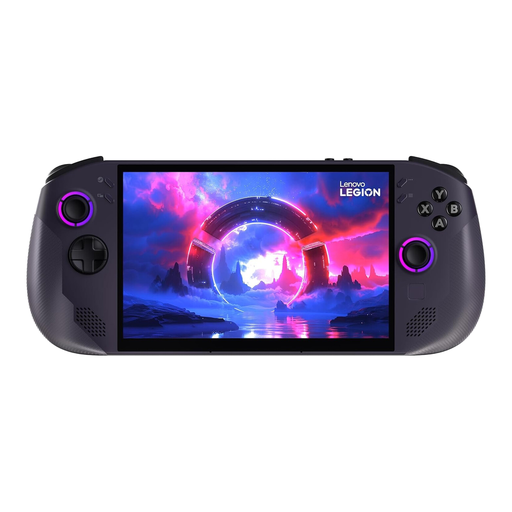
Lenovo Legion Go S handheld gaming console with AMD Ryzen Z2 Go and 1TB storage

Lenovo Legion Go S – AMD Ryzen Z2 Go, 1TB

This handheld is worth considering if portable access to your Steam games is the priority. It is the Legion Go S, not a Steam Deck OLED: check each intended game’s compatibility with this model and the runtime you need for unplugged play.

View on Joybuy
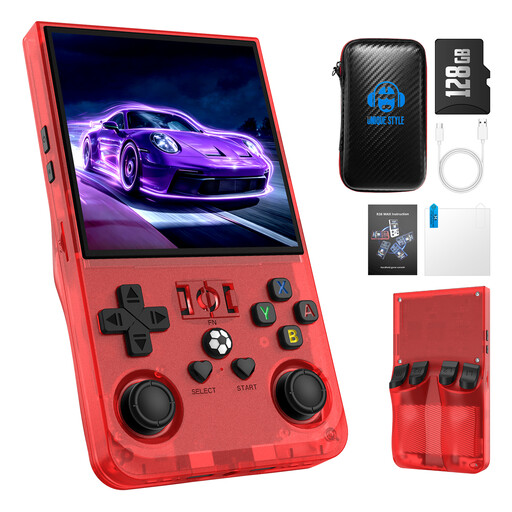
AISLPC R36MAX retro handheld console in red

AISLPC R36MAX Retro Handheld Console (Red)

This portable retro handheld is a different route if its smaller screen suits your playing position. Its title lists a 4.0-inch IPS display with 720 × 720 resolution; confirm the exact storage variant, included game list and suitable runtime before relying on it for a long puzzle session.

View on Joybuy

Questions about choosing a console

Do I need a handheld console for a long puzzle-game session?

No: a TV-first console suits play in one place, while a handheld or tabletop option lets you change position or play away from the TV. Nintendo lists handheld, tabletop and TV modes for Switch OLED; Steam Deck OLED is portable, whereas Xbox Series S and PS5 Digital Edition are home-console routes.

Will a handheld’s advertised battery range cover my whole session?

Not necessarily. Nintendo estimates approximately 4.5–9 hours for Switch OLED depending on the game, and Valve lists 3–12 hours for Steam Deck OLED depending on content. Compare the range for the particular model with your likely unplugged session rather than planning around its upper figure.

Can Xbox Series S or PS5 Digital Edition play my game discs?

No. Microsoft describes Xbox Series S as all-digital, and Sony says PS5 Digital Edition has no disc drive. If you rely on physical games, settle the format question before choosing either model.

What do I need to check to charge a Switch during tabletop play?

Use an AC adapter compatible with the console and approved for use in your country, as Nintendo advises. Nintendo’s adjustable charging stand supports charging in tabletop mode, but the stand does not include a Switch console or AC adapter.

Does a PEGI age rating tell me whether a puzzle game is difficult?

No. PEGI says its age ratings address the suitability of a game’s content, not its difficulty. If the console is for a child, check the rating of each intended game separately from whether its puzzles suit that player.