
24/7 Customer Support

Free returns

Same-day & Next-day Delivery

Quality Guaranteed

Unlock Your Welcome Offers: FREE Delivery | Up to 80% OFF | Free 30-day JoyPlus trial
Download the APP
Searching for the best gaming monitors in the UK can quickly become confusing. Product pages often emphasise a high refresh rate or a very low response-time figure, while leaving out the details that affect everyday use: which cable is required, whether your graphics card can drive the resolution, how adjustable the stand is and whether the panel suits creative work.
A sensible purchase starts with matching the monitor to your equipment and routine rather than paying for specifications you will not use.
A monitor may advertise 165Hz, 180Hz or 240Hz, but the maximum rate can depend on the input, cable and graphics card. For example, the CRUA 32-inch display specifies that its full 2560 × 1440 at 165Hz performance requires the supplied DisplayPort cable; HDMI may be limited depending on the connected hardware.
Before buying, check:
A quoted 1ms or 0.03ms figure does not always describe the same measurement. Manufacturers may use different methods, such as MPRT or GtG, and the fastest setting can introduce visible overshoot or image artefacts.
For general gaming, look at the complete specification: panel type, refresh rate, Adaptive-Sync support and independent adjustment options. A balanced 165Hz gaming monitor can be more suitable for many systems than a 240Hz model that your graphics card cannot drive consistently.
A high colour-gamut percentage indicates the range of colours a display can show, not necessarily its calibration accuracy. A VA gaming monitor may provide strong contrast and vivid colours, while an IPS monitor for graphic design may offer more consistent viewing angles and colour handling.
If you create images or video, look for stated colour standards such as sRGB or DCI-P3, calibration information, suitable presets and an adjustable stand. For long sessions, flicker-free and low blue light modes may also be useful, although they are comfort features rather than a guarantee against eye fatigue.
A QHD gaming monitor, also described as a 1440p gaming monitor, normally uses 2560 × 1440 pixels. It provides more desktop space and sharper detail than 1080p without demanding as much graphics performance as 4K.
Ultrawide models use resolutions such as 3440 × 1440 and a 21:9 aspect ratio. A curved gaming monitor can make a large screen feel more cohesive, but it needs sufficient desk depth. Measure your desk and check the stand footprint before ordering.
For mixed work and play, compare the panel’s colour specification, brightness, coating and warranty terms rather than relying on the panel name alone.
A higher refresh rate can make cursor movement and compatible gameplay appear smoother. FreeSync monitors, G-SYNC compatible monitors and displays with Adaptive-Sync can coordinate the refresh rate with a compatible GPU to reduce tearing and stuttering.
Also check the stand. Height, tilt, swivel and pivot adjustments can be more valuable for daily comfort than decorative lighting. A VESA mountable monitor, commonly using a 100 × 100mm pattern, gives you the option of using a monitor arm or wall bracket. Confirm the mount’s weight rating and screw depth.
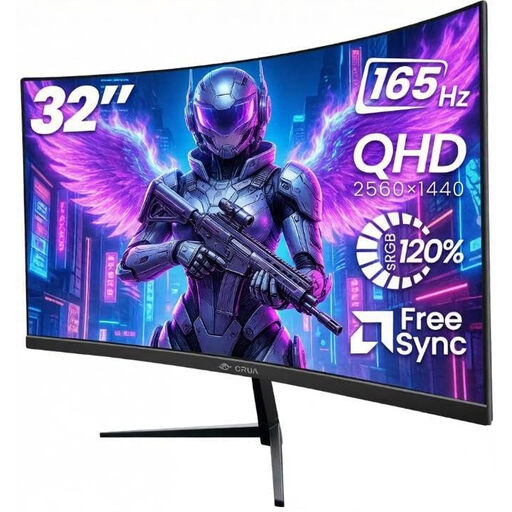
Why This Fits Their Persona: A practical option for UK home offices, console setups and gaming desks needing a larger QHD screen without moving to an ultrawide format.
The listing identifies the DisplayPort requirement for 165Hz and specifies Adaptive-Sync, HDMI and DisplayPort connectivity.
32-inch 2560 × 1440 VA panel, 165Hz refresh rate, 1500R curve and VESA 100 × 100mm support.
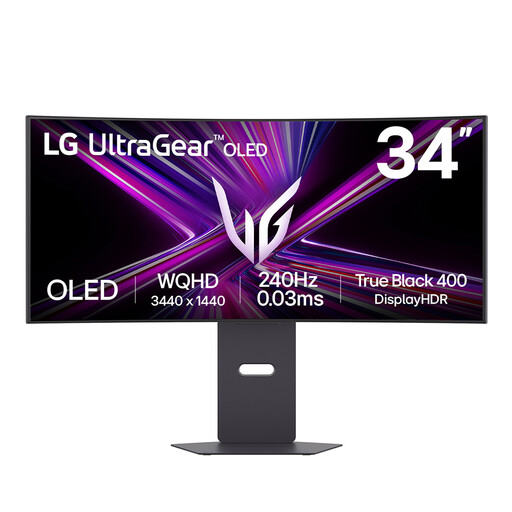
Why This Fits Their Persona: Designed for enthusiasts wanting an ultrawide OLED display for fast PC gaming, films and panoramic multitasking.
Its specification clearly states the 3440 × 1440 resolution, 240Hz rate and OLED-care guidance, including protection features for static content.
34-inch 800R OLED panel, 240Hz refresh rate, HDMI 2.1, DisplayPort and USB-C with 65W power delivery.
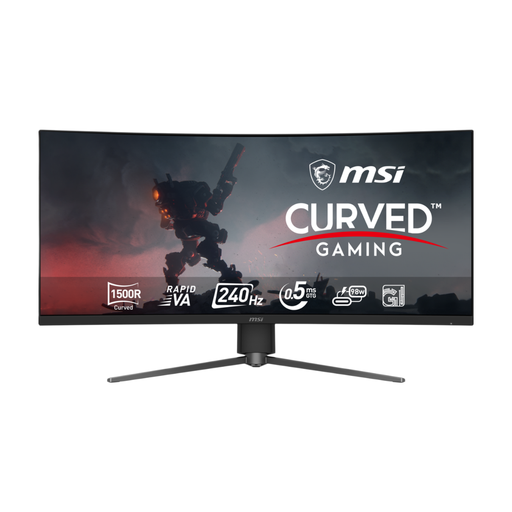
Why This Fits Their Persona: Suitable for esports players and PC users with hardware capable of driving UWQHD at a high refresh rate.
The connection specification identifies DisplayPort 1.4a, HDMI 2.1 and USB-C as supporting UWQHD at 240Hz.
34-inch 3440 × 1440 Rapid VA panel, 240Hz refresh rate, 0.5ms stated response time and 98W USB-C power delivery.
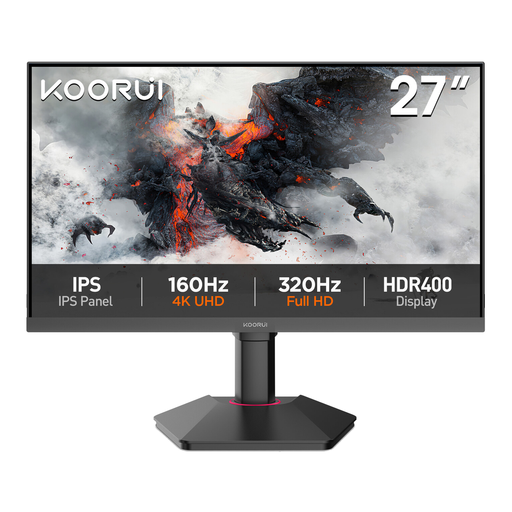
Why This Fits Their Persona: A compact choice for study, home-office work, graphic design practice and occasional gaming where 75Hz is sufficient.
The product page states its 99% sRGB coverage, 4ms GtG response time, Adaptive-Sync and VESA mounting pattern rather than focusing only on gaming language.
27-inch QHD IPS panel, HDMI, DisplayPort and VGA inputs, plus flicker-free and low blue light modes.
We have compiled a complete, real-time list of products that fully satisfy these strict selection criteria and UK safety regulations.
A 1440p gaming monitor can be suitable, but console support varies by model and game. Check the console’s output settings and the monitor’s HDMI specification. HDMI 2.1 is useful for models designed to accept higher refresh rates, while some displays may operate at a lower rate through HDMI than DisplayPort.
Power consumption depends on panel technology, brightness, screen size and connected features. A larger ultrawide or OLED monitor may use more power than a smaller office display. Check the product’s stated typical and maximum consumption, and use automatic sleep settings when the screen is idle.
There is no single lifespan for every panel. Keep the monitor ventilated, avoid impacts, use the supplied power accessories and clean it with a soft, dry cloth. OLED owners should enable the supplied pixel-shifting, logo-dimming or panel-care functions and avoid leaving static desktop elements on screen for extended periods. For any monitor, the warranty terms and availability of support are important parts of the buying decision.