
24/7 Customer Support

Free returns

Same-day & Next-day Delivery

Quality Guaranteed

Unlock Your Welcome Offers: FREE Delivery | Up to 80% OFF | Free 30-day JoyPlus trial
Download the APP
By the Joybuy Product Recommendation Officer
Is your bag weighed down by a collection of bulky chargers? One for your laptop, another for your phone and perhaps a third for your tablet or headphones. Juggling multiple power bricks is a common frustration, especially when you need to power up quickly between meetings or while travelling.
Modern electronics demand efficient power, but the standard chargers they come with are often slow, cumbersome and occupy valuable socket space. This is where Gallium Nitride (GaN) technology comes in. A GaN charger uses a more advanced semiconductor material than traditional silicon, allowing it to be significantly smaller, more energy-efficient and run cooler, all while delivering more power.
This guide will walk you through the key features to consider when choosing a new charger and present our top recommendations to help you find a single, powerful solution for all your devices.
Navigating the specifications can feel overwhelming. Here are three practical points to focus on to ensure you select a charger that meets your needs.
The total wattage (e.g., 67W, 100W, 140W) is the headline figure, but how that power is distributed across the ports is what truly matters. A multi-port USB C charger with a high total output might not deliver enough power to a single port for your most demanding device, like a laptop.
Look at the specifications for single-port and multi-port use. If you need a 100W laptop charger, ensure at least one USB-C port can deliver 100W on its own. When multiple devices are plugged in, the charger will intelligently split the total wattage, so check that the shared output is still sufficient to charge your primary devices efficiently.
The future of charging is USB-C. For modern devices, especially if you need a fast wall charger for MacBook Pro, prioritise models with at least two USB-C ports. These ports support advanced charging standards like Power Delivery (PD).
The latest standard, PD 3.1, enables even faster charging at higher wattages (above 100W). If you own a new high-performance laptop or want to future-proof your purchase, a PD 3.1 charger is an excellent choice. A spare USB-A port can also be useful for legacy devices like smartwatches or power banks.
One of the main advantages of GaN technology is its compact size. If you travel frequently or commute daily, a compact travel charger can make a significant difference. Look for features like foldable prongs, which prevent scratching other items in your bag and make the charger even more portable. Compare the dimensions and weight to your current chargers to appreciate the space-saving benefits.
We have selected a few standout options that cater to different needs, from daily commuting to power-intensive professional work.
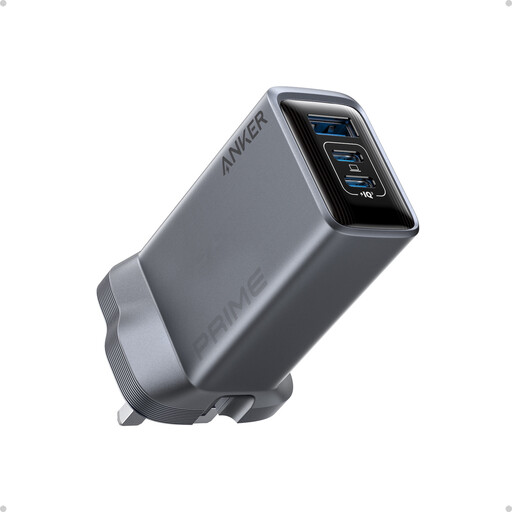
Why It Stands Out: This Anker Prime charger strikes an excellent balance between high power and portability. It’s capable of delivering a full 100W from a single USB-C port, making it ideal for charging demanding laptops, while its three-port design offers the versatility to power a phone and earbuds simultaneously.
Pros:
Who is it for? Professionals, students and digital nomads who need a reliable, all-in-one charger for their laptop, phone and another accessory.
View the Anker Prime 100W Charger
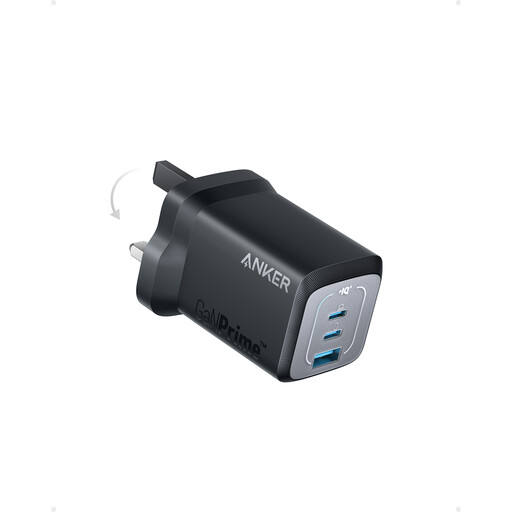
Why It Stands Out: If portability is your absolute priority, this 67W model is an exceptional choice. According to Anker, it is 51% smaller than an original 67W MacBook charger, yet it still packs two USB-C ports and a USB-A port. It’s the perfect companion for those who want to travel light without sacrificing the ability to charge multiple devices.
Pros:
Who is it for? Frequent travellers, daily commuters and anyone who values a minimal, lightweight setup for charging devices like an ultrabook, tablet and phone.
View the Anker Prime 67W Charger
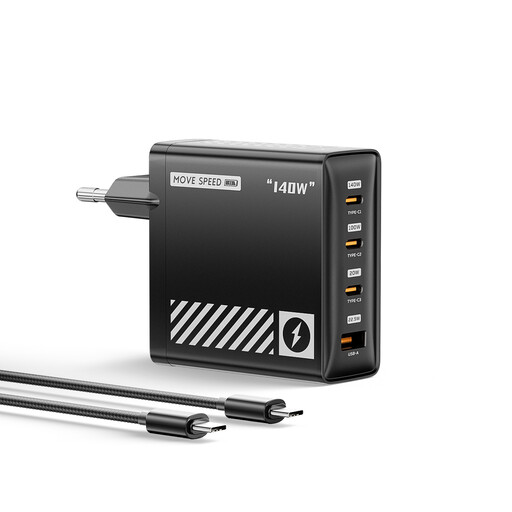
Why It Stands Out: For the ultimate power user, this Movespeed charger is a formidable option. With a massive 140W total output and support for the PD 3.1 charging protocol, it’s built to handle the most power-hungry devices on the market. Its four-port design means you can genuinely replace four separate chargers with this single, compact unit.
Pros:
Who is it for? Creative professionals, tech enthusiasts and families who need to charge multiple high-power devices, including top-tier laptops, at the same time.
View the Movespeed 140W Charger
The right charger depends entirely on your unique combination of devices and lifestyle. If the recommendations above aren't quite what you're looking for, there are many other configurations available.
Explore our full range of charging solutions to find the perfect fit. Browse our extensive collection of Type-C Port chargers for more choices.
A GaN charger uses Gallium Nitride, a modern semiconductor material, instead of the traditional silicon found in most chargers. This material can handle higher voltages and frequencies more efficiently. The practical benefits for you are that GaN chargers can be much smaller, run cooler and waste less energy than silicon-based chargers of the same wattage.
Yes, it is perfectly safe. Modern chargers and devices communicate to determine the correct amount of power needed. A 100W charger will only deliver the maximum power your phone is designed to accept (e.g., 20W or 30W). Using a higher-wattage charger will not damage your device; it simply ensures you have enough power available for more demanding gadgets like a laptop and makes your charger more versatile.
To get the full benefit of a high-power charger (especially over 60W), you need a USB-C cable that is rated to handle that amount of power. For outputs of 100W or more, look for a USB-C cable specifically marked as "100W" or "240W" compatible. While a standard USB-C cable will still work, it may limit the charging speed to a lower wattage.