
24/7 Customer Support

Free returns

Same-day & Next-day Delivery

Quality Guaranteed

Unlock Your Welcome Offers: FREE Delivery | Up to 80% OFF | Free 30-day JoyPlus trial
Download the APP
Juggling a laptop brick, a phone plug and a tablet adapter has become a daily frustration for many of us. The promise of a single, compact GaN charger to power everything is appealing, but the market is filled with confusing claims and potential pitfalls. Many UK consumers find themselves with a charger that can't power their laptop, overheats alarmingly or, worse, isn't compliant with UK safety standards.
As the Joybuy Product Recommendation Officer, my role is to help you navigate this landscape. Before you buy, be aware of these common traps:
100W laptop charger you thought you bought might only provide 60W to your MacBook Pro, leading to slow charging or even battery drain under heavy use.fast wall charger from an unknown online seller might lack the crucial UKCA mark. This certification is a legal requirement in Great Britain, indicating that the product meets safety, health and environmental protection standards. Using a non-compliant charger is a significant fire and safety risk.To avoid these issues, focus on a few core parameters that truly matter. This will ensure you get a reliable and efficient USB-C power adapter that meets your needs.
The most critical specification is not the total wattage, but how that power is distributed. A good manufacturer will provide a clear breakdown of power allocation.
MacBook Pro charger, look for a model that can supply at least 65W-100W from a single USB-C port.iPhone fast charger or for Samsung super fast charging.Consider the devices you own today and those you might buy tomorrow.
multi-port USB charger is still useful for charging older devices, smartwatches or wireless earbuds without needing a new cable.Never compromise on safety. Always verify that the charger has the UKCA mark clearly displayed on the product or its packaging. This confirms it has been tested to meet the stringent safety regulations applicable in the UK, protecting you and your expensive devices from electrical hazards.
We've filtered through the options to find chargers that address the common pitfalls and match distinct user needs.
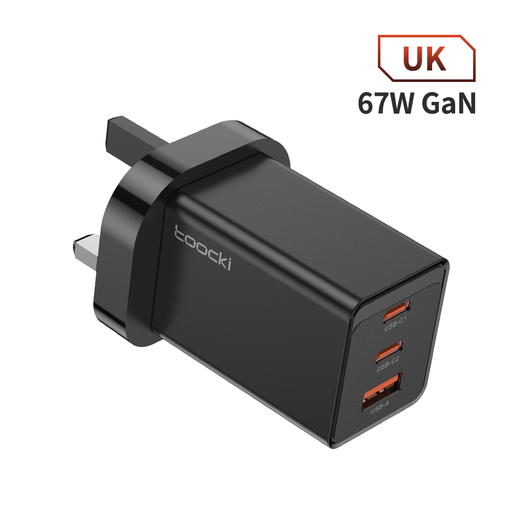
Why This Fits Their Persona: Ideal for students or professionals in the UK who carry a phone, tablet and a lightweight laptop like a MacBook Air. It's compact enough for a backpack or handbag but powerful enough to handle a typical daily tech load.
It provides a clear 67W maximum output, avoiding the "total wattage" confusion for its power class. The GaN technology ensures it runs efficiently without significant overheating, even with its compact size.
Features two USB-C ports and one USB-A port, offering a great balance of modern and legacy compatibility. Its small form factor makes it an excellent replacement for three separate, bulky chargers.
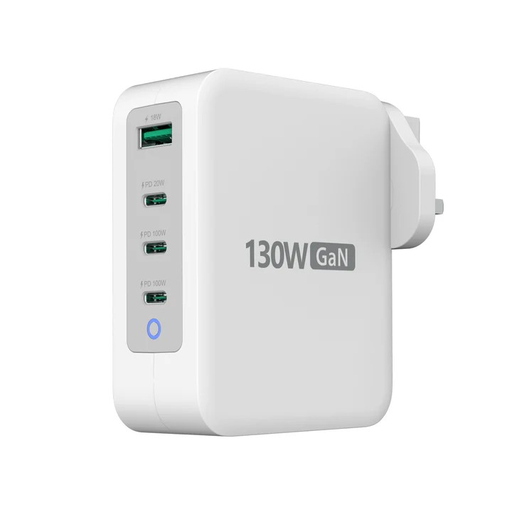
Why This Fits Their Persona: For the power user with a demanding setup: a high-performance laptop, a smartphone, a tablet and accessories. This is a desktop-class charging hub in a portable form factor, perfect for a streamlined home office or a work bag.
It features dynamic power balancing and clearly states its output scenarios (e.g., 100W from a single port, or 65W+65W from two). This transparency ensures you know exactly what charging speeds to expect for your laptop.
Delivers up to 100W from a single USB-C port, sufficient for most demanding laptops. With three USB-C ports and one USB-A port, it consolidates an entire desk's worth of chargers into one device.
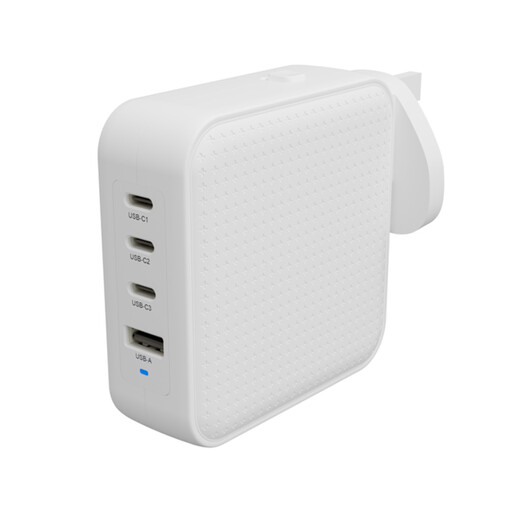
Why This Fits Their Persona: Designed specifically for those who travel frequently from the UK to Europe, the US or beyond. This is the quintessential `travel charger`, built to adapt to different power outlets while powering a full suite of devices.
It includes interchangeable, certified plugs for EU, UK and AU standards. This avoids the safety risk and unreliability of using cheap, uncertified travel adapters with your primary charger.
A true all-in-one global charging solution. Its 100W output and four ports mean you only need to pack one charger for all your electronics, saving significant space and weight in your luggage.
We have compiled a complete, real-time list of products that fully satisfy these strict selection criteria and UK safety regulations.
Yes, all chargers generate heat, but GaN chargers are more efficient than traditional silicon chargers, meaning less energy is wasted as heat. A well-designed GaN charger will feel warm to the touch under heavy load, but it should not become uncomfortably hot. Reputable models include thermal protection that reduces power if temperatures rise too high, ensuring safety.
No, a 100W charger is not necessary for an iPhone alone. An iPhone typically fast-charges at around 20-27W. However, a high-wattage, multi-port charger is useful if you want to charge your iPhone at full speed while also charging a power-hungry device like a MacBook or iPad. The charger's Power Delivery system will only provide the iPhone with the power it needs.
A quality GaN charger from a reputable brand, used under normal conditions, should last for several years. The lifespan is determined by the quality of the internal components and the effectiveness of its heat management. Avoiding constant overheating and physical damage are key to longevity. Always check for a manufacturer's warranty, as this can be a good indicator of the brand's confidence in its product.