Choose a compact colour tablet if you want gardening books alongside browsing, reading apps and PDF notes. An 11-inch tablet makes more sense if you can prop it up and need room for illustrated pages; if reading matters more than general tablet apps, consider a colour e-reader. For reading close to bedtime, NHS guidance advises avoiding tablets for an hour before bed rather than relying on display settings alone.
Who is this for?
Bedtime gardening-book readers
If you read in a shared bedroom, think about how comfortably you can hold and put away the device, as well as how its light affects the room. NHS Every Mind Matters advises trying to avoid tablets for an hour before bed; a dimmer display is not a substitute for a screen-free wind-down.
Visual garden planners and annotators
Colour photographs, planting diagrams and fixed-layout PDFs may call for more viewing space or a compatible pen. Apple lists Pencil support for the iPad mini, Rakuten Kobo describes the Libra Colour as stylus-compatible, and Lenovo lists a pen with the specified Tab M11 configuration. Check the exact bundle and files you intend to annotate.
One-device readers
If the same device must handle books, browsing and other apps, a full tablet is the more relevant route than a reading-led e-reader. Check your essential apps against the exact platform: Amazon states that Google Play is not supported on Fire tablets.
What matters when choosing?
Compact colour tablet
Choose it when: you want illustrated books and ordinary tablet apps on a device you expect to hold while reading.
Trade-off: a smaller screen shows less of a fixed-layout page at once, and a tablet remains subject to the NHS advice on screens before bed.
Tablet around 11 inches
Choose it when: you normally read with the device supported and want more room for diagrams or notes beside a book.
Trade-off: plan where the larger device will rest rather than assuming it will suit one-handed reading in bed.
Colour e-reader
Choose it when: gardening books take priority over general-purpose tablet apps.
Trade-off: confirm your book service and file requirements; Rakuten Kobo says protected PDFs and PDFs with annotation disabled cannot be marked up on its compatible e-readers.
| Concern |
What to check |
Who this matters to |
| Bedtime and shared-room comfort |
Check the exact device’s brightness controls and how you will hold or support it. Plan when you will put the screen away before sleep. |
If I read while someone else is winding down, I need a device I can manage without keeping a bright screen on beside them. Around 40% of consumers put bedtime and shared-room comfort first. |
| Illustrations and notes |
View a representative book or PDF at the intended screen size; check pen compatibility, bundle contents and whether the file permits annotation. |
When I need to inspect planting diagrams or mark up a garden plan, page space and workable notes matter more to me than compactness. Roughly 30% of consumers prioritise illustrations and annotation. |
| Apps and book access |
Check each essential reading, library or gardening service on the exact platform, along with the model variant and supplied accessories. |
If my gardening books must share a device with browsing and other apps, I need those services to work before choosing a platform. About 30% of consumers put app and reading-service access first. |
Buying pitfalls
-
Assuming a warm display settles the bedtime question
Display warmth may make viewing more comfortable, but NHS Every Mind Matters advises trying not to use phones, tablets or computers for an hour before bed because screen light can make falling asleep harder.
Use display controls for comfort and set a point at which you put the device away if sleep is a priority.
-
Choosing a larger screen without somewhere to rest it
An 11-inch tablet gives illustrated pages more viewing space, but that does not make it comfortable to hold in every reading position.
Decide whether you will read handheld or with the tablet supported before choosing a size.
If you need a folio or adjustable stand, check its compatibility and whether it comes with the device.
-
Assuming every device runs the same reading services
Amazon says Google Play is not supported on Fire tablets, while a colour e-reader is not a substitute for every full-tablet app. Access to the books or files you use can therefore change the choice.
List your essential reading, library and gardening services, then check them on the exact device or platform.
-
Assuming accessories and regional versions match
Bundles differ: Amazon’s Fire HD 8 listing says a power adaptor is not included, while Lenovo’s stated Tab M11 pen applies to a particular configuration. A regional version may also affect the support route.
Before ordering, check the model code, supplied charging equipment and pen, regional version and applicable support terms on the product page.
Relevant brands to consider
Apple
The iPad mini is a compact full-tablet reference for colour books, apps and optional pen use.
- Apple lists an 8.3-inch display, a 293 g Wi-Fi model and support for Apple Pencil Pro and Apple Pencil (USB-C).
- Check which Pencil and accessories you need; the smaller display may require more zooming on fixed-layout pages.
Samsung
The Galaxy Tab A9+ illustrates the larger Android-tablet route for books alongside other apps.
- Samsung lists an 11-inch screen and microSD expansion up to 1 TB for the checked model.
- Confirm the exact storage variant and how you would support an 11-inch device while reading.
Lenovo
A specified Tab M11 configuration offers an 11-inch route for viewing pages and taking notes with a pen.
- Lenovo lists an 11-inch 1920 × 1200 anti-glare IPS display and an included pen for the checked configuration.
- Confirm the model code and bundle: pen, storage and charging accessories should not be assumed across configurations.
Amazon
Kindle Paperwhite and Fire HD 8 are different routes: one is reading-led, while the other is a compact colour tablet.
- Amazon describes Paperwhite as having a glare-free reading display with adjustable warm light; its Fire HD 8 listing specifies an 8-inch HD colour screen.
- Amazon says Fire tablets do not support Google Play, and the checked Fire HD 8 listing says no power adaptor is included.
Kobo
Libra Colour is a colour e-reader to consider when books matter more than full-tablet functions.
- Rakuten Kobo lists a colour screen, page-turn buttons and a stylus-compatible display for Libra Colour.
- Check your book service and files; Kobo says DRM-protected PDFs and PDFs with annotation disabled cannot be written on.
Joybuy product choices
These choices cover larger tablets for supported page viewing, a 10.1-inch tablet bundle and a compact reading-led e-reader. Compare their exact configurations with how you intend to read; an e-reader does not replace every full-tablet function.
 No image available
Xiaomi Pad 7 Grey, 8GB RAM, 128GB, with Focus Pen
Consider this tablet if you intend to support a larger device while viewing gardening pages and want the listed pen for notes.
Check what you will use for charging: the product information states that a charger is not included. Confirm any display controls important to your bedroom routine.
View on Joybuy
 No image available
Apple iPad Pro 11-inch (M5), Wi-Fi, 256GB, Standard Glass, Silver
This 11-inch variant is a choice to assess if you plan to prop up illustrated books and use a full tablet for other tasks.
Apple Pencil is sold separately. Check the support position and display controls you would use in the bedroom.
View on Joybuy
 No image available
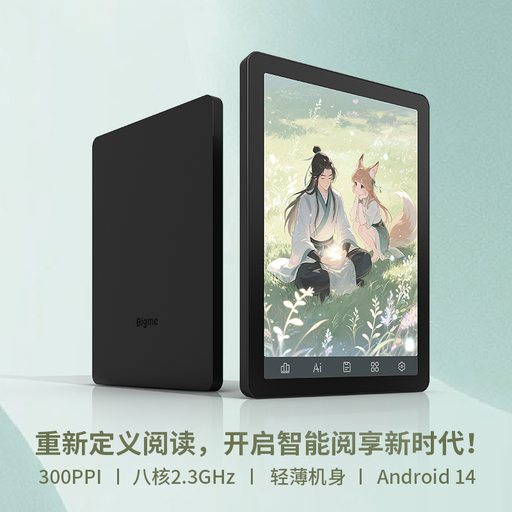
Bigme B6 6-inch E Ink E-Reader, 4GB + 64GB, Black
Consider this reading-led alternative if a small screen suits your books and general tablet functions are secondary.
The title lists a 36-level front light, Android 14 and built-in Google Play. Check how your own gardening books display and whether any annotation functions you need work with their files.
View on Joybuy
 No image available
Xiaomi Pad 8, 8GB RAM, 128GB, Wi-Fi, Grey
Assess this full tablet if you want space for illustrated pages and have a comfortable way to support it while reading.
Check whether a compatible stylus is supplied if handwritten notes matter, and confirm the display controls you would use at night.
View on Joybuy
 No image available
TABWEE T20 10.1-inch Tablet, 256GB, Keyboard, Mouse and Stylus
This tablet bundle is relevant if you want to assess a supported reading setup with accessories for typing or notes.
The title specifies a 10.1-inch In-Cell display. Confirm the Android version before relying on particular apps, and check a representative gardening book at this screen size.
View on Joybuy
Frequently asked questions
Does a warm display setting make tablet reading suitable just before sleep?
A warm setting is not a reason to set aside bedtime screen advice. NHS Every Mind Matters recommends trying to avoid phones, tablets and computers for an hour before bed because screen light can make falling asleep harder; use warmth or dimming for viewing comfort rather than as a sleep guarantee.
Is an 8-inch or 11-inch tablet easier to use for gardening books?
Choose a compact tablet if you expect to hold it while reading; assess an 11-inch model if you can support it and need more room for diagrams or fixed-layout pages. Apple lists the checked iPad mini at 8.3 inches and 293 g in Wi-Fi form, while Samsung and Lenovo list 11-inch examples. Try a representative book or PDF at the intended size where possible.
Can I write notes directly on gardening-book PDFs?
That depends on the exact device, compatible pen and PDF permissions. Apple lists Pencil support for the iPad mini, and Lenovo lists a pen with the specified Tab M11 configuration; Rakuten Kobo says protected PDFs and PDFs that disable annotation cannot be written on its compatible e-readers.
Will a Fire tablet run the reading and gardening apps I use?
Check each essential app before choosing a Fire tablet. Amazon states that Google Play is not supported on Fire tablets, so confirm availability through Amazon’s Appstore or the service provider’s device information.


