
24/7 Customer Support

Free returns

Same-day & Next-day Delivery

Quality Guaranteed

Unlock Your Welcome Offers: FREE Delivery | Up to 80% OFF | Free 30-day JoyPlus trial
Download the APP
As more of us work and study from home, the need for a reliable home office printer has become undeniable. Yet, choosing the right one can feel overwhelming. You're faced with a sea of technical jargon, confusing running costs and models that all seem to do the same thing. How do you find a printer that fits your space, budget and workload without the hassle?
This guide is designed to help you navigate the market. We'll break down the key features to consider and present a selection of multifunction printers that offer a strong balance of performance, value and reliability for UK homes and small businesses.
Before diving into specific models, let's clarify what matters most. Focusing on these three areas will help you make a more informed decision.
The initial price of a printer is only part of the story. The real cost lies in the ink. You generally have two main options:
A modern all in one printer (also known as a multifunction printer) is a central hub for your document needs. Look for these key features:
In a modern home office, seamless connectivity is non-negotiable. A wireless printer for home use allows you to print from laptops, tablets and smartphones without being tethered by cables. Look for models with stable Wi-Fi, Wi-Fi Direct for guest printing, and compatibility with mobile printing apps like Apple AirPrint and Mopria for Android.
Here are our recommendations for home office printers that deliver on performance and value.
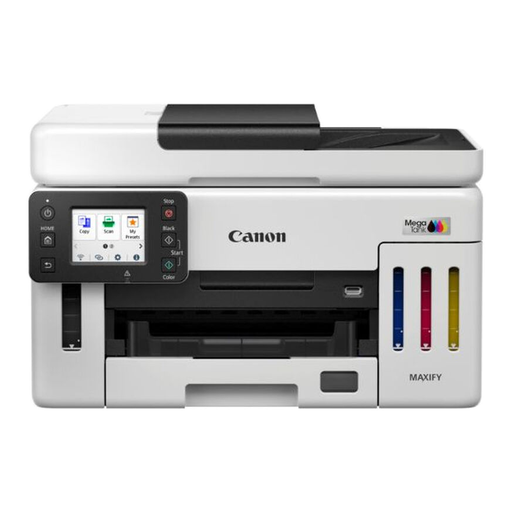
Why It Stands Out: The MAXIFY GX6150 is built for productivity and low running costs. Its standout feature is the MegaTank refillable ink system, which delivers an exceptionally high page yield—up to 14,000 colour pages or 6,000 black pages from a single set of ink bottles. This dramatically reduces the cost per page, making it a strong contender for any busy small business printer role.
Despite its high-volume focus, it maintains a compact footprint suitable for a home office. It combines fast print speeds with business-grade features like a 50-sheet ADF and a generous 350-sheet paper capacity, ensuring workflows remain smooth even during demanding periods.
Pros:
Who is it for?
View Details for Canon MAXIFY GX6150
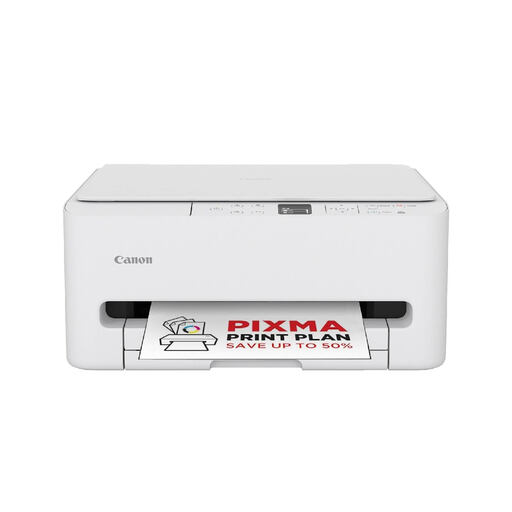
Why It Stands Out: The PIXMA TS6550i strikes a great balance between performance, convenience and affordability. It’s a compact and stylish unit that fits easily into a home environment while offering the core print, scan and copy functions needed for everyday productivity.
Its user-friendly design, featuring a clear 1.42” OLED display and simple QR code setup, makes it accessible for everyone in the household. For those who prefer a hands-off approach to ink management, it is compatible with the PIXMA Print Plan subscription service, which automates ink delivery so you never run out unexpectedly.
Pros:
Who is it for?
View Details for Canon PIXMA TS6550i
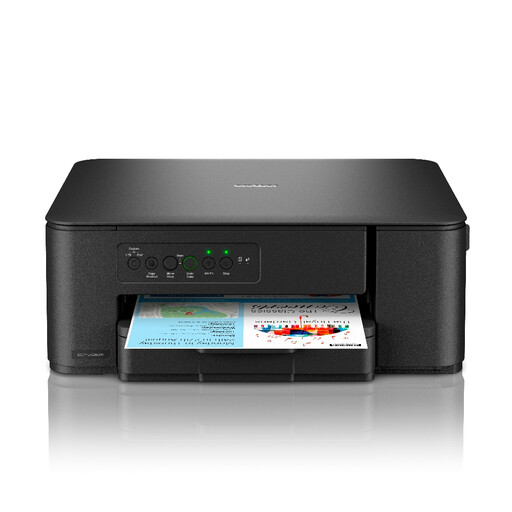
Why It Stands Out: The Brother DCP-J1260DW proves that an affordable and compact printer doesn't have to compromise on essential features. Designed with a small footprint, this 3-in-1 device offers reliable printing, scanning and copying with straightforward wireless functionality.
It's managed entirely through the Brother Mobile Connect app, which simplifies everything from initial setup to checking ink levels. The printer also includes a free 3-month trial of Brother’s EcoPro ink subscription, giving you a chance to experience the convenience of automatic ink delivery and ongoing warranty coverage.
Pros:
Who is it for?
View Details for Brother DCP-J1260DW
While a good printer is essential, many professionals are also optimising their workflow with digital tools. For reviewing documents, signing contracts or taking notes without printing, a versatile tablet can be a game-changer.
Explore our curated selection of tablet computing devices to find the perfect digital companion for your home office.
1. What is the difference between an inkjet and a laser printer for home use?
Inkjet printers, like the models recommended above, use liquid ink to create images and are generally better for printing in colour and producing high-quality photos. They are often more compact and affordable upfront. Laser printers use a powder toner and are known for their fast printing speeds and crisp text, making them ideal for high-volume, black-and-white document printing.
2. Is an all-in-one printer worth it for a home office?
For most home office users, an all-in-one (or multifunction) printer is absolutely worth it. It combines a printer, scanner and copier into a single, space-saving device. This is more cost-effective and convenient than buying and finding space for three separate machines, making it a practical choice for any productive workspace.
3. How can I reduce my printing costs at home?
The most effective way to reduce printing costs is to choose a printer with a low cost-per-page. Consider a model with a refillable ink tank system, as the replacement ink bottles offer a much higher page yield for their price. Alternatively, look into ink subscription services, which can offer savings over buying standard cartridges and prevent you from running out of ink at a critical moment. Finally, always use features like automatic duplex printing to save on paper.