Keeping an eye on your home, family or pets when you are not there is a common concern for many of us. Whether you are a new parent wanting a reliable baby monitor, a pet owner curious about what your dog gets up to, or someone caring for an elderly relative, an indoor security camera can provide valuable peace of mind. The market is filled with options, making it difficult to decide which features truly matter.
This guide is designed to help you understand the key considerations when choosing an indoor wifi camera and to highlight a few models that offer a great balance of functionality and value for UK households.
What to Look for in a Home Security Camera UK
Before diving into specific products, let's outline a few essential features to consider. Focusing on these will help you find a camera that meets your specific needs without overpaying for features you will not use.
1. Video Resolution and Night Vision
The primary function of any camera is to see clearly. For most indoor applications, 1080p (Full HD) resolution is sufficient to identify faces and details. More important than resolution alone is the quality of the sensor and its performance in low light. A good night vision camera should provide clear black-and-white or even colour images in a dark room, ensuring you can monitor a sleeping baby or check for disturbances overnight without issue. Look for the stated night vision range (e.g., 10 metres) to ensure it covers the size of your room.
2. Smart Features: Audio, Motion and Control
Modern indoor cameras are more than just passive recording devices. Key features to look for include:
- Camera with 2-way audio: A built-in microphone and speaker allow you to listen in and talk back through the camera's app. This is invaluable for comforting a pet, speaking to a family member or even warning off an intruder.
- Pan-tilt functionality: A pan tilt security camera can be remotely controlled to rotate horizontally and vertically, allowing you to view an entire room with a single device. This is far more versatile than a fixed-lens camera.
- Smart Detection: To avoid constant notifications from shifting shadows or a curtain moving, look for cameras with AI-powered detection that can distinguish between general motion, people and pets. Customisable motion zones are also a useful feature.
3. Connectivity and Storage
Most indoor cameras today are indoor wifi cameras, connecting wirelessly to your home network for easy setup. Some models support both 2.4GHz and 5GHz WiFi bands for greater flexibility and speed. For storing footage, you generally have two options: local storage via a microSD card, which is a one-off purchase or cloud storage, which usually involves a monthly subscription but ensures your footage is safe even if the camera is stolen or damaged. Many brands offer a free trial period for their cloud service.
Our Top Product Recommendations
Here are a few indoor cameras that deliver on the features that matter most, selected for their practicality and performance.
ZOSI Indoor WiFi Camera C688 1080P
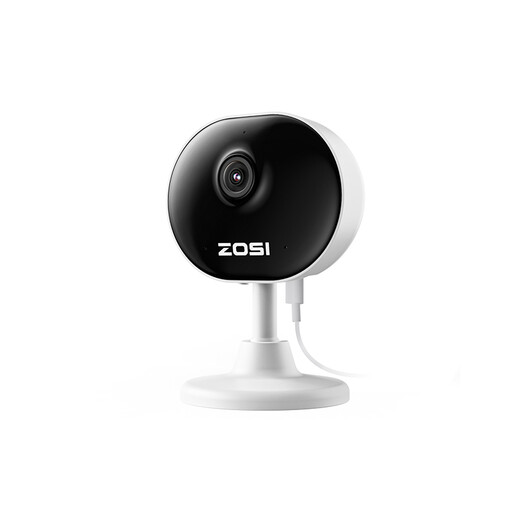
- Why It Stands Out: The C688 is all about simplicity and discretion. Weighing just 85g, its mini dome design is incredibly compact, allowing it to be placed on a shelf or desk without drawing attention. The magnetic base and included 3M tape offer flexible, drill-free installation.
- Pros:
- 1080p HD video with clear 33ft (10m) night vision.
- Smart motion detection with customisable zones to reduce false alerts.
- Simple setup via AP SmartConfig connects to your WiFi in minutes.
- Features 2-way audio for real-time communication.
- Who is it for?: This is an excellent entry-level cctv camera indoor for anyone needing to monitor a specific area, such as a front doorway, a child's cot or a pet's favourite spot. Its discreet size makes it ideal for those who want security without a visible deterrent.
ZOSI C518 2MP Pan/Tilt Indoor Security Camera
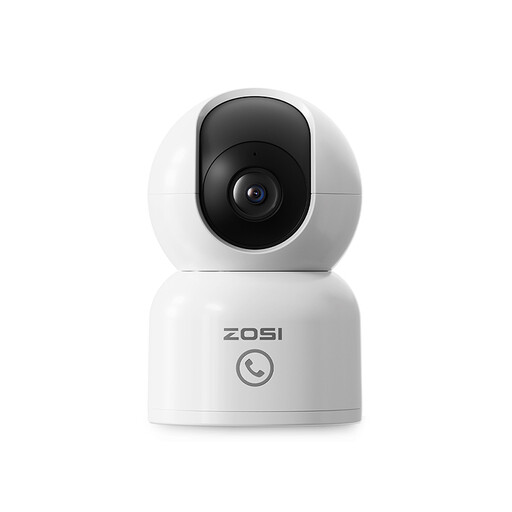
- Why It Stands Out: The C518 elevates monitoring with its full 360° pan-and-tilt capability and smart human tracking. When it detects a person, it automatically follows their movement, keeping them in the frame. The "One-Touch Call" button is a standout feature, allowing children or elderly relatives to instantly initiate a call to your phone.
- Pros:
- Full room coverage with 360° pan/tilt functionality.
- AI-powered human detection and auto-tracking.
- "One-Touch Call" button for easy communication from home.
- Supports both 2.4G/5G dual-band WiFi for a stable connection.
- Privacy mode allows you to block recording in sensitive areas.
- Who is it for?: This camera is a perfect pet camera or dog camera for owners who want to track their furry friends around a room. It is also exceptionally well-suited as a baby monitor or for homes with elderly family members, thanks to its easy one-touch calling feature.
ZOSI C528D4 2-in-1 Dual-Lens WiFi CCTV Camera
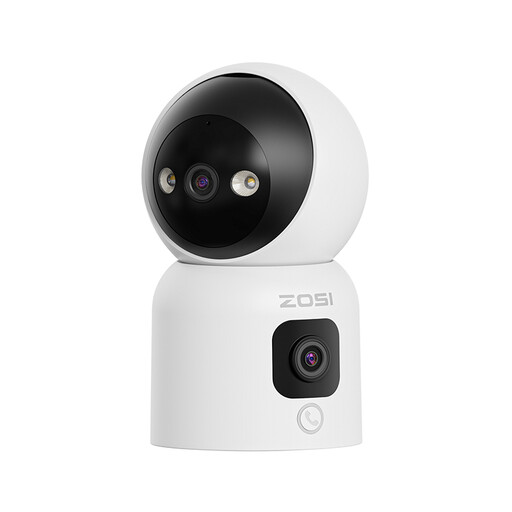
- Why It Stands Out: This model offers a unique dual-lens system. A top pan tilt security camera lens provides a detailed, controllable view, while a second, fixed lower lens offers a constant wide-angle panoramic overview. This means you can focus on one area without losing sight of the entire room. It also introduces gesture calling—making an "OK" gesture initiates a call to the app.
- Pros:
- Dual 2MP+2MP lenses for simultaneous detailed and panoramic views.
- Three night vision modes, including a full-colour night vision option.
- Innovative "Gesture Calling" in addition to a one-touch call button.
- Advanced AI detection for humans, babies and pets.
- Supports both local (up to 256GB) and cloud storage.
- Who is it for?: Users who require comprehensive surveillance of a large, active space like an open-plan living area or a small shop floor. The dual-lens and colour night vision provide a superior level of detail, while the gesture calling is a helpful feature for families with children.
Looking for Other Options?
While these cameras offer excellent features for common needs, your requirements might be different. If you are looking for a different style of camera or want to explore a wider range of monitoring solutions, you can browse our full collection.
[Explore our complete range of display device solutions here](https://www.joybuy.co.uk/explore/display-device/parqolEs)
Frequently Asked Questions
1. Do indoor security cameras record all the time?
It depends on the model and your settings. Most cameras offer two modes: continuous recording (24/7), which requires a large amount of storage (usually a microSD card) or event-based recording, where the camera only records when it detects motion or sound. Event-based recording saves storage space and makes it easier to find important clips.
2. Can I use an indoor security camera as a baby monitor?
Absolutely. Many people find that a modern indoor security camera is a more versatile and cost-effective option than a traditional baby monitor. Features like high-definition video, night vision, two-way audio and app-based viewing on your phone make them perfectly suited for monitoring a nursery.
3. How secure is an indoor wifi camera from being accessed by others?
Reputable manufacturers prioritise security. They use encrypted connections between the camera, the cloud and your app to protect your video stream. To enhance your security, always set a strong, unique password for your camera's account, enable two-factor authentication if available and keep the camera's firmware updated.


