
24/7 Customer Support

Free returns

Same-day & Next-day Delivery

Quality Guaranteed

Unlock Your Welcome Offers: FREE Delivery | Up to 80% OFF | Free 30-day JoyPlus trial
Download the APP
The constant cycle of buying expensive ink cartridges can be a significant drain on the budget for any household or small business. You print a few dozen pages, and suddenly, you are faced with low-ink warnings and another trip to the shops. If this sounds familiar, an ink tank printer could be the economical and efficient solution you have been looking for.
Instead of using small, disposable cartridges, these printers feature integrated, high-capacity tanks that you refill from cost-effective bottles. This design dramatically lowers the cost per page and reduces waste, making it a practical choice for anyone with regular printing needs. This guide will walk you through the key features to consider and present our recommendations to help you find a model that fits your requirements.
Navigating the specifications can feel overwhelming. Here are a few key points to focus on to ensure you select the right refillable ink printer for your home or office.
The main appeal of an ink tank model is its long-term value. To understand the savings, look at the page yield provided by the manufacturer for each ink bottle. A printer that includes ink to print, for example, 7,500 black pages and 5,000 colour pages straight out of the box offers substantial upfront value. By comparing the cost of replacement ink bottles to their page yield, you can get a clear picture of the cost-per-page, confirming why this technology is considered a truly low cost printer solution for the UK market.
Consider what you need your printer to do besides printing. An all-in-one ink tank printer combines printing, scanning and copying functions into a single device, saving space and money. This is particularly useful for home offices that handle invoices and documents, or for families with school projects that require copying and scanning. Features like an Automatic Document Feeder (ADF) can further streamline your workflow by allowing you to scan or copy multi-page documents automatically.
In today's connected environment, a wireless printer for home use is almost essential. Look for models with robust Wi-Fi capabilities, including support for mobile printing apps (like Canon PRINT or Brother Mobile Connect), Apple AirPrint and Mopria. This allows you to print directly from your smartphone, tablet or laptop without being tethered to the device, offering flexibility for the whole family or office team.
Here are our recommendations, selected to meet a range of needs from busy small offices to creative photo printing.

The Canon MAXIFY GX6150 is a 3-in-1 Canon MegaTank printer built for productivity. It balances a compact footprint with features typically found in larger office machines, making it a strong contender for small businesses and demanding home offices seeking an economical printer in the UK.
Note: Canon is running a cashback promotion. Purchases made between 1st March – 31st March 2026 may be eligible for a ?120 cashback offer.
View Details for Canon MAXIFY GX6150

The Brother ink tank DCP-T580DW is designed for homes and students who need a dependable, ultra-low-cost printing solution. It arrives with a huge amount of ink in the box, enough to last many users for years, making it a standout for budget-conscious buyers.
Note: A cashback promotion of ?50 is available for purchases made between June 1st and June 30th, 2026.
View Details for Brother DCP-T580DW
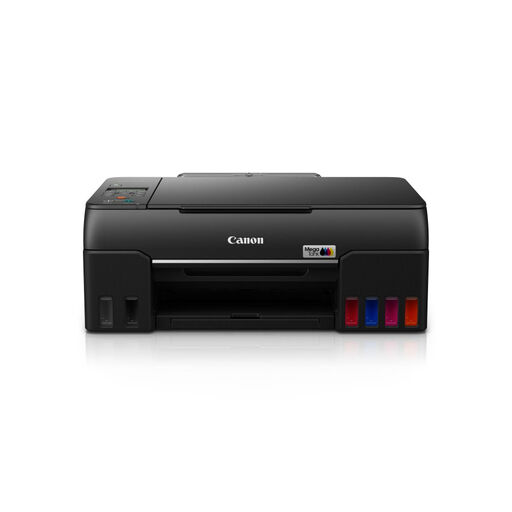
For photographers, designers and creative hobbyists, colour accuracy and print quality are paramount. The Canon PIXMA G650 uses a six-colour dye-based ink system to deliver vibrant, detailed photos, all while benefiting from the cost-saving Canon MegaTank system.
Note: Canon is running a cashback promotion. Purchases made between 1st March – 31st March 2026 may be eligible for a ?120 cashback offer.
View Details for Canon PIXMA G650
If these models aren't quite what you're looking for, or if you'd like to compare them against a wider selection, we have many other options available. Browse our complete collection to find the perfect device for your needs.
Explore our full range of Office Printers.
For most users with regular printing needs, the answer is yes. While the initial purchase price can be higher than a basic cartridge printer, the total cost of ownership is significantly lower. The savings on ink quickly offset the initial investment, especially for those who print several times a week, such as small businesses, students or busy families.
Like any inkjet printer, the ink can dry and clog the print heads if left unused for very long periods. However, ink tank systems are generally well-sealed to minimise evaporation. Most modern printers also run automatic maintenance cycles to keep the print heads clear. To avoid issues, it is good practice to print a page in both black and colour at least once every couple of weeks.
It is strongly recommended to only use the official, manufacturer-branded ink bottles designed for your specific printer model. Using third-party inks can lead to poor print quality, colour inaccuracies and potential damage to the print head, which may not be covered by the warranty. Official inks are formulated to work perfectly with the printer's technology, ensuring longevity and consistent results.
Article by the Joybuy Product Recommendation Officer