Choose a keyboard with accessible navigation keys, and a number pad if you regularly enter numeric metadata. Programmable keys matter when they can handle commands you actually repeat; device switching matters only if the two-screen desk uses more than one computer. For long cataloguing sessions, consider a split layout if its shape suits your desk and typing habits. Adobe says Lightroom Classic can show a second Library view, but check your own photo application and shortcuts before choosing controls around that workflow.
Who these keyboards suit
High-volume photo organisers
If you repeatedly rate, name and sort photos, readily accessible navigation keys and predictable shortcuts may matter more than a compact keyboard. Adobe describes viewing, sorting and rating photos as Library tasks in Lightroom Classic.
Two-computer desk workers
If your screens are connected to different computers, switching keyboard control can be useful. Logitech specifies that MX Keys S can switch among up to three devices with one key press; two displays connected to one computer do not create the same need.
Long-session comfort seekers
If extended cataloguing makes keyboard shape a priority, consider whether a split layout, wrist support and adjustable tilt fit your desk. Logitech lists these design features for ERGO K860, though their presence does not establish how comfortable the keyboard will feel to you.
What to check before choosing
Start with the keys and commands you use while organising photos. Then establish whether your two screens share one computer or require you to switch between devices.
| Concern |
Buying checks |
Who this matters to |
| Archive commands and metadata |
Check access to your usual navigation and number keys. Confirm that any programmable controls work with your operating system and photo application. |
If I repeatedly rate photos and enter filenames, I want familiar keys within reach rather than extra key combinations. Around 46% of consumers put archive-command access first. |
| Control across devices |
Check the supported device count and switching method, including whether your computers permit the required connection. |
When I move between computers at the same desk, I want one keyboard to follow the machine I am using without re-pairing. Roughly 27% of consumers prioritise control across devices. |
| Long-session comfort |
Check the keyboard’s width, wrist-rest depth and tilt options against your desk space and familiar typing position. |
During long cataloguing sessions, I care more about whether a different keyboard shape fits my hands and desk than extensive shortcut remapping. Around 27% of consumers put long-session comfort first. |
Buying pitfalls
-
Assuming a UK listing has a UK-ISO layout
Key positions and legends can differ between variants of a keyboard family, affecting familiar typing and metadata entry. Keychron explicitly identifies its Q6 Max UK-ISO variant, but that label should not be assumed for other versions.
Check the selected variant’s layout label and product images, not just the model-family name.
-
Choosing macro controls before checking your commands
Programmable keys are useful only if they can be assigned to actions you repeat. Adobe publishes Lightroom Classic shortcuts, while Logitech specifies Logi Options+ for MX Keys S Smart Actions.
List your regular rating, labelling and view commands, then check the keyboard’s configuration software and operating-system support.
-
Expecting a split keyboard to guarantee comfort
A split shape, wrist rest and tilt settings change how a keyboard sits on the desk, but they do not establish an individual fit. Logitech and Razer describe these as design features of their respective split models.
Check the dimensions, key arrangement and tilt positions, along with the applicable return terms, before committing to an unfamiliar shape.
Relevant brands to consider
Logitech
Logitech offers different approaches to this desk setup: the full-size MX Keys S for programmable, multi-device work and the split ERGO K860 for a different keyboard shape.
- Logitech specifies switching among up to three devices for MX Keys S and lists wrist support and adjustable palm-lift positions for ERGO K860.
- MX Keys S Smart Actions use Logi Options+; ERGO K860’s split design should not be treated as a guarantee of individual comfort.
Keychron
The Q6 Max UK-ISO is a full-size mechanical option for consumers who want a specified UK layout and keyboard customisation.
- Keychron lists QMK/VIA support and 2.4 GHz wireless, Bluetooth 5.1 and wired USB-C connection modes for this version.
- Confirm the selected variant’s layout and whether its customisation approach suits the commands you use in your photo software.
Razer
Razer presents the Pro Type Ergo as a wireless split keyboard with dedicated macro controls and a Command Dial.
- Its stated split form and controls give consumers two distinct features to assess for longer sessions and repeated commands.
- Check the selected variant’s physical layout, operating-system support and software requirements before planning shortcuts around those controls.
Joybuy keyboard options
These keyboards offer different shapes and layouts for a two-screen photo desk. Compare their physical key arrangements first, then check whether any shortcut or device-switching features you need work with your computers and photo application.
 No image available
HP 960 Ergonomic Split Wireless Keyboard with Padded Wrist Rest
Consider this model if a split key arrangement is your priority during long cataloguing sessions. Its name specifies wireless operation and a padded wrist rest; check that the key arrangement suits your typing habits and that the commands you want to assign work with your software.
View on Joybuy
 No image available
AULA F99 Wireless Mechanical Keyboard, US QWERTY, Light Blue/Reaper Switch
Consider this model if you want a mechanical keyboard with wired, Bluetooth and 2.4 GHz connection choices. The listed variant has a US QWERTY layout and Reaper switches; check its key positions against your typing habits before relying on it for frequent metadata entry.
View on Joybuy
 No image available
HyperX Alloy Rise 75 Wireless Keyboard UK
Consider this model if desk space makes a compact keyboard appealing. Before using it for archive work, check the exact physical key positions, whether its available keys suit your navigation and numeric-entry routine, and whether any desired assignments work with your photo application.
View on Joybuy
 No image available
Ticktype EVO75 Tri-Mode Mechanical Keyboard, US Layout, Nebula/Creamy Rye Switches
Consider this variant if you want a US-layout mechanical keyboard with several connection choices. Its title specifies wireless and wired modes, hot-swappable switches and VIA compatibility; confirm that its physical keys and any planned shortcut configuration suit your operating system and photo application.
View on Joybuy
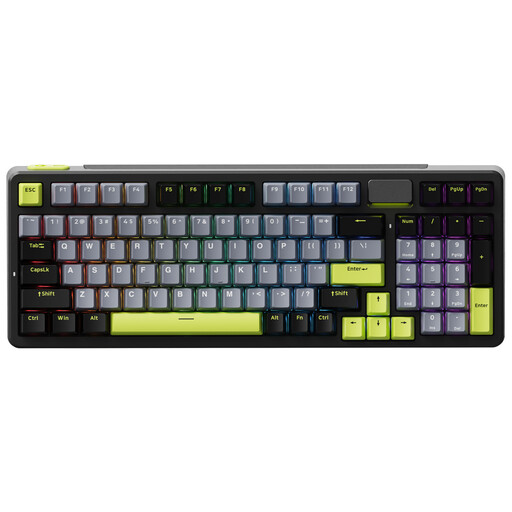 No image available
Rapoo V700DIY 96% Mechanical Keyboard, US QWERTY, Gasket Mount-BG
Consider this 96% layout if you want to compare a compact arrangement with a full-size desk keyboard. The listed variant uses a US QWERTY layout and is described as tri-mode; check the exact keys you need for archive navigation and confirm any required programmable shortcuts or device switching before choosing it for those purposes.
View on Joybuy
Frequently asked questions
Will a new keyboard make my two-screen photo workflow work?
A keyboard alone cannot provide a second-screen view; your photo application must support the arrangement you want. Adobe says Lightroom Classic can open a second Library view, so check your application’s display options before choosing keyboard controls for that workflow.
Do I need a full-size keyboard to organise photos?
Choose a full-size layout if dedicated navigation keys or a number pad are important to your naming and metadata routine. A compact layout may suit a desk where mouse space matters more, provided its available keys and shortcuts still cover your regular commands.
Should I choose a UK-ISO keyboard?
Choose UK-ISO if that physical key arrangement and its legends match how you type. Check the exact variant: Keychron labels its Q6 Max UK-ISO version explicitly, while the US-layout Joybuy options on this page have different layout descriptions.
Can an old wireless keyboard go in household rubbish in the UK?
Do not put an unwanted electrical keyboard in household rubbish. UK government guidance advises recycling unwanted electrical products and batteries through an appropriate collection route; check your local collection options when replacing a keyboard.


