
24/7 Customer Support

Free returns

Same-day & Next-day Delivery

Quality Guaranteed

Unlock Your Welcome Offers: FREE Delivery | Up to 80% OFF | Free 30-day JoyPlus trial
Download the APP
Juggling a laptop bag, a personal bag and a separate lunch container during the morning commute can be a frustrating start to any day. For UK professionals, students and anyone with a busy schedule, streamlining your daily carry is not just a convenience—it's a necessity. A laptop backpack with a dedicated lunch compartment offers a practical, all-in-one solution, keeping your tech safe, your food fresh and your hands free.
As the Joybuy Product Recommendation Officer, my role is to help you navigate the options. This guide provides practical advice and highlights a few noteworthy choices to help you find a bag that simplifies your daily routine.
Choosing the right bag involves more than just finding one with two main sections. Here are a few key features to consider to ensure your new backpack meets the demands of your day.
The core feature is, of course, the insulated compartment. Look for linings made from materials like water-resistant aluminium foil, which helps maintain the temperature of your food and is easy to clean. Consider the size of this section. Do you need to fit several meal prep containers or just a sandwich and a drink? A well-designed insulated lunch backpack should prevent leaks and odours from reaching the main compartment where your laptop and documents are stored.
A modern commuter backpack should cater to your electronic devices. Many now include a built-in USB port, allowing you to connect your own power bank inside the bag to charge your phone on the go. For peace of mind in crowded spaces, look for an anti-theft rucksack design, which often includes a hidden pocket on the back panel for your wallet, phone or passport. If you travel for work, a TSA-friendly laptop bag that opens 180 degrees can make airport security checks much smoother.
Your backpack will be carrying a significant load, so comfort is paramount. Padded, adjustable shoulder straps and a breathable back panel can make a substantial difference. The material should be durable and, ideally, water-resistant to protect your belongings from unpredictable British weather. Beyond the main sections, check for organisational pockets for pens, notebooks and cables. A dedicated, padded sleeve is essential for protecting your device, so ensure it matches your laptop's size.
Here are a couple of options that combine these features effectively, catering to different needs and preferences.
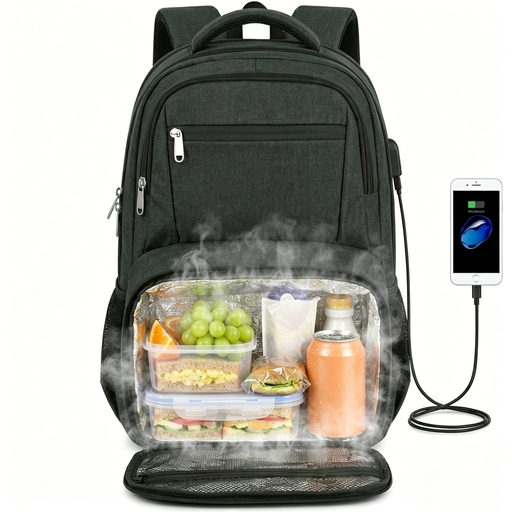
Why It Stands Out: This backpack is built for capacity and versatility. Its standout feature is the large, collapsible insulated compartment at the base. When you're carrying a full lunch, it expands to hold multiple containers or up to 10 cans. On days you don't need it, it compresses to maximise space in the main compartment. The TSA-friendly design allows the bag to open flat, simplifying travel.
Pros:
Who is it for? This is an excellent choice for professionals, commuters or university students who carry a larger laptop and require a robust, high-capacity bag for work, meals and even occasional travel.
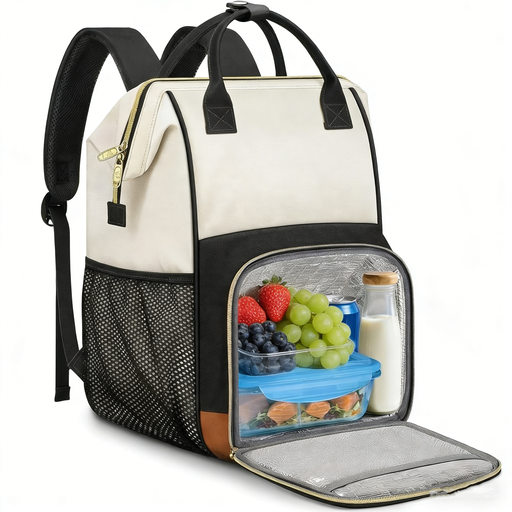
Why It Stands Out: This model offers superior flexibility with its 2-in-1 design. It includes a completely removable insulated lunch bag, allowing you to use it separately or leave it at home to create one large internal compartment. The thoughtful organisation, including a dedicated A4-sized pocket, makes it ideal for keeping documents and devices tidy. Its stylish beige finish and dual top handles provide a polished, professional look.
Pros:
Who is it for? This is well-suited for professionals like teachers and nurses or office workers who appreciate smart organisation and the choice to carry their lunch separately. Its design combines functionality with a more refined aesthetic.
If these specific models aren't quite what you're looking for, or if you'd like to browse a wider range of carrying solutions, there are many other styles available. From minimalist sleeves to feature-rich travel packs, finding the right bag is about matching it to your unique needs.
Explore our full collection of home office laptop bags and accessories to find your perfect match.
1. How do you clean the insulated compartment of a lunch backpack? Most insulated linings made from aluminium foil or similar materials can be easily wiped clean. Use a damp cloth with a small amount of mild washing-up liquid to wipe down the interior, then dry it thoroughly with a clean cloth before closing it. Avoid machine washing the entire backpack, as this can damage the water-resistant coating and the bag's structure.
2. Can you put hot food in an insulated lunch compartment? Yes, the insulated section is designed to help maintain temperature, whether hot or cold. For hot food, it's advisable to use a sealed, leak-proof container. The insulation will help keep your meal warm for several hours, though the duration will vary based on the initial food temperature and ambient conditions.
3. How does a backpack with a USB port work? A backpack with a USB port has a cable inside connected to an external port on the bag's exterior. You must connect your own portable power bank to the internal cable. You can then plug your device's charging cable into the external port to charge it without having to hold the power bank. The power bank itself is not included with the backpack.