What matters when choosing?
Confirm workplace approval and software compatibility before comparing screens and travel convenience. For a confidential contract, sign-in features alone do not establish that a device meets your organisation's security requirements.
| Concern | What to check | Who this matters to |
|---|
| Confidentiality and access |
Confirm device approval and compatibility with required applications, VPN, sign-in and encryption arrangements. |
If I handle sensitive contracts, I need to know I can use and protect the device under my organisation's rules; around 40% of consumers put approved, secure access first. |
| Document readability |
Compare the exact display's size, aspect ratio and finish; view a representative contract at a comfortable text size if possible. |
Reading clauses and comparing versions takes a usable text workspace; for around 30% of consumers, readability is the primary concern. |
| Travel and charging |
Check carry weight, charger inclusion and compatibility, plus the ports needed for your accessories. |
When I move between meetings and a hotel room, I need a setup I can carry and power without relying on a battery-life claim alone; travel and charging come first for around 30% of consumers. |
Joybuy product choices
These laptops offer different screen sizes and operating-system options for hotel-room contract review. Before choosing one, confirm that your organisation approves the device and that your required contract tools work on it.
 No image available
Apple MacBook Air 13-inch (2026, M5), 24GB, 1TB SSD, Midnight
Consider this compact macOS model if your organisation approves macOS and its contract tools work on it.
Its title specifies 24GB memory and a 1TB SSD. Apple lists a 13.6-inch, 2560 × 1664 display and two Thunderbolt 4 ports for the cited 13-inch M5 model; check whether your accessories need an adapter.
View on Joybuy
 No image available
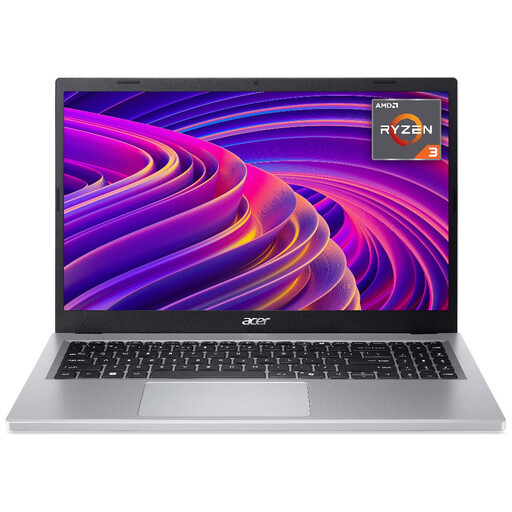
Acer Aspire Go 15 AG15-21P, 15.6-inch Full HD, 8GB, 256GB SSD, Silver
Consider the larger display if you prefer more screen area for reading documents and can accommodate a 15.6-inch laptop when travelling.
The title specifies an AMD Ryzen 3 7320U processor, 8GB memory and a 256GB SSD. Confirm the required workplace software and security configuration, along with the supplied charger.
View on Joybuy
 No image available
Apple MacBook Air 13-inch (2026, M5), 16GB, 1TB SSD, Sky Blue
This is another compact macOS choice for an approved, Mac-compatible contract workflow.
Its title specifies 16GB memory and a 1TB SSD, distinguishing it from the 24GB Midnight variant above. Apple lists a 13.6-inch, 2560 × 1664 display for the cited 13-inch M5 model; confirm your charging and peripheral setup.
View on Joybuy
 No image available
ASUS Vivobook 15 X1504VA, 15.6-inch, 24GB, 1TB SSD, Cool Silver
Consider this 15.6-inch model if a larger screen matters more to you than carrying a smaller laptop.
The title specifies an Intel Core 5 120U processor, 24GB memory and a 1TB SSD. Check workplace compatibility, the charger supplied and battery performance for your actual work session.
View on Joybuy
 No image available
Lenovo IdeaPad Slim 3 Chromebook 14IAN8, 14-inch, 8GB, 256GB eMMC, Grey, 83BN001EUK
Consider a Chromebook only if your organisation permits ChromeOS and every required contract-review and signing tool works with it.
The title specifies a 14-inch model with an Intel Core i3 N305 processor, 8GB memory and 256GB eMMC storage. Confirm peripheral compatibility and charging arrangements before relying on it for a hotel-room session.
View on Joybuy
Frequently asked questions
Do I need a business laptop to review a contract in a hotel room?
Not necessarily: a business configuration becomes relevant when your organisation requires its operating system, management features or support arrangements. If it permits a consumer laptop, confirm that the exact device can run your applications and meet its security requirements.
Can I use my personal laptop for a confidential contract?
Use a personal laptop only if your organisation permits it for that work. For personal data, the Information Commissioner's Office advises following organisational policy, using approved technology where provided and keeping organisational and personal data separate when personal equipment must be used.
Is a privacy screen enough in a hotel room?
No: a filter does not replace approved access methods or careful screen positioning. The Information Commissioner's Office advises placing screens where they are less likely to be overlooked.
How should I connect when reviewing contracts over hotel Wi-Fi?
Use the remote-access and document-sharing methods your organisation approves. Confirm its VPN and communication requirements before travelling rather than assuming a hotel connection is suitable for confidential work.
Should I check whether a charger is included?
Yes, check the exact configuration and its charging requirements. Dell states that the cited XPS 13 DX13260 configuration has no charger included and specifies 27–65W charging, while Lenovo lists a 65W UK USB-C adapter for the cited ThinkPad X1 Carbon configuration.


