For short-story writing, choose a laptop around the keyboard, the space you need for a draft and research, and compatibility with your existing software and accessories. A compact model makes sense if you write away from your desk and can connect a suitable monitor at home; if you mainly stay at one workstation, consider a larger built-in screen while checking its size and weight against your plans to carry it.
Who this advice is for
Writers at one desk
You spend long sessions drafting and editing in a home office, and want a practical way to view a manuscript alongside notes or research. Keyboard comfort and the option of an external display matter more to your setup than carrying the laptop between locations.
Writers who move between rooms
You sometimes write away from your usual desk but return to a home-office setup. Compare the weight and built-in screen with the connections you would need to use your desk display and accessories.
Writers with essential software or peripherals
Your workflow depends on particular applications, a printer or scanner, or other accessories. Check those requirements before choosing macOS or a Windows laptop, especially one using an Arm processor.
What matters when choosing
Start with where you will write and what must run on the laptop. Then compare the exact keyboard, screen and connections of the configurations you are considering.
| Concern |
What to check |
Who this matters to |
| Drafting comfort and document visibility |
Check the keyboard layout and key feel, built-in screen dimensions, and external-display support if you use a desk monitor. |
If I draft for long stretches and refer to notes as I edit, I want a comfortable keyboard and enough room to read my work. Around 42% of consumers put drafting comfort and document visibility first. |
| Portability with a desk setup |
Compare the exact model weight and screen size; check its display connections and the basis of any battery-life claim. |
When I write in different rooms but return to a desk, carrying the laptop should be manageable without making my monitor setup awkward. For around 33% of consumers, that balance is the primary concern. |
| Software and accessory compatibility |
Check essential applications and peripherals against the operating system; for Windows on Arm, confirm required driver support. |
I need my writing tools, files and peripherals to work before screen size becomes the deciding factor. Compatibility comes first for around 25% of consumers. |
Buying pitfalls to avoid
-
Choosing by processor branding alone
A processor name does not tell you whether the keyboard, screen arrangement, ports or operating system suit your writing routine.
Settle your software requirements first, then compare the keyboard, display and connections on the exact configuration you intend to buy.
-
Assuming a USB-C port settles monitor compatibility
Your desk setup depends on the laptop’s supported display configuration as well as the monitor’s inputs and the connection between them. Apple advises checking display documentation when connecting a MacBook Air.
Note your monitor model and inputs, decide how many displays you need, and confirm the cable or adapter for that combination before ordering.
Your setup may require a compatible cable, dock or adapter.
-
Assuming app emulation covers every Windows accessory
Microsoft says Windows 11 on Arm can emulate x86 and x64 user-mode apps, but drivers are not covered by that emulation; kernel-mode components need native Arm64 support.
Check current support information for any essential printer, scanner, security tool or specialist writing software before choosing an Arm-based laptop.
Relevant brands to consider
Apple
The M5 MacBook Air line is a macOS option for writers considering a compact laptop with a separate desk display.
- Apple lists a 13.6-inch display and support for up to two external displays on the current 13-inch M5 MacBook Air.
- Its two Thunderbolt/USB-C ports mean existing displays and USB-A accessories may need compatible cables or adapters.
Microsoft
Surface Laptop offers Windows models with a 3:2 display for writers who want a taller built-in view of documents.
- Microsoft lists the 13-inch Surface Laptop at 1,225 g and describes its 3:2 screen as showing more of a document vertically.
- The current Snapdragon-based models use Windows on Arm. Microsoft says driver-dependent tools need native Arm64 support, even where an application can run through emulation.
Lenovo
The ThinkPad E14 Gen 6 Intel line is a business-oriented Windows option for writers assessing keyboard navigation and future storage or memory needs.
- Lenovo describes upgradeable storage and memory and identifies TrackPad and TrackPoint navigation on this line.
- Display, keyboard and internal specifications vary by configuration; check the complete model number and keyboard layout rather than assuming every E14 has the same features.
Joybuy laptop choices
These choices span larger-screen laptops for a regular desk and compact models to consider if you also write elsewhere. Check the listed configuration and your software and monitor requirements before deciding.
 No image available
Acer Aspire Lite AL15-36P-C29Z 15.6-inch, Intel N150, 8GB/128GB
Consider this larger-screen option if you usually draft at a desk. Its title lists a Full HD display, 8GB DDR4 memory and a 128GB SSD.
Confirm the installed Windows 11 Home configuration, including whether S Mode affects the applications you need to install, and check the keyboard layout before buying.
Joybuy
 No image available
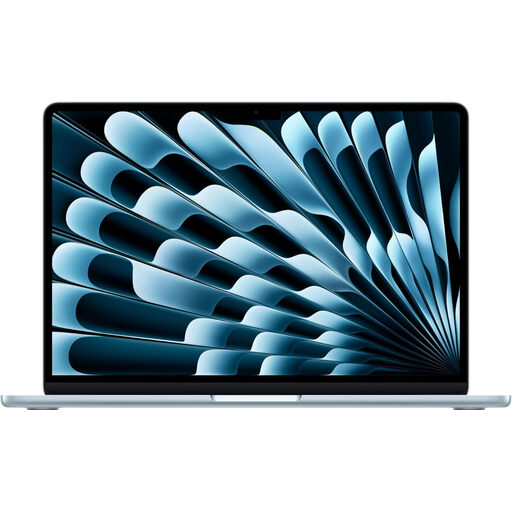
Apple MacBook Air (2026) 13-inch M5, 10-core CPU/GPU, 16GB/1TB, Sky Blue
This compact macOS option suits a writer who moves between rooms but wants to connect a display at the desk. Apple lists a 13.6-inch screen and support for up to two external displays on the M5 MacBook Air line.
Check the keyboard layout and your monitor’s inputs, including any cable or adapter needed for the connection.
Joybuy
 No image available
Lenovo IdeaPad Slim 3 83K7009MUK 15.3-inch, Ryzen 5 7535HS, 24GB/512GB
The 15.3-inch WUXGA screen makes this a larger built-in-screen choice for desk-based drafting. The title specifies DDR5 memory, a PCIe SSD and Windows 11 Home.
Confirm the UK keyboard layout and the ports and display connections required by your desk setup.
Joybuy
 No image available
ASUS Vivobook 14 X1407QA-LY003W, Snapdragon X, 16GB/512GB, Quiet Blue
This 14-inch Windows-on-Arm option is worth considering if you want a compact laptop and your essential software and peripherals are compatible.
Microsoft says Windows 11 on Arm can emulate x86 and x64 user-mode apps, but driver-dependent components need native Arm64 support. Confirm those requirements and the keyboard layout before buying.
Joybuy
 No image available
HP OmniBook X Flip 16-as0004na 16-inch, Core Ultra 5 226V, 16GB/512GB
Consider this larger touchscreen model if you mainly write at a desk and want a 16-inch built-in display. Its title identifies a 2-in-1 design and Windows 11 Home; decide whether the convertible format matters to your workflow.
Check keyboard layout and typing characteristics, weight and external-display connections against your intended setup.
Joybuy
Frequently asked questions
Should I choose a 13-inch or a larger laptop for writing at home?
Choose a compact laptop if you regularly move it and can arrange the document space you need at your desk; consider a larger built-in screen if it will mostly stay in one place. Microsoft lists its 13-inch Surface Laptop at 1,225 g and its 15-inch version at 1,664 g, so check the weight of the exact model you would carry.
Can an M5 MacBook Air connect to two external displays?
Yes: Apple states that the M5 MacBook Air supports up to two external displays, subject to its stated display limits. Check your monitors’ inputs and the compatible cables or adapters before planning a two-monitor desk setup.
Will my writing software work on a Windows-on-Arm laptop?
Many conventional x86 and x64 user-mode applications can run through Windows 11 on Arm emulation, but that does not establish compatibility for every writing setup. Microsoft says drivers are not emulated, so confirm native Arm64 support for any essential printer, scanner, security tool or other driver-dependent component.
What should I do with an old laptop when replacing it?
Use an appropriate electrical-equipment collection or recycling route rather than putting the laptop in general waste. UK government guidance places electrical and electronic equipment within the WEEE framework; erase your personal data before handing the device over.


