What should you check?
Work through one complete inventory task—opening, editing, saving and retrieving a file—before choosing a screen size. Then weigh carrying the laptop against the space and keyboard you want at a library table.
| Concern |
What to check |
Who this matters to |
| Software and files |
Confirm that your application and spreadsheet features work on the operating system, including any required offline editing or export. |
If my inventory depends on a desktop app, macro or local files, I need to know I can complete the whole workflow. Around 40% of consumers would put software and file compatibility first. |
| Carrying and data entry |
Compare screen size with the model’s dimensions and weight; confirm the exact keyboard layout if you need a numeric keypad. |
When I carry the laptop to the library but also update many figures, I need a workable balance between portability and entry space. Roughly 30% of consumers would make that balance their primary concern. |
| File protection |
Check device-lock and encryption options, how you will back up files, and the library’s Wi-Fi policy. |
If my records include personal details, I want to limit exposure in public and be able to recover the files. For around 30% of consumers, protecting those records would come first. |
Brands to consider
These ranges offer useful configurations to compare, but the brand name alone cannot tell you whether a particular laptop fits your inventory workflow.
Lenovo
The ThinkPad E14 line is relevant if you want to compare 14-inch business laptops for library visits.
- Lenovo UK lists an E14 Gen 7 configuration with a 14-inch, 1920 × 1200 IPS anti-glare display.
- E14 configurations differ: confirm the part number, memory, storage, keyboard and supplied charger rather than applying one listing’s details to the whole line.
HP
The ProBook 440 G11 provides a specific 14-inch Windows business-laptop configuration to compare.
- HP Store UK lists configuration DD7V9EA#ABU with Windows 11 Pro, 16 GB RAM and a 512 GB SSD.
- The cited configuration excludes a charger. HP’s security and upgradeability descriptions are claims about its product line, not a substitute for checking the exact model.
Dell
Dell’s Pro range and numeric-keypad listings are relevant if you want to compare larger Windows laptops for regular data entry.
- Dell UK lists a Pro 16 configuration with Windows 11 Pro, 16 GB RAM and a 512 GB SSD.
- Confirm keypad presence and the selected configuration on the exact laptop; neither the Dell name nor a 16-inch screen establishes its keyboard layout.
ASUS
ExpertBook is another business-laptop family to examine if maintenance and device-security features affect your choice.
- ASUS describes maintenance, upgrade and security features across its ExpertBook ranges.
- Those are ASUS’s range-level descriptions; compare the features and software compatibility of the exact model you are considering.
Joybuy product choices
These laptops offer 14-inch and larger-screen options for reviewing inventory files at a library table. Check your application and keyboard requirements against the exact model before choosing between them.
 No image available
ASUS Vivobook 14 X1407QA-LY003W, Snapdragon X, 16 GB RAM, 512 GB SSD, Quiet Blue
Consider this 14-inch model if you want a smaller laptop to carry to the library. Its title specifies a Snapdragon X processor, 16 GB RAM and a 512 GB SSD; confirm that your inventory application and files work with the exact configuration, and check the keyboard if numeric entry is frequent.
View on Joybuy
 No image available
Lenovo IdeaPad Slim 3 15IAH8, 83ER00G4UK, 15.6-inch, 8 GB RAM, 512 GB SSD
The 15.6-inch format is worth considering if you prefer more screen space while reviewing inventory rows. The title identifies an Intel Core i5 processor, 8 GB RAM and a 512 GB SSD. Confirm application compatibility and keypad presence, and check the exact listing’s battery information before planning time away from a socket.
View on Joybuy
 No image available
HP OmniBook Ultra Flip 14-fh0006na, 2-in-1, 16 GB RAM, 1 TB SSD
Consider this 14-inch two-in-one if its convertible design suits the way you review files at a library table. The title specifies 16 GB RAM, a 1 TB SSD and Windows 11 Home. Check your inventory software, keyboard layout and exact graphics configuration before relying on them for your work.
View on Joybuy
 No image available
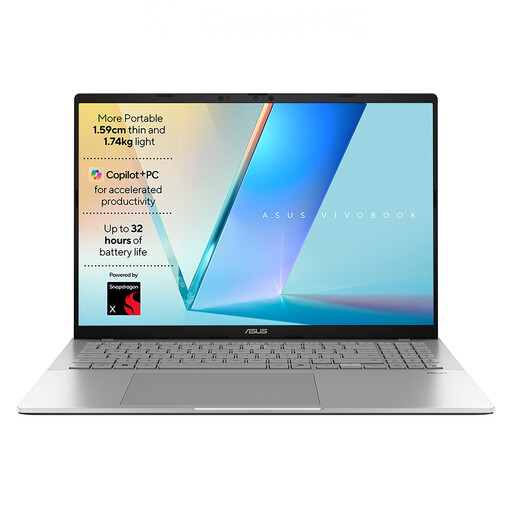
ASUS Vivobook S3607QA-PL004W, 16-inch, Snapdragon X1-26-100, 16 GB RAM, 512 GB SSD
The 16-inch display may appeal if you review many inventory rows while seated at a table. The title specifies a 1920 × 1200 display, 16 GB RAM, a 512 GB SSD and Windows 11 Home. Confirm software compatibility and keypad layout, and compare its dimensions and weight with what you are comfortable carrying.
View on Joybuy
 No image available
HP OmniBook X Flip 16-as0004na, 16-inch touchscreen, 16 GB RAM, 512 GB SSD
This 16-inch two-in-one is an option to examine if you want a larger touchscreen for table-based inventory review. The title specifies an Intel Core Ultra 5 226V processor, 16 GB RAM, a 512 GB SSD and Windows 11 Home. Check application compatibility, the keyboard layout and its carrying dimensions before deciding.
View on Joybuy
Common questions
Do I need a numeric keypad for a household inventory?
A dedicated numeric keypad is worth checking if you repeatedly enter quantities, dates, values or item codes; occasional edits may not justify choosing a larger laptop for that feature. Confirm the keypad on the exact model rather than assuming it comes with a particular screen size.
Can I use a Chromebook for my inventory?
A Chromebook is a possible choice if every required step works in your browser or chosen cloud tools. Check your actual files, editing features, export, sign-in and offline needs first; a Windows-only application, macro or add-in changes that decision.
How should I handle inventory files on library Wi-Fi?
Treat library Wi-Fi as a public connection and protect both the screen and the files. Islington Council warns about increased risk on open, unencrypted Wi-Fi; check your own library’s policy, keep the device updated and use encryption and recoverable backups where appropriate.
What should I do with an old laptop?
Before passing an old laptop on for reuse or recycling, remove personal inventory files and check an appropriate local collection or recycling route. GOV.UK identifies the Waste Electrical and Electronic Equipment Regulations 2013, as amended, as the underpinning UK legislation for electrical-equipment waste.


