
24/7 全天候客户支持

免费退货

当日/次日达

品质保障

开启新人专享福利: 全场免邮 | 低至 2 折 | 免费试用 30 天 JoyPlus 会员
下载 Joybuy
As a Joybuy Product Recommendation Officer, my role is to help you navigate the crowded market of PC peripherals. When it comes to competitive gaming, few tools are as critical as your mouse. The search for the perfect lightweight wireless gaming mouse can be frustrating, with many products promising pixel-perfect accuracy but failing to deliver when it matters most. Before you invest, it's crucial to understand the common pitfalls that lead to buyer's remorse.
Many gamers are caught out by two prevalent marketing traps. Firstly, the obsession with ever-higher DPI numbers, which often has little bearing on real-world performance. Secondly, the race to the bottom on weight, where some manufacturers sacrifice structural integrity for a headline-grabbing low number, resulting in a mouse that feels cheap and can fail under pressure. A truly effective gaming mouse balances cutting-edge technology with practical, durable design.
To avoid these traps, focus on the core parameters that define a high-performance gaming mouse. Instead of getting distracted by flashy marketing, pay close attention to the sensor, the build and the connection technology.
The sensor is the heart of your mouse. While brands often advertise enormous numbers like 24,000 or even 40,000 DPI (Dots Per Inch), most competitive players use settings between 400 and 1600 DPI. What's more important than the maximum DPI is the quality of the sensor itself. Look for mice equipped with proven optical sensors, such as those from the PixArt (PAW) series. A quality sensor ensures flawless 1:1 tracking, meaning it translates your hand movements to the screen without any unwanted acceleration, angle snapping or jitter. This raw input is what gives you the consistent aim needed in a mouse for Valorant or CS2. A high DPI mouse is only useful if its sensor is fundamentally accurate across its entire range.
The trend towards sub-70-gram mice has been a game-changer for reducing fatigue and enabling faster flicks. However, weight is only one part of the equation. An ergonomic gaming mouse that fits your hand size and grip style (palm, claw, or fingertip) will always outperform a lighter mouse that causes cramping or discomfort during long sessions.
Pay attention to the materials. While some ultra-light mice use thin, flexible plastic, others employ advanced construction techniques or materials like magnesium alloy. These can provide a rigid, durable frame at an exceptionally low weight, ensuring the mouse can withstand the intensity of competitive play without creaking or flexing.
A modern tri-mode gaming mouse offers three connection options: low-latency 2.4GHz wireless, convenient Bluetooth and a wired USB-C connection for charging and playing. For any serious gaming, the 2.4GHz connection is non-negotiable, as it provides the near-instantaneous response required.
Another critical specification is the polling rate, measured in Hertz (Hz). This determines how many times per second the mouse reports its position to your computer. The industry standard is 1000Hz (1ms response time), which is perfectly adequate for most gamers. However, for those with high-refresh-rate monitors (240Hz and above), an 8KHz polling rate mouse can offer a noticeably smoother and more responsive experience by sending data up to eight times more frequently. This ensures the absolute minimum delay between your physical movement and the on-screen action. Finally, a reliable rechargeable gaming mouse should offer sufficient battery life to last through multiple long sessions on a single charge.
Based on these practical criteria, we've identified several models that align with specific gamer profiles, helping you find a mouse that genuinely matches your needs.

Why This Fits Their Persona: This user plays a variety of competitive titles and needs a reliable, feature-rich mouse that offers excellent value. The ergonomic shape is suited for medium-to-large hands and extended gaming sessions.
It sidesteps the flimsy build trap with a "dragonbone" internal structure that reinforces the 63g frame. It focuses on a proven PAW3311 sensor, prioritising tracking quality over an inflated DPI number.
Includes a magnetic charging dock for convenient power top-ups. Offers versatile tri-mode connectivity for gaming, work and travel.
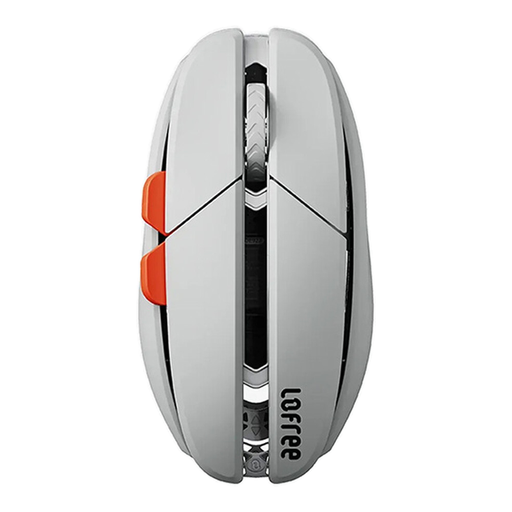
Why This Fits Their Persona: This gamer prioritises speed and agility above all else. They need the lightest possible mouse to minimise inertia for rapid flicks and tracking, without compromising on sensor performance or build quality.
It directly solves the weight-vs-durability problem by using a premium magnesium alloy unibody frame. This achieves an exceptionally low weight of 47g while maintaining structural rigidity.
Equipped with a flagship PAW3950 sensor for top-tier tracking precision. The ultra-lightweight 47g construction reduces physical strain and allows for maximum movement speed.
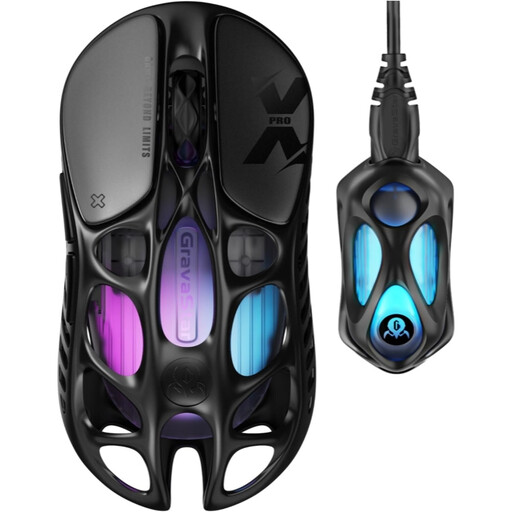
Why This Fits Their Persona: This user has a high-end setup with a 240Hz+ monitor and seeks the lowest possible system latency. They understand technical specifications and want cutting-edge hardware to gain a competitive advantage.
It avoids the wireless latency trap by including an 8K dongle, enabling an 8000Hz polling rate that provides significantly more data to the PC, reducing micro-stutters and input lag on high-refresh displays.
Features a top-tier PAW3950 sensor and a true 8000Hz polling rate for peak responsiveness. The 49g hollow magnesium alloy design combines extreme light weight with a solid feel.
We have compiled a complete, real-time list of products that fully satisfy these strict selection criteria and UK safety regulations.
For most gamers using standard 60Hz or 144Hz monitors, a 1000Hz polling rate is more than sufficient. However, if you are a competitive player with a 240Hz, 360Hz or higher refresh rate monitor, an 8KHz polling rate mouse can provide a tangible benefit. It delivers a smoother cursor path and reduces input lag by a fraction of a millisecond, which can make a difference in high-stakes, reaction-based scenarios. Be aware that it requires more CPU resources, so a powerful PC is recommended to take full advantage of it.
Weight is a significant factor in user comfort and performance, especially in fast-paced FPS games. A lightweight wireless gaming mouse (typically under 70 grams) reduces inertia, making it easier to start and stop movements quickly. This can lead to faster aiming and less fatigue over long gaming sessions. However, it is a matter of personal preference. Some users prefer the stability of a slightly heavier mouse. The ideal approach is to find the lightest mouse that still feels comfortable and robust in your hand.
The battery life of a rechargeable gaming mouse varies widely depending on the model, battery capacity and usage. Most modern wireless gaming mice offer between 40 to 100 hours of continuous use on a single charge when using the 2.4GHz connection. Features like RGB lighting can significantly reduce battery life. Many models include power-saving features and can be used in wired mode while charging, so you are never left without a functioning mouse.