Choose for the device running the game and the game’s supported player controls before choosing a connection type. An Xbox Wireless Controller suits an Xbox setup, DualSense suits PS5, and individual Joy-Con may cover two Nintendo Switch players when the game allows it; a Windows-focused controller is another option for a PC setup. From a side seat, wireless play avoids a cable between seats, but the host must support the controller’s particular wireless mode.
Who is this for?
PS5 co-op households
If a second person is joining a game on PS5, start with a controller intended for that console. PlayStation also describes DualSense connections to supported computers and mobile devices, although available features vary by device and game.
Xbox or Windows shared-screen players
Players using an Xbox console or Windows PC can consider the Xbox Wireless Controller. Microsoft Xbox lists support for both, but the intended connection method and the individual game still matter.
Nintendo couch-sharing players
For a Nintendo Switch or Switch 2 game, check whether each player can use an individual Joy-Con before buying another controller. The game’s control requirements and the console generation determine which arrangement works.
What matters when choosing?
Check the game’s local player count and supported controllers, then match the controller to the host device and the connection you plan to use from the side seat.
| Concern |
What to check |
Who this matters to |
| Host compatibility |
Confirm the exact console or computer, its supported connection mode and the game’s controller requirements. |
I need the controller to work with the device running our game, not just have a familiar layout; around 36% of consumers put host compatibility first. |
| Wireless play from the side seat |
Check whether the host uses Bluetooth, a dedicated wireless mode or a USB receiver, and whether any needed receiver is included. |
A cable across the seating area would get in my way; roughly 29% of consumers prioritise a supported wireless connection. |
| Controls for each player |
Check the game’s local player count and controller layouts. For Nintendo, confirm the console generation as well. |
Before buying another pad, I want to know whether each of us can use one Joy-Con in this game; about 21% of consumers make the player-control arrangement their main concern. |
| PC control options |
Confirm game recognition and whether the connection mode supports any extra controls you intend to use. |
On a PC, I would use configurable buttons only if the game recognises the controller; around 14% of consumers put these control options first. |
Mistakes to avoid
-
Assuming every wireless controller connects to every host
Wireless refers to several connection methods. Microsoft Xbox lists Xbox Wireless for Xbox consoles, while 8BitDo lists 2.4G or wired Windows use and Bluetooth Android use for its Ultimate 2C Wireless Controller.
Match the stated connection mode to your gaming device, and check whether a receiver or suitable cable is needed and included.
-
Buying another full-size controller before checking Joy-Con support
Nintendo says the original Switch’s left and right Joy-Con can act as individual controllers, but the game must support that arrangement. Some local co-op games may require additional controllers.
Read the game’s supported controller layouts and consider whether an individual Joy-Con suits each player before deciding what to buy.
-
Expecting every DualSense feature over PC Bluetooth
PlayStation says DualSense features vary by device and game. On PC, haptic feedback requires USB and a compatible game.
Check the game’s DualSense support and the connection required for the particular feature you want.
Relevant brands to consider
Xbox
A first-party route for an Xbox console, with Windows PC and supported mobile devices also listed by Microsoft Xbox.
- Microsoft Xbox lists Xbox Wireless and Bluetooth connectivity, device switching and button mapping for the Xbox Wireless Controller.
- Those specifications do not establish compatibility with PlayStation or Nintendo consoles, or with every game.
PlayStation
The DualSense route for a second PS5 player, with connections to supported computers and mobile devices.
- PlayStation lists Bluetooth and USB connections for DualSense on supported non-PS5 devices.
- Features vary by device and game; PC haptic feedback requires USB and a compatible game.
Nintendo
A local-sharing route where a compatible game lets two players use separate left and right Joy-Con.
- Nintendo says the original Switch’s Joy-Con can function as individual controllers.
- Some games need additional controllers, and Joy-Con 2 is for Nintendo Switch 2 rather than the original Switch.
8BitDo
A third-party option for Windows PC or Android setups, depending on the intended connection.
- 8BitDo lists 2.4G wireless and wired Windows modes, Bluetooth Android use and configurable controls for the Ultimate 2C Wireless Controller.
- Its stated compatibility does not establish support for Xbox, PlayStation or Nintendo consoles.
Controllers on Joybuy
These choices cover Nintendo Switch Joy-Con sharing, an Xbox controller and a PS5 DualSense controller. Choose the route that matches the device running your local co-op game, then confirm the game’s player and controller requirements.
 No image available
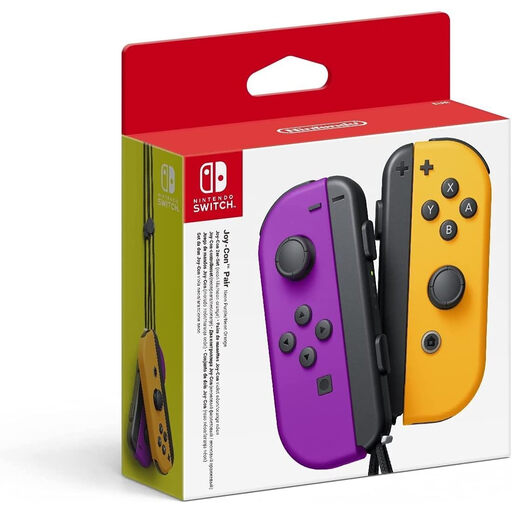
Nintendo Joy-Con Pair, Neon Purple/Neon Orange
Consider this pair for original Nintendo Switch local play if your game allows two people to use individual Joy-Con. Confirm the console generation and the game’s controller layout before counting the pair as two player controls.
View on Joybuy
 No image available
Xbox Wireless Controller, Robot White
Consider this controller when an Xbox console or Windows PC hosts the co-op game. Microsoft Xbox lists Xbox Wireless and Bluetooth connectivity; confirm which mode your device uses and whether the game supports the controller.
View on Joybuy
 No image available
Sony PlayStation 5 DualSense Wireless Controller, Starlight Blue (PS5) V3
Consider this DualSense variant for a second player in a PS5 game that supports local co-op. If you also plan to use it on PC, PlayStation says feature availability depends on the device and game; haptic feedback there requires USB and a compatible game.
View on Joybuy
Common questions
Can one controller work on every console in our co-op setup?
Do not assume it will. Microsoft Xbox lists its Wireless Controller for Xbox consoles, Windows PC, iOS and Android; PlayStation lists DualSense connections to supported computers and mobile devices; and 8BitDo lists the Ultimate 2C Wireless Controller for Windows and Android. Check the host device and game rather than treating those lists as universal console support.
Can two people share the Joy-Con supplied with an original Nintendo Switch?
Yes, if the game supports one Joy-Con per player. Nintendo says the left and right Joy-Con can work as individual controllers, but some local co-op games may require additional controllers, so check the game’s specified layout.
Will every DualSense feature work on PC?
No. PlayStation says feature availability varies by device and game; PC haptic feedback requires USB and a compatible game. Check support for the particular game and feature before choosing Bluetooth or USB.
What should I do with an unwanted controller or battery in the UK?
Keep unwanted electrical products and batteries out of household rubbish. The Office for Product Safety and Standards advises recycling them through an appropriate collection route; check local arrangements for the controller and its battery.


