
24/7 全天候客户支持

免费退货

当日/次日达

品质保障

开启新人专享福利: 全场免邮 | 低至 2 折 | 免费试用 30 天 JoyPlus 会员
下载 Joybuy
Choosing among mechanical gaming keyboards involves more than selecting RGB lighting and a colour scheme. The right model must suit your desk space, typing habits, connection preferences and the games or software you use. A compact keyboard can improve mouse room, while a full-size model may be more practical for spreadsheets and frequent number entry.
This guide highlights the common buying traps and the specifications worth checking before you purchase a mechanical gaming keyboard in the UK.
A 60% mechanical keyboard saves space by removing the dedicated function row, navigation keys and arrow keys. These functions are usually accessed through an Fn layer. That can work well for gaming, but it may slow down programming, office work or editing if you regularly use separate arrow and navigation keys.
A 75% mechanical keyboard generally retains the function row and arrow keys in a smaller footprint. It is often a more practical compromise for users who alternate between gaming and work. Full-size and 90% designs remain useful if you depend on a number pad.
A wireless mechanical keyboard can reduce cable clutter, but battery charging, receiver storage and connection compatibility need checking. A tri-mode mechanical keyboard typically supports wired USB, Bluetooth and 2.4GHz wireless connections. The 2.4GHz mode is generally intended for a desktop gaming setup, while Bluetooth may suit laptops, tablets and other devices.
For competitive play, check whether the keyboard supports a wired mode and whether the product includes the required receiver. A wired keyboard also avoids battery-related interruptions.
Terms such as 8,000Hz polling, rapid trigger and adjustable actuation can be useful for specific gaming setups, particularly fast-paced competitive titles. However, these features do not automatically make a keyboard suitable for every buyer. They may require compatible software and time spent configuring actuation points.
Likewise, RGB lighting affects appearance rather than typing performance. If lighting is important, confirm whether the keyboard offers per-key customisation, preset effects or only basic backlighting.
Mechanical switches determine the feel and sound of each keypress.
A hot-swappable mechanical keyboard allows compatible switches to be removed and replaced without soldering. Check whether the PCB accepts 3-pin, 5-pin or a specific switch format. Hot-swapping is particularly useful if you are still deciding between linear, tactile and clicky switches.
Review the connection type before ordering. Wired USB keyboards are straightforward for desktop PCs and do not need charging. Wireless models should state whether they use Bluetooth, 2.4GHz or both.
Also check the key layout. Several products listed here use a QWERTY US keyboard layout rather than UK QWERTY. A US layout commonly has a different Enter key shape and punctuation arrangement from a UK layout. Windows can change the software input language, but the printed legends on the keycaps will not change. Confirm this detail if you regularly type symbols, quotations or currency signs.
Measure the available desk width and leave room for your mouse. Consider:
PBT keycaps are often selected because they are less prone to developing a glossy surface than many ABS keycaps, although the final feel depends on profile and surface texture. Features such as a volume knob, adjustable feet, detachable USB-C cable, stabilisers and internal foam can also affect practical use. Marketing descriptions should not replace checking the actual specification sheet.
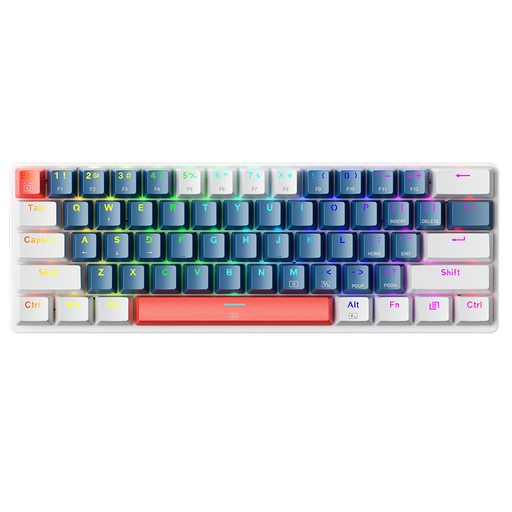
Why This Fits Their Persona: A suitable starting point for PC gamers who want a compact gaming keyboard with wired USB-C connectivity and a smaller footprint.
Its wired design avoids battery management, while the stated 60% layout makes the missing dedicated keys clear before purchase.
Blue mechanical switches, RGB backlighting, hot-swappable switch support and QWERTY US legends.

Why This Fits Their Persona: Designed for users who want a compact layout, customisation options and flexibility between desktop, laptop and mobile setups.
The 75% format retains arrow keys and the function row, while tri-mode connectivity gives a wired alternative when charging is inconvenient.
Bluetooth, 2.4GHz and wired modes, a 4000mAh battery, full-key hot-swapping, PBT keycaps, RGB lighting and a media knob.

Why This Fits Their Persona: A focused option for players who want magnetic switches, adjustable actuation and a compact wired setup for PC gaming.
It clearly identifies its 60% layout and wired connection, so buyers can assess key availability and avoid expecting wireless use.
Hall Effect magnetic switches, adjustable actuation, rapid trigger mode, RGB lighting and an 8,000Hz polling-rate specification.
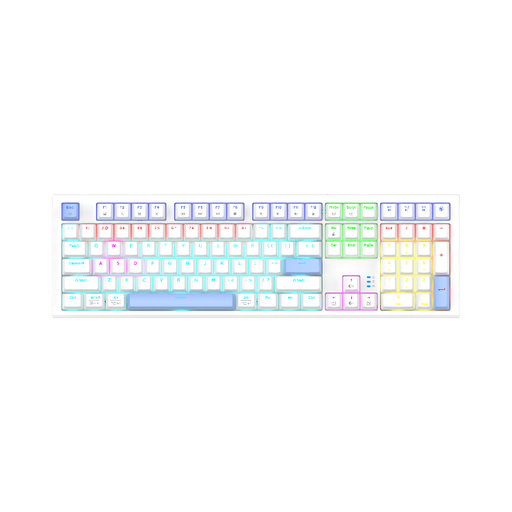
Why This Fits Their Persona: A practical match for users who want a familiar 104-key arrangement for office work, coding, gaming and frequent number-pad use.
The full-size format avoids the missing navigation and number-pad issue associated with compact gaming keyboards.
104 keys, wired USB-A connectivity, RGB backlighting and a QWERTY US layout.
We have compiled a complete, real-time list of products that fully satisfy these strict selection criteria and UK safety regulations.
Yes, provided the switch type and layout match your environment. Linear or tactile switches may be more suitable for shared spaces than clicky switches. A 75% or full-size layout can also be more convenient than a 60% model for documents, coding and regular function-key use.
Service life depends on switch construction, usage, cleaning, liquid exposure and cable or battery care. Avoid spills, disconnect the keyboard before cleaning and use a soft cloth or compressed air. Hot-swappable models can be easier to maintain because compatible switches may be replaced individually, but check the manufacturer’s compatibility information first.
RGB lighting uses additional power compared with having the backlight switched off. On wired keyboards, this may have a modest effect on electricity use. On wireless models, RGB can reduce the time between charges. Lowering brightness or turning lighting off when it is not needed can help conserve battery power.