Desktop filter-interface testers
If you check filter labels, selected states, result counts and layout at a defined desktop viewport, start with that viewport and the space you need beside the browser.


A 23.8-inch Full HD monitor can suit checks of filter controls and results at a standard desktop viewport. Consider QHD or 4K if the work calls for more simultaneous workspace or detailed visual review. Before choosing, define the target viewport and check your computer’s video output, connection needs and desk setup.
If you check filter labels, selected states, result counts and layout at a defined desktop viewport, start with that viewport and the space you need beside the browser.
If your browser, test cases and developer tools need to share the screen, consider workspace alongside laptop video compatibility. For a USB-C desk connection, check the monitor’s power delivery against your laptop’s charging needs.
Detailed interface or asset review may call for a higher-resolution screen. If colour is part of the acceptance criteria, specify the required accuracy separately: a stated colour-gamut figure does not establish calibration.
Set the browser viewport and decide what must remain visible alongside it; then check connections and any visual-review requirements.
| Concern | Buying check | Who this matters to |
|---|---|---|
| Viewport and workspace | Confirm the target viewport and whether the browser and supporting tools fit at the chosen native resolution. | I need to inspect filter controls and results without losing sight of the layout I am testing. Around 44% of consumers put a usable viewport first. |
| Laptop connection | Check the laptop’s video output, the required cable and whether USB-C power delivery meets its charging demand. | When I move a test laptop to my desk, I want the display connection to work without complicating the setup. Roughly 33% of consumers prioritise this connection and workflow need. |
| Visual detail | Establish whether the work requires screenshot-level inspection or defined colour accuracy, and check computer output at the selected resolution. | I need to review fine interface details, not just whether a filter works. About 23% of consumers place detailed visual review first. |
USB-C charging capacity differs between monitors: LG UK specifies up to 15W for the 27U631A-B and up to 90W for the 27U730A-B. A suitable connector alone does not establish laptop video compatibility or sufficient charging.
Check your laptop’s USB-C video support, charging requirement and cable against the exact monitor.
Depending on the setup, you may still need a separate charger, cable, dock or adapter.
A refresh-rate specification does not tell you whether the required browser viewport and supporting panels will fit on screen.
Write down the target viewport, simultaneous windows and any screenshot-comparison requirement before comparing display specifications.
Stated sRGB or DCI-P3 coverage describes a specification, not the calibrated accuracy of an individual monitor in your workflow.
If colour affects test acceptance, define the colour space, calibration method and tolerance before choosing a display.
Controlled-colour work may also require calibration equipment or a calibration service.
GOV.UK guidance on the UK Waste Electrical and Electronic Equipment Regulations 2013, as amended, describes measures intended to encourage recovery, reuse and recycling of electrical equipment.
When replacing a monitor in the UK, use an appropriate electrical-waste collection or retailer take-back route.
The Dell Pro 24 Plus P2425H is a 23.8-inch Full HD IPS example for a fixed desktop setup.
The BenQ GW2490 is a 23.8-inch Full HD IPS example with two HDMI ports, DisplayPort and 100 × 100 mm VESA mounting.
LG’s 27U631A-B and 27U730A-B illustrate different QHD and 4K USB-C setups.
These choices cover Full HD, QHD and 4K displays for different search-filter testing setups. Match a model’s resolution and connections to your target viewport and computer before choosing.
 No image available
Consider this model if your test plan calls for a 4K viewport or detailed interface review. Its name specifies a 27-inch IPS 4K UHD display, USB-C, HDR, P3 and a height-adjustable stand; confirm your computer’s 4K output and the connection requirements before buying.
 No image available
This model is an option when a 4K testing screen also needs a USB-C laptop connection. Its name specifies an IPS panel, Google TV, Dolby Audio and USB-C 65W; confirm USB-C video compatibility and whether 65W meets your laptop’s charging needs. The smart-TV features matter only if they serve your testing workflow.
 No image available
Consider this display if the testing setup calls for a 4K screen at a fixed desk. Its name specifies a 27-inch-class 4K UHD LED monitor with a 16:9 aspect ratio and matte black finish; check your computer’s 4K output and any required laptop connection before choosing it.
 No image available
This WQHD model is worth considering when you need workspace for the browser and supporting tools without choosing a 4K display. Its name specifies an IPS panel; if colour accuracy or laptop charging is essential, check the requirements for your workflow against the exact model.
 No image available
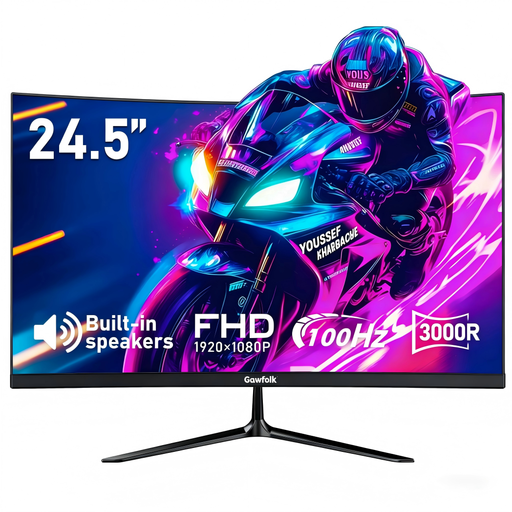
This is a Full HD option if your testing is centred on a standard desktop viewport. Its name specifies a 3000R curved screen, HDMI, a 75 × 75 mm VESA mount and 1ms MPRT response time; decide whether the curved screen and available positioning suit your layout-review work.
No: functional checks of filter controls and results can be done on a Full HD or QHD monitor if it accommodates the required viewport and working space. Consider 4K when the test plan calls for a 4K viewport, detailed visual inspection or more simultaneous panels.
No. Confirm that the laptop supports video output through the chosen USB-C port, that the cable is suitable and that the monitor’s power delivery meets the laptop’s needs. LG UK specifies up to 15W for the 27U631A-B and up to 90W for the 27U730A-B.
No. Colour-gamut coverage does not establish the calibrated accuracy of an individual monitor for a particular test. If colour affects acceptance, define the required colour space, calibration method and tolerance before purchase.
Use an appropriate electrical-waste collection or retailer take-back route rather than ordinary household waste. GOV.UK guidance describes the UK Waste Electrical and Electronic Equipment Regulations 2013, as amended, as underpinning measures to encourage recovery, reuse and recycling.