Students making lots of cards at a desk
If you repeatedly select text, edit card fields and scroll through source notes, check hand fit and scrolling before focusing on sensor specifications.


For revision cards, choose a mouse that fits your hand, lets you scroll through notes comfortably and connects to the laptop you use. A compact receiver mouse suits straightforward work when you have a suitable USB port; consider hand-size options for longer desk sessions or Bluetooth if carrying the mouse or changing devices matters more. A vertical shape is a grip alternative to assess, not a remedy for persistent pain.
If you repeatedly select text, edit card fields and scroll through source notes, check hand fit and scrolling before focusing on sensor specifications.
A mouse that is easy to carry still needs to connect to your laptop. Check its ports and Bluetooth support before deciding between a receiver and Bluetooth.
A different shape may be worth assessing for fit, but do not rely on a mouse change to address persistent symptoms. The NHS identifies repeated use as a possible contributor to repetitive strain injury.
Start with hand fit and your laptop’s connection options, then decide whether your card-making routine calls for a different way to scroll or switch devices.
| Concern | What to check | Who this matters to |
|---|---|---|
| Hand fit during longer sessions | Check the stated hand size and handedness, and whether the grip suits you. A vertical shape is not a treatment for pain. | If I spend a long session selecting text and editing cards, an uncomfortable grip could become my deciding issue. Around 40% of consumers put hand fit first. |
| Carrying and connecting a mouse | Check for a usable USB port if the mouse has a receiver, or confirm its Bluetooth and operating-system requirements. | When I move between study spaces, I want a mouse I can carry and connect to my laptop without changing my setup. Around 30% of consumers prioritise that portability and connection need. |
| Moving through notes and cards | Compare the stated scroll control with the way you work; check device-switching support if you use more than one device. | If I alternate between editing individual cards and reading longer notes, scrolling control matters most to my workflow. Roughly 30% of consumers make navigation or device flexibility their primary concern. |
Vertical mice vary in size and grip. Kensington describes its Pro Fit Ergo Vertical Wireless Mouse as intended for average-to-larger hands and says that model does not currently support Windows ARM-based computers.
Check hand-size guidance and device compatibility, and consider whether you can assess the grip before keeping it. Seek appropriate advice if pain persists or worsens rather than relying on a mouse purchase.
Logitech’s M185 connects through a USB receiver, while Bluetooth models have their own device requirements. A connection mismatch can prevent you from using an otherwise suitable mouse.
Check your laptop’s ports and Bluetooth support before ordering. If it has no usable USB-A port, establish whether a compatible adapter would be needed for a receiver mouse.
Logitech lists multi-device Bluetooth and alternative scrolling modes for the MX Anywhere 3S, but those features need to match the way you prepare cards.
Think about whether you actually switch devices, need quieter clicks in a shared space or regularly scroll through long documents before choosing those features.
The Health and Safety Executive identifies poorly arranged workstations and display-screen use as potential contributors to pain and fatigue. A comfortable-feeling mouse does not address the whole setup.
Vary your activity and arrange your workstation so you can use the mouse without an awkward position. Seek advice if symptoms persist or worsen.
Relevant if you are comparing basic receiver use, hand-size variants or compact multi-device mice.
Relevant if you want to assess a vertical grip rather than a conventional compact shape.
Relevant if a slim Bluetooth mouse for travel with a Windows laptop is your priority.
These mice offer different connection methods and controls for preparing cards on a laptop. Compare each listing with your device and preferred way of scrolling; the models are not interchangeable on fit or compatibility.
 No image available
For laptop-based card work, consider its Bluetooth or 2.4G connection according to your device setup.
The named variant has five adjustable DPI levels and an 800mAh battery. Check the hand fit and scrolling control you prefer.
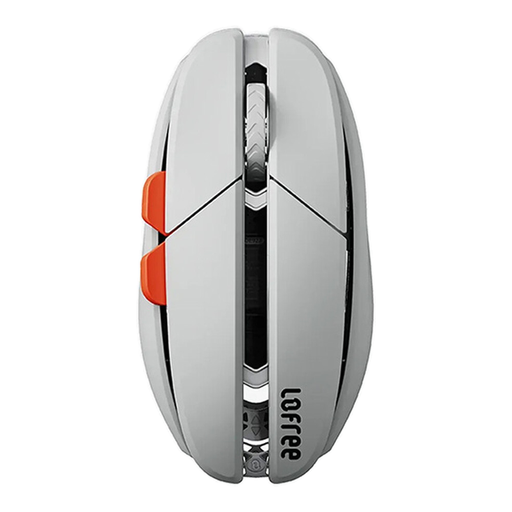 No image available
If you work in different study setups, this model offers a choice of Bluetooth, 2.4G wireless and wired connections.
The named variant has a magnesium alloy frame, PC shell and PAW3950 laser sensor. Check device compatibility, hand fit and scroll feel before choosing it.
 No image available
Consider this mouse if a Multi-Touch surface appeals to you for working through digital cards and notes.
Check that its touch controls suit the way you navigate and that it is compatible with the device you will use.
 No image available
If you prepare cards in a shared space, check whether this Silent-labelled model’s clicks meet your expectations.
Its name specifies 2.4G and Bluetooth connections, adjustable multi-level DPI and one AA battery. Check its scroll control and hand fit as well.
 No image available
For card work on a laptop, this receiver model is an option if you have a suitable USB connection.
The named variant specifies a 2.4GHz nano receiver, ambidextrous design, four buttons and a 1600 DPI optical sensor. Check device compatibility and the scrolling control you need.
No high-DPI specification is necessary simply to prepare revision cards. Focus first on hand fit, scrolling and a connection that works with your device; a sensor specification alone does not show that card-making will be easier.
Choose according to your laptop’s connections and the devices you use. Logitech’s M185 uses a USB receiver, while Microsoft specifies Windows 10 or 11 and Bluetooth 4.0 or later for the Surface Arc Mouse; check the requirements of the particular model before ordering.
A vertical mouse is not a medical fix for wrist pain. Assess its size, grip and compatibility if you want to try one; the NHS advises seeking help when repetitive strain injury symptoms are not improving or are worsening.
No particular mouse is specified as a requirement for personal revision in the Health and Safety Executive’s display-screen guidance. The duties described there concern employers and workers using display-screen equipment daily for continuous periods of an hour or more; if your revision is part of work using employer equipment, ask your employer about its workstation process.