Choose a dense thumb grid if you regularly map many camera, army-group and interface commands; for fewer shortcuts, consider a less crowded multi-button layout. In a dark room, check whether the lighting can be set to a level you find comfortable, and make sure the side buttons are reachable with your usual grip. Wireless models also call for a look at battery conditions and your preferred charging routine.
Who might need which layout?
Shortcut-heavy strategy players
If you repeatedly use map, army-group, diplomacy or interface commands, a programmable thumb-button layout may put selected shortcuts within reach. Check comfort as well as control count: a dense grid is useful only if you can identify and press its buttons reliably.
Dark-room minimalists
If bright desk lighting distracts you, look for lighting settings that suit your room and confirm how they work with your chosen profile. RGB alone does not tell you whether a mouse will be comfortable to use in low light.
Long-session, mixed-genre players
If you switch between strategy games and other tasks, hand fit and a layout you can use across those activities may matter more than a full thumb grid. Compare shape and button reach with your normal grip.
What matters when choosing?
Start with the commands you would actually move to the mouse, then consider lighting and hand fit before deciding which wireless features you need.
| Concern |
What to check |
Who this matters to |
| Shortcut access |
Count your recurring commands, then check reachable programmable controls and the stated remapping options. |
If I often switch maps, select armies and open menus, I want the commands I use most within easy reach. Around 50% of consumers put command access first. |
| Low-distraction lighting |
Check the software's brightness and off settings, and whether your preferred setting works in the profile you plan to use. |
In a dark room, I would rather keep visible mouse lighting subdued than add another bright spot beside the screen. For around 30% of consumers, lighting control is the primary concern. |
| Comfort and session convenience |
Compare shape and thumb reach; for wireless use, check the connection mode, power arrangement and conditions attached to runtime figures. |
During a long campaign, I need a mouse I can grip comfortably and manage without disrupting play. Comfort and session convenience come first for around 20% of consumers. |
Buying pitfalls
-
Choosing the highest button count without a command plan
A 12-button thumb grid gives you room for recurring commands, but a crowded layout can also make buttons harder to distinguish or reach with your usual grip.
List the shortcuts you use most often and map those first. If a full grid feels awkward, consider a layout with fewer controls.
-
Assuming RGB helps in a dark room
Visible lighting may distract you, and a published wireless runtime may apply only with RGB switched off. CORSAIR states its cited SCIMITAR ELITE WIRELESS SE runtimes with RGB off.
Check the lighting settings in the relevant software and compare battery figures under the conditions in which you expect to play.
-
Assuming a specialist thumb grid fits every hand
Command capacity does not establish whether you can reach the side buttons without changing your grip.
Compare the mouse shape and side-button position with your hand and grip preferences. If you plan to rely on a retailer's return policy, check its applicable terms before ordering.
-
Comparing wireless runtimes without their conditions
A runtime stated for Bluetooth cannot be treated as the same result for a different connection mode or lighting setting.
Check the mode and lighting condition attached to each figure, then consider whether the model's battery or charging routine suits your sessions.
Brands to consider
Razer
Relevant if you want a dense thumb grid or a choice of side-button layouts. Razer lists 21 programmable controls and a 12-button thumb grid for the Naga V2 HyperSpeed; the Naga V3 Pro has three swappable side plates.
- The cited Naga models offer different ways to arrange a large set of commands.
- Neither control count nor interchangeable plates establish which shape will fit your hand.
CORSAIR
Relevant if thumb-button placement is a priority. CORSAIR lists 16 programmable buttons and an adjustable 12-button Key Slider panel for the SCIMITAR ELITE WIRELESS SE, with RGB configuration through iCUE.
- The cited model lets you adjust the position of its thumb-button panel.
- CORSAIR states its cited wireless battery runtimes with RGB off; check the conditions before comparing them with illuminated use.
Logitech G
Relevant if you want several configurable controls without committing to a 12-button thumb grid. Logitech G specifies 13 programmable controls for the G502 X LIGHTSPEED and describes macros and game-specific profiles through G HUB.
- The cited G502 X LIGHTSPEED provides a middle-ground control count for a smaller shortcut map.
- Its listed control count is lower than those of the cited Naga V2 HyperSpeed and SCIMITAR ELITE WIRELESS SE; check whether it accommodates the commands you want on the mouse.
Joybuy product choices
These wireless gaming mice offer different starting points for historical strategy play. Compare each one against your shortcut map, grip and dark-room lighting preferences rather than assuming that a product name settles those choices.
 No image available
Rapoo VT7 MAX Wireless Gaming Mouse, White
Consider this model if you want to assign a defined set of recurring strategy-game commands rather than use a full thumb grid.
The product title specifies 10 programmable buttons and a weight of 53 g. Check thumb-button reach and whether its lighting settings suit your room.
View on Joybuy
 No image available
ASUS ROG SPATHA X Wireless Gaming Mouse
If you are considering this wireless mouse for frequent commands, check how many side buttons you can comfortably reach with your grip.
Confirm that its lighting controls offer a setting you would use in a dark room. Assess any battery-runtime figure under its stated lighting condition.
View on Joybuy
 No image available
AJAZZ AJ200 AI MC Wireless Gaming Mouse with Charging Dock
The charging dock may appeal if you want a regular place to put the mouse between sessions; check whether the button layout covers your recurring commands.
The product title lists Bluetooth, 2.4G and USB-C modes. Confirm the programmable-button count and consider whether any dock lighting suits your dark-room setup.
View on Joybuy
 No image available
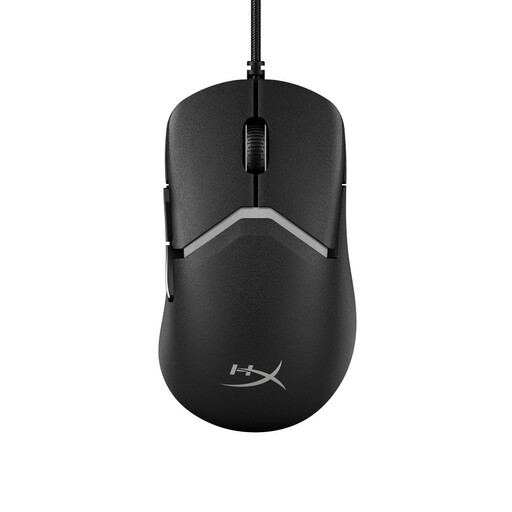
HyperX Pulsefire Saga Pro Wireless Gaming Mouse
For a smaller shortcut map, assess whether this wireless model gives you enough reachable controls before choosing it for strategy play.
Check the button count and software options you need. If lighting control matters, confirm the settings available for the product you would receive.
View on Joybuy
 No image available
AJAZZ AJ159 APEX Wireless Gaming Mouse with Magnetic Charging Base
Consider this model if its stated 56 g weight and charging-base arrangement match what you want, then check its grip and reachable controls.
The product title specifies 2.4G and wired modes; confirm the connection modes for this variant before relying on Bluetooth. Check the programmable-button count and whether any dock lighting can be kept unobtrusive.
View on Joybuy
Common questions
Do historical strategy games call for a 12-button thumb grid?
A thumb grid is worth considering if you will assign many recurring commands and can reach the buttons comfortably. If your shortcut list is shorter, start by checking a less crowded layout against the commands you actually use.
What should I check about mouse lighting in a dark room?
Check whether the software offers a brightness or off setting that suits you, and whether it works with your intended profile. Logitech G describes G502 X PLUS lighting configuration through G HUB, while CORSAIR describes RGB configuration through iCUE for the SCIMITAR ELITE WIRELESS SE; confirm the controls on the exact model you choose.
Can I compare wireless battery figures directly?
Compare them only when the connection modes and lighting conditions are clear. CORSAIR states its cited SCIMITAR ELITE WIRELESS SE runtimes with RGB off, so those figures should not be treated as a runtime for illuminated use.
What should I do with an old gaming mouse?
Check the electrical-equipment collection options available to you rather than assuming a particular retailer offers take-back. GOV.UK explains that the UK Waste Electrical and Electronic Equipment framework regulates electrical and electronic equipment to reduce waste; a retailer's collection arrangements need to be checked separately.


