For routine handout editing, start with a conventional mouse that fits your hand; consider a vertical shape if your priority is a more upright grip during long desk sessions, or an advanced scrolling mouse if you regularly navigate lengthy documents. Check handedness and computer compatibility before choosing, and consider the mouse alongside your whole workstation rather than as a standalone answer to discomfort.
Who is this mouse choice for?
Long-session home-office preparers
If you spend sustained periods editing and formatting handouts, consider hand fit as well as your desk arrangement. The Health and Safety Executive advises looking at the whole workstation when assessing display-screen work at home.
Document-navigation focused teachers
If you move repeatedly between lengthy plans, PDFs and multi-page handouts, controllable scrolling may matter more than extra controls you will rarely use. Logitech describes both precision and faster scrolling on its Signature M650.
Multi-device Windows users
If you prepare materials across several Windows PCs, check pairing and switching before choosing a mouse. Microsoft says its Bluetooth Ergonomic Mouse can pair with up to three PCs.
What matters when choosing a mouse?
Start with hand fit and a connection your computer can use, then decide whether sustained-use comfort, document navigation or straightforward operation should drive the choice.
| Concern |
What to check |
Who this matters to |
| Comfort during sustained work |
Compare hand-size and handedness guidance; check whether your workstation allows a comfortable posture. |
If I spend long sessions selecting and formatting text, I want a shape that fits my hand without overlooking my desk setup. Around 31% of consumers would put sustained-use comfort first. |
| Long-document navigation |
Look for controllable precision and faster scrolling; consider whether you would use additional buttons. |
Moving between a handout and lengthy source documents makes scroll control my main concern. Roughly 31% of consumers would prioritise document navigation. |
| Connection and device switching |
Check the operating system, Bluetooth requirements and available USB ports for the exact mouse. |
If I work across computers, I need a connection and switching arrangement that works with each one. About 23% of consumers would make compatibility their primary concern. |
| Quiet, simple operation |
Consider the stated click behaviour, battery type and whether a compact shape suits your session length. |
For everyday editing in a shared room, I would rather have unobtrusive clicks and familiar controls than features I do not need. Around 15% of consumers would put quiet, uncomplicated use first. |
Buying mistakes to avoid
-
Treating a new mouse as the whole workstation fix
A different mouse shape does not address an awkward desk, chair or display arrangement. The Health and Safety Executive advises considering equipment, furniture, work conditions and the job when assessing a display-screen workstation.
Check mouse placement and the rest of your workstation, including opportunities to change activity, before relying on a mouse change alone.
-
Choosing a shape without checking fit
Size guidance differs even within a product line: Logitech specifies different Signature M650 versions for small-to-medium hands, large hands and left-handed use. Its Lift targets small-to-medium hands, while Kensington specifies average-to-larger hands for the Pro Fit Ergo Vertical.
Use the exact model’s size guidance and choose the appropriate handed version where one is offered.
-
Assuming every wireless mouse works with every computer
Connection requirements vary by model. Microsoft specifies Bluetooth 4.0 or later for its cited Bluetooth mice, while Kensington says its Pro Fit Ergo Vertical does not support Windows ARM-based computers.
Check the mouse’s operating-system and connection requirements against your computer, including whether a receiver needs an available USB port.
Relevant mouse brands
Logitech
Relevant when comparing conventional, vertical and document-navigation mice with different fit and control options.
- Logitech specifies small-to-medium, large and left-handed versions of the Signature M650; its SmartWheel offers precision and faster scrolling.
- Fit depends on the version: Logitech positions Lift for small-to-medium hands, so a vertical shape alone does not establish suitability.
Microsoft
Relevant for Windows-centred Bluetooth setups, particularly when switching between PCs matters.
- Microsoft says its Bluetooth Ergonomic Mouse pairs with up to three PCs and has two customisable thumb buttons.
- Check the exact model’s Windows and Bluetooth requirements; the Bluetooth Ergonomic Mouse uses two AAA batteries.
Kensington
Relevant when considering a vertical mouse sized for average-to-larger hands.
- Kensington specifies a 46.7-degree slope and average-to-larger-hand fit for its Pro Fit Ergo Vertical Wireless Mouse.
- Kensington says this model does not support Windows ARM-based computers; its posture descriptions do not establish individual comfort.
Joybuy mice for handout preparation
These mice cover document scrolling, upright-grip preferences, quieter everyday use and a wired desk setup. Compare the exact model’s fit and connection with the work you do most often.
 No image available
Logitech MX Master 3S Ergonomic Black mouse
Consider this model if scrolling through long plans and handouts is a priority. Logitech specifies MagSpeed scrolling, quiet clicks and 8,000-DPI tracking for the MX Master 3S; check that its shape fits your hand and that any customisation you need works with your operating system.
View on Joybuy
 No image available
HP 920 Ergonomic Wireless Mouse, Black, with Detachable Wrist Rest
Consider this mouse if you want to assess an upright-grip option for desk work. It has a detachable wrist rest; check its shape, dimensions and handedness fit rather than assuming an ergonomic label guarantees comfort.
View on Joybuy
 No image available
V7 MW500BT Bluetooth Vertical Ergonomic Mouse, 2.4GHz Dual-Mode
This is another upright-shape option for handout work, with six buttons and an adjustable sensor specified up to 1600 DPI. Check hand and handedness fit, then confirm that your computer can use the chosen Bluetooth or 2.4GHz connection.
View on Joybuy
 No image available
HOFOTEK M311 2.4G+BT Silent Office Mouse, White-Grey
Consider this model if quieter clicks and routine editing matter more to you than specialised document controls. Its name specifies adjustable DPI and one AA battery; check its dimensions and whether your computer supports the connection you intend to use.
View on Joybuy
 No image available
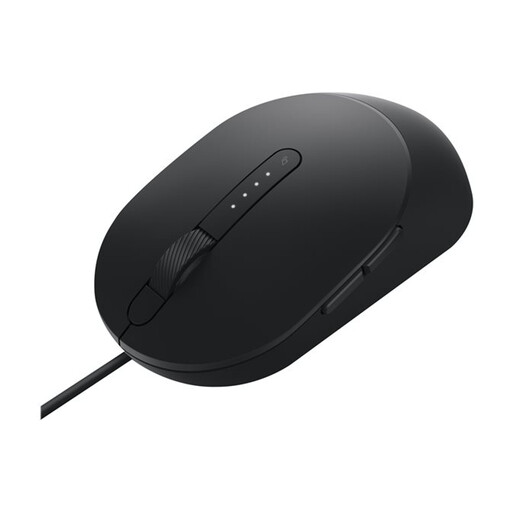
Dell MS3220 Laser Mouse
Consider this wired mouse for a fixed desk where navigation controls are useful. Check that your computer has a compatible available USB connection and that the mouse’s dimensions suit your hand for longer editing sessions.
View on Joybuy
Questions about choosing a mouse
Should I choose a vertical mouse for preparing handouts at home?
Consider a vertical mouse if a more upright grip is your main preference and the exact model fits your hand. Logitech positions Lift for small-to-medium hands, while Kensington specifies average-to-larger hands for its Pro Fit Ergo Vertical; the Health and Safety Executive advises considering the whole workstation, not just the mouse.
How do I choose the right mouse size and handed version?
Follow the exact model’s hand-size guidance and select a handed version where needed. Logitech specifies Signature M650 for small-to-medium hands, M650 L for large hands and M650 L Left for left-handed users; its Lift also has a left-handed option aimed at small-to-medium hands.
Will a Bluetooth mouse work with my computer?
Check the requirements for the particular mouse and computer before buying. Microsoft specifies a Windows PC with Bluetooth 4.0 or later for its cited Bluetooth mice; if you plan to use a USB receiver instead, check that you have a compatible available port.
What should I check about mouse batteries?
Check whether the model uses replaceable batteries or is rechargeable, so its ongoing use suits you. Microsoft specifies two AAA batteries for its Bluetooth Ergonomic Mouse and one AA battery for its standard Bluetooth Mouse.


