Choose a vertical mouse if an upright hand position is your priority, provided the model suits your hand size and dominant hand. If editing means repeatedly scrolling through long drafts and using shortcuts, a familiar-shaped productivity mouse may suit your workflow better; a trackball is another option when moving the mouse across the desk is the difficulty. Whichever you choose, the Health and Safety Executive advises keeping the mouse in line with your elbow and the keyboard and screen centrally positioned.
Who is this for?
Standing-desk editors focused on hand position
If you spend long periods editing newsletters, the grip must suit your hand without encouraging an awkward reach. Logitech and Contour Design describe different upright shapes, while the Health and Safety Executive advises placing the mouse in line with your elbow.
Editors navigating long drafts
Frequent movement between drafts, web pages and layout screens makes scrolling and accessible controls worth examining. Logitech specifies fast scrolling and customisation features for its MX Master range; check whether those controls fit the actions you repeat.
Consumers with particular fit or handedness needs
A vertical shape alone does not establish fit. Logitech identifies a left-handed Lift option, and Evoluent distinguishes VerticalMouse D models by hand size, so select the particular version rather than relying on the range name.
What matters when choosing?
Vertical mouse
Consider it when: You want a more upright grip and can choose a version suited to your hand and dominant hand.
Trade-off: The movement may take getting used to, and fixed shapes will not fit everyone; Contour Design's UniMouse offers adjustable tilt as an alternative.
Conventional productivity mouse
Consider it when: Long-page scrolling and repeated editing controls matter more to you than an upright grip.
Trade-off: A sculpted conventional shape is still different from a vertical one; check hand fit and software compatibility before relying on custom buttons.
Trackball or central pointing device
Consider it when: Moving a mouse across the desk is the part of editing you want to change.
Trade-off: Ball control or a central device changes how you point and select text. Check its control layout and the space it needs before switching.
| Concern |
What to check |
Who this matters to |
| Hand position during long sessions |
Check grip angle, hand-size guidance and whether the mouse can sit close to your elbow. |
If I edit for long stretches, I want a grip that suits my hand without making me reach across the desk. Around 42% of consumers put hand position and comfort first. |
| Scrolling and editing controls |
Try the scroll-wheel style and button placement; confirm that customisation software works on your computer. |
Moving through long drafts and repeating navigation actions makes easily reached controls my priority. For around 33% of consumers, that workflow need comes first. |
| Fit and connection |
Select the intended hand and size variant, then confirm the required USB, receiver or Bluetooth connection. |
If a mouse is the wrong size, made for my other hand or cannot connect to my computer, its other features will not settle the choice. Fit and compatibility are the primary need for around 25% of consumers. |
Buying pitfalls
-
Expecting a vertical mouse to fix the whole workstation
Changing grip does not address an awkward reach, shoulder position or poorly placed keyboard and screen. The Health and Safety Executive advises keeping the mouse in line with your elbow and the keyboard and screen central.
Set the desk and input-device positions together, then check your reach again when you change between sitting and standing.
-
Choosing an ergonomic shape without checking fit
Logitech describes Lift as suited to small-to-medium hands and offers a separate left-handed version. Evoluent lists different VerticalMouse D sizes, so a range name does not identify the version that fits you.
Use the maker's size guidance, select the intended hand version and read the retailer's applicable return terms before opening the packaging.
-
Choosing extra buttons before deciding how to use them
Shortcut controls help with repeated editing actions only if you can reach them comfortably and use the required software on your computer.
Identify the actions you repeat most, then check button placement and operating-system support for the exact mouse.
Brands to consider
Logitech
Its Lift vertical mouse and MX Master productivity models address different priorities: upright grip on one hand, scrolling and controls on the other.
- Logitech specifies a 57° shape for Lift, describes it as suited to small-to-medium hands and offers a left-handed version.
- Check the selected model's hand fit and available hand version; MX Master's conventional shape is not a substitute for Lift's upright grip.
Contour Design
UniMouse is relevant if you want to adjust an upright mouse rather than commit to one fixed angle.
- Contour Design specifies 35°–70° tilt and adjustable thumb support for UniMouse.
- Choose the appropriate hand and wired or wireless variant, and check connection and software needs for your setup.
Evoluent
Its VerticalMouse range is worth examining when the size of an upright mouse is a decisive fit question.
- Evoluent distinguishes small, medium and large VerticalMouse D versions in its model guidance.
- Connection and compatibility vary by model; check the exact version rather than assuming one specification applies across the range.
Joybuy product choices
These mice cover upright and conventional shapes for newsletter editing, including options for scrolling, quieter clicks and a fixed wired setup. Compare each model's fit and connection with your desk arrangement; the selection does not include a trackball.
 No image available
Logitech MX Master 3S Ergonomic Black Mouse
Consider this conventional-shaped mouse if scrolling through drafts and using editing controls matter more to you than an upright grip. Check that its shape suits your hand and that the customisation software supports your computer before relying on programmable controls.
View on Joybuy
 No image available
HP 920 Ergonomic Wireless Mouse, Black, with Detachable Wrist Rest
Consider its upright form if hand position is your priority during extended editing. The title specifies a wireless mouse and detachable wrist rest; check the fit, intended hand and software compatibility if you plan to customise its controls.
View on Joybuy
 No image available
V7 MW500BT Bluetooth Vertical Ergonomic Mouse
This is an upright option for editors who also want mouse buttons for navigation. Its title specifies six buttons, Bluetooth and 2.4 GHz wireless operation, and an adjustable sensor rated at 1600 DPI. Confirm hand fit, intended hand and compatibility with your computer before buying.
View on Joybuy
 No image available
Rexsun V2 Wired USB Mouse, Black
Consider this for a fixed USB desk setup if quieter clicks matter more than specialised scrolling. Its title specifies four buttons and adjustable 1000, 1200 and 1600 DPI settings. Check the button functions if you need particular editing shortcuts, as well as the mouse's fit in your hand.
View on Joybuy
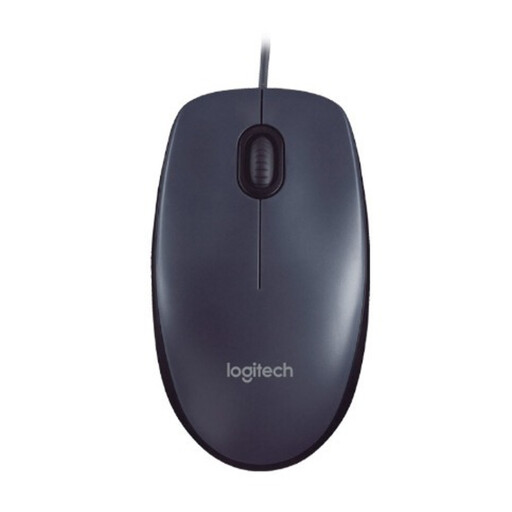 No image available
Logitech M91P Wired Mouse
Consider this if you want a straightforward wired mouse for editing at one desk. Its symmetrical shape may suit left- or right-handed use; confirm operating-system compatibility with your computer and check the exact model's tracking specification if that affects your choice.
View on Joybuy
Frequently asked questions
Is a vertical mouse automatically right for a standing desk?
No. An upright grip may suit your preference, but hand fit and desk arrangement still matter. The Health and Safety Executive advises keeping the mouse in line with the elbow and the keyboard and screen central.
How should I choose between Logitech Lift and a larger vertical mouse?
Start with the makers' guidance for the exact model and hand version. Logitech describes Lift as suited to small-to-medium hands and offers a left-handed option; Evoluent lists small, medium and large VerticalMouse D variants.
Can a conventional productivity mouse work for long newsletter drafts?
Yes, if its shape suits you and scrolling or editing controls are your priority. Logitech specifies MagSpeed scrolling and customisable controls for the MX Master 3S; confirm that any software features you want work on your computer.
Should I change only the mouse if my wrist or shoulder remains uncomfortable?
No. Reassess your reach, desk height, keyboard and screen positions, and work pattern rather than treating a different grip as a complete solution. The Health and Safety Executive's display-screen guidance addresses posture and workstation arrangement alongside mouse placement.


