What to check before choosing
For portfolio-homepage work, decide which need takes priority: repeatable shortcuts, fit at a fixed desk, Apple gestures or flexibility in a small workspace. Then check the exact mouse and computer combination rather than choosing by shape or sensor number alone.
| Concern |
What to check |
Who this matters to |
| Shortcuts and navigation |
Check which controls can be assigned actions, whether the software works on your computer and how you configure it. |
If I keep switching between a design tool, assets and a browser preview, I want quick access to actions I repeat. Around 30% of consumers put shortcut-led navigation first. |
| Hand fit and desk position |
Check the maker’s hand-size and handedness guidance, then whether the mouse can sit close to the keyboard and in line with your elbow. |
During long sessions at one desk, I would put a comfortable fit and an easy reach ahead of extra buttons. For around 30% of consumers, that is the primary concern. |
| Mac and iPad gestures |
Check the exact device and operating-system requirements, and decide whether touch gestures suit you better than physical shortcuts. |
When I build my portfolio on a compatible Mac or iPad, I may prefer swiping and scrolling on the mouse itself. Gesture-led navigation comes first for around 20% of consumers. |
| Space and flexibility |
Check the mouse’s dimensions, the room beside your keyboard and the connection methods your computer accepts. |
If my work area is cramped or I move between desk setups, I need a mouse that fits both the space and my hand. Around 20% of consumers prioritise that flexibility. |
Joybuy mouse choices
These mice cover different approaches to home-office portfolio work, from a sculpted desk mouse and vertical shapes to wireless models you might consider for configurable controls. Compare the exact fit, connections and software conditions that matter to your setup.
 Image unavailable
Logitech MX Master 3S Mouse, Black
Consider this sculpted mouse if repeated navigation is central to your desk-based design work. Check its control configuration and whether the shape fits your hand before relying on it for long sessions.
View on Joybuy
 Image unavailable
HP 920 Ergonomic Wireless Mouse, Black, with Detachable Wrist Rest
Consider the HP 920 if you want to assess a vertical shape for work at a fixed desk. It comes with a detachable wrist rest; check how the mouse and rest fit your hand and available desk space.
View on Joybuy
 Image unavailable
V7 MW500BT Bluetooth Vertical Mouse, 2.4 GHz, 6 Buttons
This is another vertical-shape option for a desk where browser navigation is part of the design workflow. The title specifies Bluetooth and 2.4 GHz modes, six buttons and an adjustable sensor up to 1600 DPI. Check hand fit before choosing it for long sessions.
View on Joybuy
 Image unavailable
AJAZZ AJ200 AI MC Wireless Mouse with Charging Dock
Consider this model if you want to compare connection methods while planning shortcuts for design or browser tasks. Its title lists Bluetooth, 2.4 GHz and USB-C modes and a PAW3311 sensor. Confirm driver compatibility before depending on remapped buttons, and check the exact variant’s weight if that affects your choice.
View on Joybuy
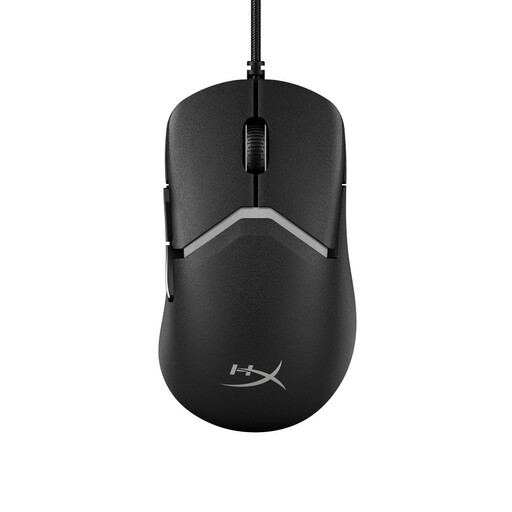 Image unavailable
HyperX Pulsefire Saga Pro Wireless Mouse
This wireless model is worth comparing if you want to assign repeatable actions during homepage work. Before making customisation the deciding factor, check the exact button layout and whether the required software works on your computer.
View on Joybuy
Common questions
Do I need a vertical mouse for long portfolio-design sessions?
No: a vertical mouse is one shape to consider if it fits your hand and desk setup, not a requirement for long sessions or a treatment for discomfort. The Health and Safety Executive advises keeping the mouse in line with the elbow, so assess its position as well as its shape.
Which mouse shortcuts are useful when designing a homepage?
Start with actions you repeat, such as browser back and forward, zoom or switching applications, rather than assigning every button at once. Check that the exact mouse’s software works on your computer; Keychron says its mouse software needs USB or 2.4 GHz for configuration rather than Bluetooth.
Will a higher DPI setting make design work more precise?
Not automatically: dots per inch, or DPI, changes cursor sensitivity, while a controllable setting depends on your screen and task. Logitech lists a 200–8,000 DPI adjustment range for MX Master 3S for Business; the maximum is not a target you need to use.
Will Apple Magic Mouse work with any Mac or iPad?
No: compatibility depends on the device and its software version. Apple lists macOS 15.1 or later or iPadOS 18.1 or later for its USB-C Magic Mouse, alongside specific compatible models; check your exact device before buying.


