What matters when choosing?
Start with the task that most affects your dashboard work, then check the controls, fit and software conditions that support it.
| Concern |
What to check |
Who this matters to |
| Navigation and editing controls |
Check tracking adjustment, scrolling and button placement. Confirm that any intended button assignments work with your operating system and dashboard application. |
When I move visuals and navigate long reports repeatedly, I want controls I can reach without disrupting my keyboard workflow. Around 42% of consumers put dashboard navigation and editing controls first. |
| Grip and hand fit |
Compare the stated hand-size guidance, handedness and button reach; assess the wider workstation if discomfort affects regular work. |
During extended desktop sessions, I need a shape that fits my hand rather than an ergonomic label alone. For around 33% of consumers, comfort and hand fit are the primary concern. |
| Stationary pointing |
Check the available desk space and whether thumb-controlled movement suits your usual dragging and resizing tasks. |
With little room to move a conventional mouse, I would rather keep the device in one spot, provided I can adapt to its cursor control. Roughly 25% of consumers prioritise stationary pointing. |
Joybuy product choices
These mice cover conventional pointing and alternative grips for dashboard work. Compare each model's stated controls with your report-editing tasks, and check fit before choosing a shape for long sessions.
 No image available
Logitech MX Master 3S Black
Consider this conventional mouse if report navigation and repeated commands matter more to you than changing grip style.
For the MX Master 3S for Business, Logitech specifies 200–8000 DPI adjustment, seven buttons and a thumb wheel. Check hand fit, which connectivity hardware is included, and whether your intended button assignments work with your system and dashboard software.
View on Joybuy
 No image available
HP 920 Ergonomic Wireless Mouse, Black, with Detachable Wrist Rest
Consider the HP 920 if grip and wrist-rest placement are priorities during desktop work.
It is a wireless mouse supplied with a detachable wrist rest. Check its shape, hand-size fit, handedness and button reach before relying on it for long dashboard sessions.
View on Joybuy
 No image available
V7 MW500BT Bluetooth Vertical Mouse
Consider this vertical mouse if you want a different grip while retaining adjustable pointer sensitivity.
The title specifies Bluetooth and 2.4GHz connectivity, six buttons and an adjustable sensor up to 1600 DPI. Check hand fit and handedness, and confirm button-assignment support if shortcuts are important to you.
View on Joybuy
 No image available
Rexsun V2 Wired Mouse, Black
This is a straightforward wired option if adjustable pointer speed is more important to you than configurable dashboard shortcuts.
Its listed features include four buttons, USB connectivity and 1000, 1200 and 1600 DPI settings. Check hand fit and any shortcut requirements before choosing it for repeated editing work.
View on Joybuy
 No image available
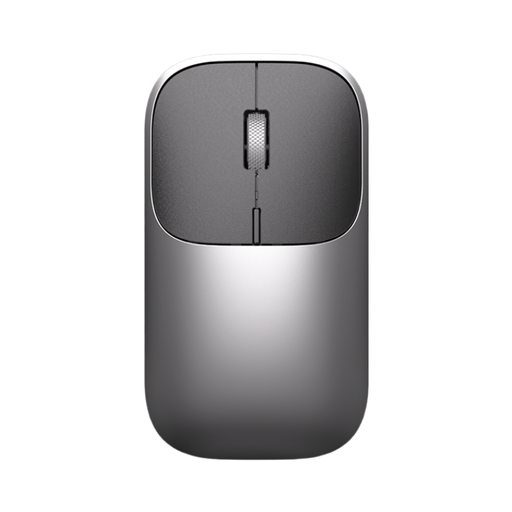
Ochama JZ001 Dual-Mode Wireless Mouse, Metallic Grey/Silver White
Consider this mouse if wireless connection options and adjustable pointer sensitivity meet your basic dashboard-pointing needs.
Its title specifies Bluetooth 5.0, 2.4GHz connectivity and adjustable DPI. Check the button layout, scrolling and hand fit if you regularly work through long reports.
View on Joybuy
Frequently asked questions
Which mouse controls help when arranging dashboard visuals?
Controllable pointer speed, reachable buttons and scrolling suited to your reports are useful starting points. Microsoft Learn describes moving and formatting visuals in Power BI Desktop; check whether extra mouse controls can handle actions you repeat, while keeping keyboard shortcuts available.
How can I tell whether a vertical mouse will fit?
Start with the model's hand-size and handedness guidance, then check button reach. Logitech describes Lift as suited to small to medium hands and offers a left-handed version; that guidance should not be assumed to apply to other vertical mice.
Is a trackball practical on a small desk?
A stationary trackball can be practical when there is little room to move a mouse. Logitech describes thumb-controlled cursor movement on the ERGO M575S, but try your usual dragging and visual-resizing tasks before deciding whether that method suits you.
Do I need customisation software for dashboard shortcuts?
You need compatible software for mouse-button assignments that depend on an optional app. Logitech lists Logi Options+ for customising MX Master 3S for Business controls; check your operating system and intended dashboard actions before relying on those assignments.
Do UK display-screen rules require a vertical mouse?
The Health and Safety Executive's UK guidance addresses assessment of the whole workstation, not a prescribed vertical mouse. Its display-screen-equipment guidance applies to employers whose workers use display screens daily as a significant part of normal work for continuous periods of an hour or more; mouse choice should be considered alongside the task and individual needs.


