
24/7 Customer Support

Free returns

Same-day & Next-day Delivery

Quality Guaranteed

Unlock Your Welcome Offers: FREE Delivery | Up to 80% OFF | Free 30-day JoyPlus trial
Download the APP
Juggling a work laptop, a personal desktop and a tablet can quickly lead to a cluttered desk and a tangled workflow. Switching between different mice for each device is inefficient, and constantly plugging and unplugging cables is a hassle of the past. A single, high-quality multi-device wireless mouse can solve these problems, offering a streamlined and productive experience.
As a Joybuy Product Recommendation Officer, my role is to help you navigate the options and find a device that genuinely improves your daily routine. This guide will walk you through the key features to consider and present a few carefully selected models that cater to different needs, from intensive multitasking to ergonomic comfort.
Finding the right mouse goes beyond just looks. For a device you'll use for hours every day, focusing on connectivity, comfort and customisation is crucial.
The defining feature of a wireless mouse for multiple computers is its ability to connect to and switch between them seamlessly. You'll typically find two main connection types:
Many advanced mice offer both, allowing you to use the dongle for your primary desktop and Bluetooth for your laptop and tablet, switching between them with the press of a button.
An uncomfortable mouse can lead to wrist strain and fatigue. An ergonomic mouse is designed to fit the natural contour of your hand, promoting a more relaxed posture. Consider vertical mice, which hold your hand in a "handshake" position to reduce pressure on the wrist. Pay attention to the size and shape, ensuring it fits your hand comfortably for prolonged use.
For true productivity gains, look for customisable features. An adjustable DPI mouse allows you to change the cursor's sensitivity on the fly. A lower DPI (e.g., 800-1200) is great for precision tasks like photo editing, while a higher DPI (1600+) lets you move the cursor across large or multiple monitors quickly.
Furthermore, a programmable mouse with side scroll can be a game-changer. Programmable buttons can be assigned to frequent shortcuts (like copy, paste or undo), while a horizontal side scroll wheel makes navigating wide spreadsheets or timelines effortless.
Here are three distinct options that excel in different areas, from all-in-one power to specialised comfort.
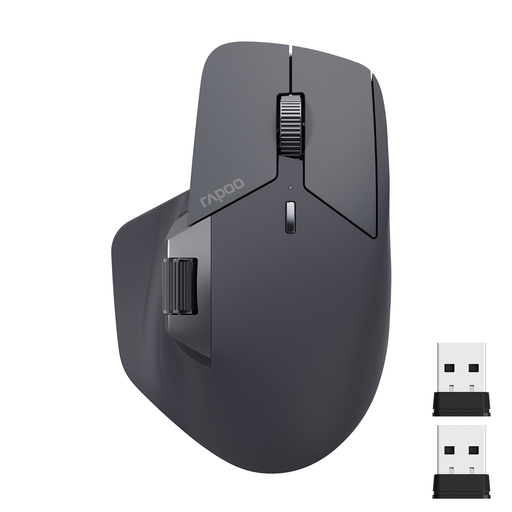
Why It Stands Out: This mouse is a powerhouse of connectivity and customisation. It supports both Bluetooth 5.0 and 2.4GHz connections and features M+ Cross-Computer Technology, which allows you to move your cursor across the screens of multiple computers seamlessly.
Pros:
Who is it for? This is an excellent choice for power users, developers and content creators who work across multiple machines and demand extensive control and workflow shortcuts.
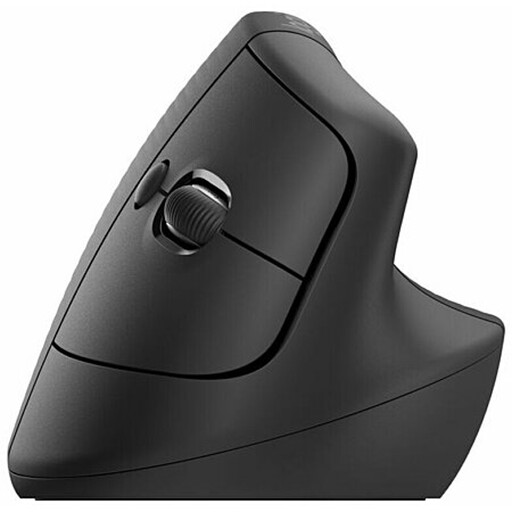
Why It Stands Out: The Logitech Lift prioritises all-day comfort. Its 57-degree vertical angle places your hand in a natural handshake position, which can help reduce wrist strain during long workdays. It’s specifically designed for small to medium-sized hands.
Pros:
Who is it for? Professionals, writers and office workers who spend hours at their computer and are looking for a rechargeable ergonomic mouse to improve comfort and reduce physical strain.
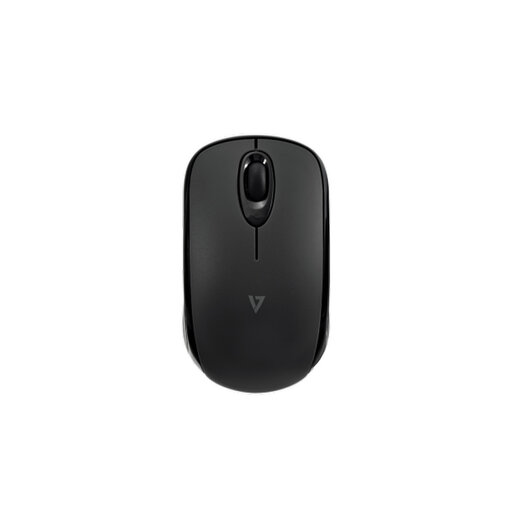
Why It Stands Out: This mouse is built for portability and efficiency. By using Bluetooth 5.2, it connects directly to your devices without a dongle, saving a precious USB port. Its compact, ambidextrous design and exceptional battery life make it an ideal travel companion.
Pros:
Who is it for? Hybrid workers, students and frequent travellers who need a simple, reliable and long-lasting mouse that works seamlessly across different operating systems without taking up a USB port.
While these three models cover a wide range of needs, the world of wireless mice is vast. If you're looking for a different set of features, a specific colour or a different price point, there are many other choices available.
Explore our full collection of Wireless Bluetooth Mouse products to find the perfect fit for your setup.
1. Can you use one wireless mouse for two or more computers? Yes. A multi-device wireless mouse is designed for this exact purpose. These mice typically have a button that lets you switch between paired devices (e.g., one connected via a 2.4GHz dongle and others via Bluetooth). Some advanced models even offer software that lets you move your cursor from one computer screen to another automatically.
2. Is Bluetooth or 2.4GHz better for a wireless mouse? It depends on your priorities. A 2.4GHz connection via a USB dongle generally offers a slightly faster, more stable connection, which is often preferred for gaming. Bluetooth is more versatile as it doesn't require a USB port, making it ideal for thin laptops, tablets and connecting to multiple devices. For general productivity, both are excellent and many top-tier mice offer both options.
3. What is a good DPI for a productivity mouse? For most office and productivity tasks, a DPI range of 800 to 1600 is perfectly adequate. This provides a good balance of speed and precision for navigating documents and web pages. An adjustable DPI mouse is beneficial because you can increase it to quickly move across large 4K monitors or decrease it for detailed work like graphic design or editing spreadsheets.