Console party hosts
If you are adding controllers for people playing on one PlayStation, Xbox or Nintendo console, check the exact console and game before choosing extra pads. The game’s local-player limit matters as much as controller pairing.


Start with a controller that works with your console or PC and is accepted by the games you plan to play; a controller designed for the console is a straightforward starting point, while a PC-focused option needs a closer compatibility check. For a long group session, confirm the game’s local-player limit, arrange power for every controller and consider whether each player can use the controls comfortably.
If you are adding controllers for people playing on one PlayStation, Xbox or Nintendo console, check the exact console and game before choosing extra pads. The game’s local-player limit matters as much as controller pairing.
If play will run for several hours, think about how each controller will be powered and whether players can swap or recharge controllers between rounds. Grip and layout are worth considering for the people who will use them.
For a living-room PC, check the operating system, connection method and individual game. Compatibility with another device does not by itself establish support for your PC setup or the planned number of players.
Choose for the device and game first, then work out how many controllers the group can use and keep powered. Comfort and configurable controls matter most when they address a particular player’s needs.
| Concern | What to check | Who this matters to |
|---|---|---|
| Device and game compatibility | Confirm the exact console or PC system, connection method and game-supported controller types. | I want extra pads that work with both my device and the game we are playing, rather than relying on the platform name alone. Around 34% of consumers put compatibility first. |
| Group capacity | Check the game’s local-player limit separately from the device’s controller-pairing capacity. | If everyone is playing together, I need enough controllers that can be connected and used in the same game. For around 25% of consumers, group capacity is the primary concern. |
| Power for a long session | Check the controller’s power method and charging arrangements for every player. | I do not want a controller running out of power to interrupt the group, so I need a workable plan between rounds. Keeping controllers powered comes first for around 25% of consumers. |
| Comfort and control fit | Consider grip and layout, plus remapping where the controller and game support it. | When we play for hours, I care about whether the controls suit the people holding them. Around 16% of consumers prioritise comfort or customisation. |
A console may accept more controllers than a particular game or mode accepts local players. Nintendo UK, for example, says up to eight wireless controllers can be paired to a Nintendo Switch, with the maximum depending on controller types and features.
Check the game’s local-player count and supported controller types before ordering pads for the whole group.
Published figures have different conditions. Nintendo says Switch Pro Controller runtime can vary with software and functions; Microsoft Xbox says Xbox controller battery life varies with usage, headsets and accessories.
Charge controllers before play and plan another power option where needed, rather than assuming a quoted figure will cover the session.
PlayStation says its DualSense Charging Station charges up to two DualSense or DualSense Edge controllers at once; the controllers are separate.
Match the dock to the exact controller family and count how many controllers need to be ready together.
A separate dock also adds another accessory to arrange for the group.
8BitDo describes its Ultimate 2 Wireless Controller latency figure as laboratory data from an ideal environment. That does not establish how it compares with other controllers in your game and setup.
Use the exact model’s device and connection requirements to decide whether it fits your setup; do not choose on an unmatched performance figure alone.
DualSense is the PlayStation controller route for adding a player to a PS5 local game.
The Xbox Wireless Controller covers the standard Xbox and Windows route; Elite Wireless Controller Series 2 offers additional control adjustments.
The Nintendo Switch Pro Controller is an official full-size option for Nintendo Switch play; check Switch 2 controllers as distinct models.
The Ultimate 2 Wireless Controller is a third-party option to assess for a compatible PC or Android setup.
These controllers cover Xbox or Windows, Nintendo Switch 2 and PS5 choices for local play. Pick for the device and game your group will actually use; the different platform options are not interchangeable.
 No image available
Consider this model if a regular player wants adjustable controls for an Xbox or Windows session. Microsoft describes adjustable-tension sticks, trigger locks and stored profiles for Elite Series 2. Confirm compatibility with your exact device and game before buying, particularly where platform descriptions differ.
 No image available
This is an Xbox and Windows option for a group considering a wireless controller. Check support for the exact Xbox or Windows device and local game, and arrange charging around the length of play. If using interchangeable small components, keep them away from young children.
 No image available
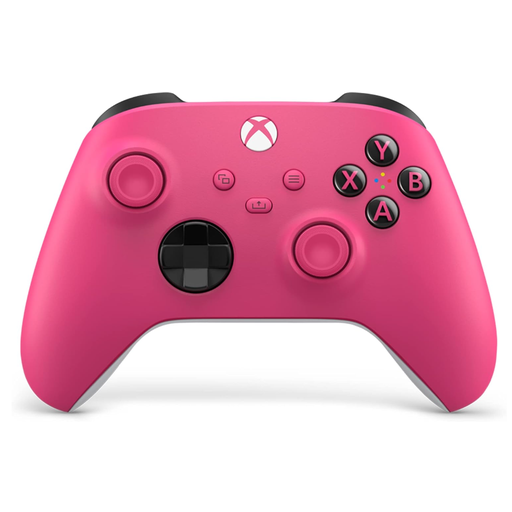
This standard Xbox controller is an option when your group plays on a compatible Xbox or Windows PC. Microsoft lists Bluetooth, textured contact points and button mapping for the Xbox Wireless Controller. Check the game’s player limit and plan power for each extra pad; runtime varies with use and accessories.
 No image available
Choose this route if the group will play on Nintendo Switch 2 and the selected game supports this controller. It is the Switch 2 Pro Controller, not the earlier Switch Pro Controller; do not use the earlier model’s battery estimate to plan this session. Check charging needs before a long round of play.
 No image available
This DualSense variant is an option for adding a controller to a PS5 local game. PlayStation’s haptic feedback and adaptive-trigger features depend on game support. Confirm the game’s player count and charge each controller before the session.
Not necessarily: the game must support the intended number of local players and their controller types. Pairing capacity is separate; Nintendo UK says up to eight wireless controllers can be paired to a Nintendo Switch, although controller types and features can affect the maximum.
Charge wireless controllers beforehand and plan how to power or rotate spares. Nintendo UK gives approximately six hours for a full Switch Pro Controller charge, while PlayStation says its separate DualSense Charging Station charges up to two compatible controllers at once. Check the arrangements for the specific models your group will use.
Nintendo UK advises against replacing the Switch Pro Controller battery yourself and directs users to Nintendo Customer Support. Its guidance concerns the Switch Pro Controller and should not be assumed to describe every other controller model.
They matter if a player will use the particular adjustments. Microsoft lists adjustable-tension sticks, trigger locks and stored profiles for Xbox Elite Wireless Controller Series 2, but those features do not increase a game’s local-player limit or establish compatibility with a different console family.