
24/7 Customer Support

Free returns

Same-day & Next-day Delivery

Quality Guaranteed

Unlock Your Welcome Offers: FREE Delivery | Up to 80% OFF | Free 30-day JoyPlus trial
Download the APP
Your smartphone is likely a treasure trove of memories, holding thousands of photos from holidays, family gatherings and everyday moments. Yet, most of these digital images remain unseen, buried in your camera roll. A dedicated photo printer offers a simple and rewarding way to bring these memories to life, creating tangible keepsakes you can hold, share and display.
Navigating the market can be confusing, with a wide array of technologies, sizes and features. This guide is designed to help you understand the key considerations and find a model that suits your needs, whether you're scrapbooking on the go or creating high-quality prints for your wall.
Before looking at specific models, it’s helpful to consider what you value most in a printer. Focusing on these three areas will help you narrow down your options.
The technology inside the printer determines the print quality, cost per photo and the device's size.
Consider where you'll do most of your printing.
Most modern photo printers are designed to work seamlessly with your mobile devices. Look for a photo printer for phone use that offers simple wireless photo printer connectivity via Wi-Fi or Bluetooth and a user-friendly companion app. These apps often include basic editing tools, allowing you to crop, add filters or create collages before you print.
Here are a few standout options that cater to different printing needs and priorities.

Why It Stands Out: The Xiaomi 1S is built for spontaneity. Its pocket-sized design and ZINK technology make it an excellent companion for turning digital snaps into physical stickers instantly. The absence of ink cartridges means there are no messy refills or smudges to worry about.
Pros:
Who is it for? This is for social users, scrapbookers and families who want a fun and easy way to print small, sticker-backed photos directly from their phones at parties, on holiday or for creative projects.
View Details for Xiaomi Portable Photo Printer 1S
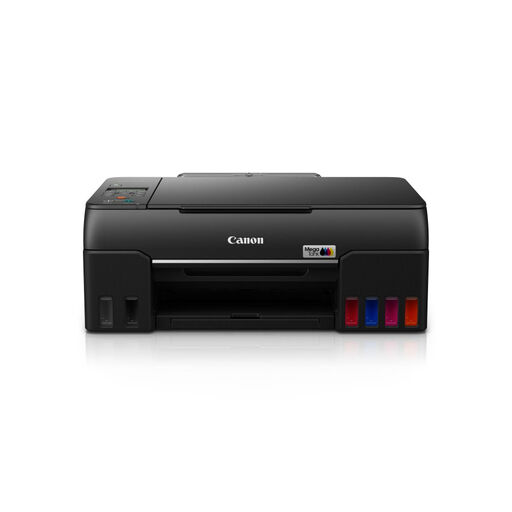
Why It Stands Out: The PIXMA G650 is a multi-function printer geared towards high-quality photo output. Its six-colour MegaTank system, which includes dedicated red and grey inks, produces prints with an expanded colour gamut and excellent tonal range. The refillable tanks make it a cost-effective choice for high-volume printing.
Pros:
Who is it for? Photography hobbyists and creative professionals who need to produce high-quality, large-format prints at home without the high running costs of traditional cartridge-based printers.
View Details for Canon PIXMA G650
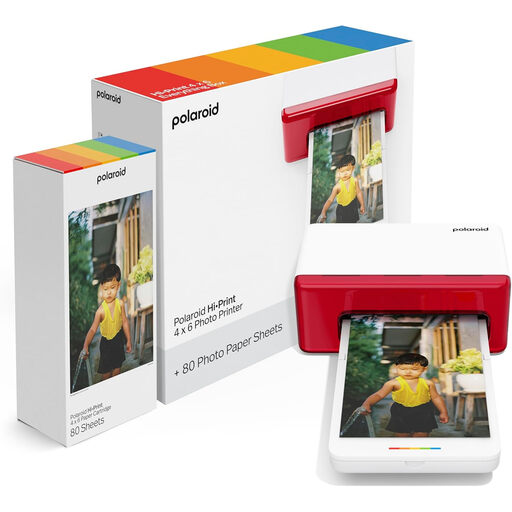
Why It Stands Out: This printer uses dye-sublimation technology to create classic 4x6 inch postcard-sized prints that are vibrant and durable. It bridges the gap between small instant printers and large desktop models, offering a convenient way to produce standard-sized photos from your phone. This bundle includes 80 sheets of paper, so you can start printing right away.
Pros:
Who is it for? Anyone looking to create classic, high-quality 4x6 inch prints for photo albums, frames or sharing with family and friends, with the ease of printing directly from a smartphone.
View Details for Polaroid Hi-Print 4x6 Printer Bundle
The models above represent just a few of the choices available. If you're looking for different features or sizes, you can explore our full range of phone printing devices to find the perfect match for your creative needs.
1. Is it cheaper to print photos at home or at a shop? For small volumes, using a high-street or online printing service can be more economical. However, if you print photos regularly, investing in a printer with a low cost-per-print, such as an ink tank model like the Canon PIXMA G650, can be significantly cheaper in the long run. The convenience of printing instantly at home is also a major factor for many.
2. What is the main difference between a ZINK printer and an inkjet printer? The primary difference is the technology. A ZINK printer uses no ink; it heats special paper to create an image, making the device very portable but limited to small print sizes. An inkjet printer uses liquid ink to produce high-resolution images on various paper types and sizes, offering more versatility but requiring a larger device and ink replacements.
3. How long do photos from a home printer last? The longevity of a printed photo depends on the technology, ink and paper used. Prints from dye-sublimation and quality inkjet printers using archival-grade inks and paper can last for many decades without significant fading, especially when stored in an album or behind UV-protective glass. ZINK prints are durable and water-resistant but are generally intended for more casual, short-to-medium-term use.