
24/7 Customer Support

Free returns

Same-day & Next-day Delivery

Quality Guaranteed

Unlock Your Welcome Offers: FREE Delivery | Up to 80% OFF | Free 30-day JoyPlus trial
Download the APP
Driving a car you love shouldn't mean being stuck with outdated technology. If your vehicle predates the era of built-in infotainment systems, you've likely felt the frustration of juggling your phone for navigation or missing out on seamless music streaming. A portable CarPlay screen offers a brilliant solution, promising to modernise any car with a simple plug-and-play setup.
However, the market is flooded with options and not all are created equal. Many drivers in the UK invest in a new screen only to be disappointed. Before you buy, it's crucial to understand the common pitfalls that can turn a promising upgrade into a frustrating waste of money.
By understanding what to look for, you can easily sidestep these issues and find a reliable plug and play infotainment system that truly enhances your driving experience.
To avoid buyer's remorse, focus on a few core specifications. These are the non-negotiable features that separate a reliable device from a dashboard ornament.
The quality of your connection dictates the entire experience. For a seamless wireless Android Auto display or CarPlay connection, look for devices that specify Dual-Band Wi-Fi (2.4GHz + 5.8GHz). The 5.8GHz band is less crowded and offers faster data transfer, which translates to smoother map rendering and uninterrupted audio streaming. Also, check for Bluetooth 5.0 or higher. This ensures a more stable, higher-quality connection for hands-free calls and audio playback through your car's existing Bluetooth system.
How the sound gets from the screen to your ears is critical. A good universal car screen will offer multiple audio output options:
The screen is your main interface, so its quality matters. A larger 10 inch car stereo style display offers great visibility, which is particularly useful for navigation. However, ensure it doesn't obstruct your view of the road. Pay attention to the resolution; a higher resolution like 1600x600 pixels will provide a much sharper and clearer image than a standard 1024x600 screen.
Finally, examine the mounting mechanism. A robust, adjustable mount is essential for a dashboard mounted display. Look for strong suction cups with locking levers and options for both windscreen and dashboard placement to ensure a secure fit in your specific vehicle, whether it's a compact car or a large van or lorry. For maximum flexibility, ensure the device supports a wide voltage range, such as 12V-24V, making it suitable as a lorry CarPlay screen.
As a Joybuy Product Recommendation Officer, my role is to filter the market for you. Based on the criteria above, here are a couple of options tailored to different types of UK drivers.
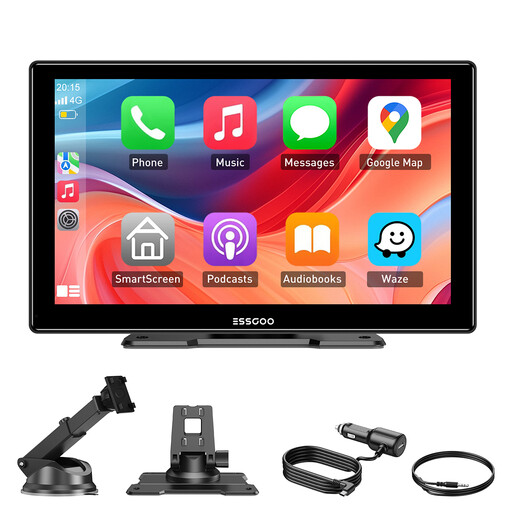
Why This Fits Their Persona: This 9-inch screen is ideal for the daily commute in a standard car or van. It's large enough for clear navigation without overwhelming the dashboard, offering a straightforward, reliable upgrade for getting to work with maps and music.
It directly counters the poor audio pitfall by providing four audio modes, including a high-quality AUX connection and Bluetooth 5.3, ensuring you are not reliant on a potentially noisy FM transmitter.
Features true plug-and-play installation and universal 12-24V compatibility, making it a versatile choice for nearly any vehicle, from a Ford Fiesta to a Transit van.
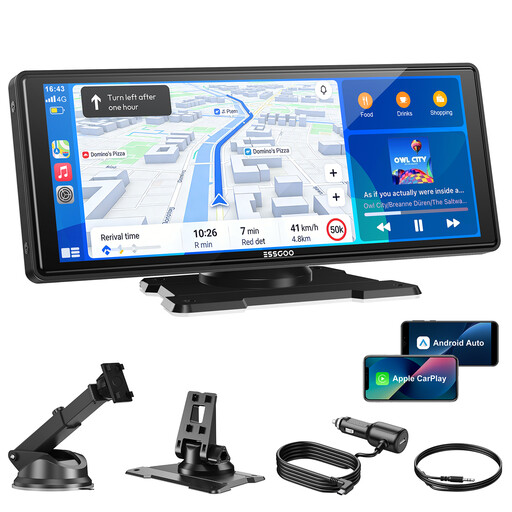
Why This Fits Their Persona: Perfect for lorry drivers, van lifers, or anyone who spends long hours on the road. The expansive 10.26-inch widescreen and high resolution (1600x600) make maps incredibly easy to read, reducing eye strain on motorways.
This model tackles the unstable connection trap head-on with its exclusive dual-band Wi-Fi (2.4GHz/5GHz), ensuring a stable, high-speed connection that prevents frustrating dropouts during critical navigation.
The superior HD screen offers outstanding picture quality and brightness. It also features Over-The-Air (OTA) updates, keeping the device's software current without any manual effort.
We have compiled a complete, real-time list of products that fully satisfy these strict selection criteria and UK safety regulations.
You have several options, depending on your car's setup. The most reliable method for high-quality sound is connecting the screen to your car's AUX-in port with a 3.5mm audio cable. If your car has Bluetooth audio, you can often pair the screen to your car's head unit. The third option is the built-in FM transmitter, but this can be susceptible to interference from local radio stations.
To minimise risk, always apply the suction cup to a clean, dry and smooth surface. For textured or soft-touch dashboards, it is often safer to mount the screen to the windscreen. Avoid leaving the mount attached in the same spot under intense, direct sunlight for months at a time, as this can, in rare cases, cause discolouration on some materials. A quality mount should not leave any permanent marks if used correctly.
Yes, using a car screen for older cars is legal in the UK. However, it is subject to the same laws as any other in-car device. The screen must not obstruct the driver's clear view of the road, and you must not touch or operate the screen by hand while driving. Always use voice commands for functions like making calls or changing music, and be sure to set your navigation route before you begin your journey.