
24/7 全天候客户支持

免费退货

当日/次日达

品质保障

开启新人专享福利: 全场免邮 | 低至 2 折 | 免费试用 30 天 JoyPlus 会员
下载 Joybuy
As a Joybuy Product Recommendation Officer, my role is to help you navigate the crowded market of tech gadgets. When your laptop warns you that disk space is critically low, or you need a reliable way to transport large files for work or university, finding the right portable storage is essential. The constant worry about losing precious photos or the frustration of waiting for large video files to transfer are common problems.
This guide is designed to cut through the marketing clutter. We will look at the key features to consider and highlight a few recommended models to help you find a dependable portable hard drive that fits your needs and budget.
Selecting the right device comes down to understanding a few core differences. Focusing on these will ensure you get the best value and performance for your specific tasks.
The most significant choice you will make is between a Solid-State Drive (SSD) and a traditional Hard Disk Drive (HDD).
Consider what you will be storing. For daily work, documents and a moderate photo collection, 500GB to 1TB is often sufficient. If you are a photographer or videographer creating large files, you will need more space.
Check the ports on your computer. Most new drives use USB-C for fast speeds, but many come with adapters for older USB-A ports. If you work in challenging environments, look for a rugged external hard drive with an IP rating for water and dust resistance. For Apple users, most drives work with both Windows and macOS, but some may require reformatting or a specific driver to be a fully functional hard drive for mac.
Here are a few standout options that cater to different needs, from everyday use to demanding professional workflows.

Why It Stands Out: The SanDisk Portable SSD strikes an excellent balance between performance, durability and value. It offers the speed benefits of an SSD without a prohibitive price tag, making it a superb all-rounder for a wide range of users. Its solid construction and convenient rubber hook make it a practical companion for life on the move.
Pros:
Who is it for? This drive is ideal for students, office professionals and casual photographers who need a fast, reliable and portable solution for backing up coursework, transporting documents and managing a growing photo library.

Why It Stands Out: When sheer storage capacity is the priority, the WD My Passport delivers. Offering a massive 2TB of space in a slim, pocket-sized form, it is an exceptional choice for archiving your entire digital life. It also comes with useful software for automatic backups and robust 256-bit AES hardware encryption to keep your data private.
Pros:
Who is it for? This drive is perfect for users who need to create comprehensive system backups or archive years of photos, videos and documents. It is a reliable data vault for home users and professionals who prioritise capacity and security over raw speed.
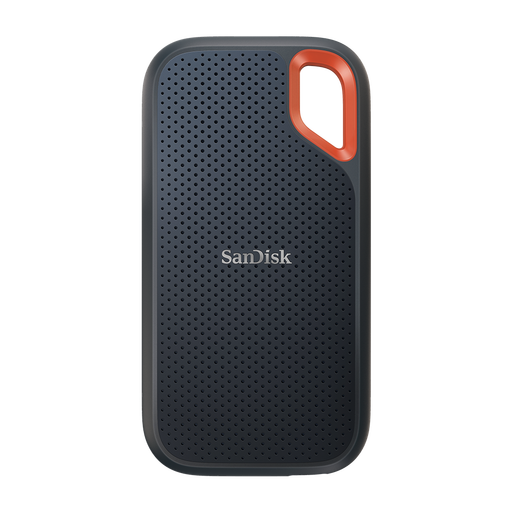
Why It Stands Out: Built for creators and professionals who cannot afford to wait, the SanDisk Extreme is all about speed and resilience. With read speeds reaching up to 2000MB/s, it can move huge files in an instant. Its rugged build, featuring an IP65 rating for water and dust resistance, means it is ready for demanding work in the studio or out in the field.
Pros:
Who is it for? This is the drive for professional videographers, photographers and digital creators who work with massive files and require top-tier performance and durability. If your workflow depends on speed and your gear needs to withstand the elements, this is a formidable choice.
If these specific models do not quite match what you are looking for, or if you want to compare different capacities and features, there are many other choices available. From ultra-compact drives to high-capacity desktop solutions, finding the right fit is key.
Explore our full range of external storage solutions to find the perfect match for your needs.
1. What is the main difference between a portable SSD and a portable HDD? The primary difference is the technology inside. A portable SSD (Solid-State Drive) uses flash memory, making it much faster, more durable and quieter. A portable HDD (Hard Disk Drive) uses spinning disks, which offers more storage capacity for a lower price but is slower and more fragile.
2. How much portable storage do I need for photos and videos? For a casual photographer, a 1TB drive can hold thousands of high-resolution photos. For videographers shooting in 4K, file sizes are much larger. A 30-minute 4K video can easily exceed 100GB. In this case, a 2TB or 4TB drive is a more practical choice for storing multiple projects.
3. Can I use any portable hard drive with a Mac? Most portable drives are compatible with both Windows and Mac computers. However, they often come pre-formatted for Windows (NTFS file system). To use it with a Mac, you may need to reformat the drive to a Mac-compatible format (like APFS or HFS+), which will erase all data on it. Some brands, like Western Digital, provide a downloadable driver that allows a Mac to read and write to an NTFS drive without reformatting. Always check the product specifications for compatibility details.