For opera recordings in a dark room, choose a home-cinema projector whose stated picture capabilities and placement requirements suit your screen and playback source; 4K resolution matters most when your recordings and playback device can provide it. A conventional projector with lens shift can suit a room with enough throw distance, while an ultra-short-throw model addresses limited placement depth. Check the route from your playback device to your speakers separately.
Who is this for?
Dedicated dark-room opera viewers
If you can darken the room for a full recording, shadow detail, stage-light colour and fine visual detail may matter more to you than portability. BenQ and Epson describe home-cinema models intended for controlled-light rooms, but their picture claims remain model-specific.
Viewers with limited projector space
If you want a large image but cannot position a projector across the room, an ultra-short-throw layout is worth examining. Epson states that its EH-LS800B can produce an 80-inch image from 2.3 cm away from the wall; check the placement instructions for the screen size you want.
Viewers connecting a separate playback and sound system
If recordings come from a streaming device, Blu-ray player or other HDMI source, check the projector’s input as well as the connection needed by your speakers or sound system. Audio options differ between models.
What matters when choosing?
Conventional home-cinema projector
Choose it when: You can place the projector at its specified throw distance and want flexibility to align a fixed screen; Epson lists motorised lens shift, zoom and focus for the EH-LS9000B.
Allow for: Planning the projector position and installation before choosing a screen size.
Ultra-short-throw projector
Choose it when: A projector across the room is impractical and the unit needs to sit close to the screen wall.
Allow for: Careful positioning and a suitable, flat projection surface; confirm the exact model’s instructions for your intended image size.
| Concern |
What to check |
Who this matters to |
| Dark-scene detail and colour |
Check the exact model’s display resolution, HDR formats and colour claims. Consider them alongside your usual recording quality rather than treating a brightness figure as the whole picture. |
If dark sets, costumes and stage lighting are what draw me into a recording, I want the picture to retain their differences. Around 33% of consumers would make picture quality their primary concern. |
| Placement and alignment |
Measure the available projector position and intended screen size, then check the model’s throw range and optical alignment controls. |
If I cannot position a projector across the room, its ability to produce and align the image from the available space decides the purchase. Placement would come first for around 27% of consumers. |
| Recording and source compatibility |
Check the projector’s stated display resolution and HDMI inputs against your usual recordings and playback device; accepting a 4K signal does not establish native 4K display resolution. |
When I use a Blu-ray player or streaming device, I need the recording to reach the projector in a format it can display. Around 20% of consumers would put source and detail compatibility first. |
| Sound-system connections |
Check the exact model’s audio options against your speakers or sound system, including whether your intended setup keeps sound and picture in sync. |
For a full opera, I want voices and orchestra through a sound setup I can connect reliably. Sound integration would be the primary concern for around 20% of consumers. |
Mistakes to avoid
-
Treating 4K signal support as native 4K display resolution
A projector can accept a 4K source without displaying a native 4K image. That distinction matters if subtitles, close-ups or detailed sets are a reason you are choosing a higher-resolution model.
Read the stated display resolution for the exact model and compare it with the resolution of your usual recordings.
-
Choosing an image size before measuring the room
Projector position and image size depend on the model. Epson describes close-wall placement for the EH-LS800B, while its EH-LS9000B has motorised lens controls for a conventional home-cinema installation.
Measure the screen position and available projector positions, then use the exact model’s throw specification to check the image size.
The layout may also call for a mount, stand or screen.
-
Leaving the sound connection until after purchase
Projector audio options vary. A picture setup that fits the room still needs a workable path to the speakers you intend to use for opera.
Check the projector, playback device and sound system together, including connection types and sound-to-picture synchronisation.
Connecting an existing system may require cables or adapters suited to those devices.
Brands to consider for this setup
BenQ
BenQ positions its W2710i for dark AV rooms and describes 4K HDR Blu-ray and HLG use, HDR-PRO and 95% DCI-P3 coverage.
- The W2710i’s stated dark-room positioning makes it relevant when stage colour and shadow detail are priorities.
- These are BenQ’s model claims, not a cross-brand picture comparison. Check throw distance, inputs, fan noise and audio connections for the unit you are considering.
Epson
Epson offers different installation layouts in its home-cinema range: the EH-LS9000B has motorised lens controls, while the EH-LS800B is an ultra-short-throw model.
- Those two models give you distinct placement options to assess against the room.
- Check each model’s imaging specification, throw requirements and source connections individually; Epson’s 4K PRO-UHD terminology does not describe every model in the same way.
Sony
In its 2024 UK BRAVIA projector announcement, Sony described native-4K laser models with processing intended to manage dark scenes and colour.
- The stated focus on dark-scene gradation and colour is relevant to a dark-room opera setup.
- The announcement is Sony’s own description, not an independent comparison. Check the exact model’s installation and connection requirements.
Joybuy projector choices
These Full HD projector choices are relevant if your opera recordings and setup do not require native 4K display resolution. Check each model’s placement and picture specifications against your room before choosing.
 No image available
XBJ A5Pro Gray projector with touch tablet
Consider this model if Full HD playback and its stated Android system suit the way you watch recordings.
The title states native 1080p resolution, autofocus and keystone correction. Its 4K support does not mean native 4K display resolution; confirm the brightness specification, throw distance and connections needed for your playback device.
View on Joybuy
 No image available
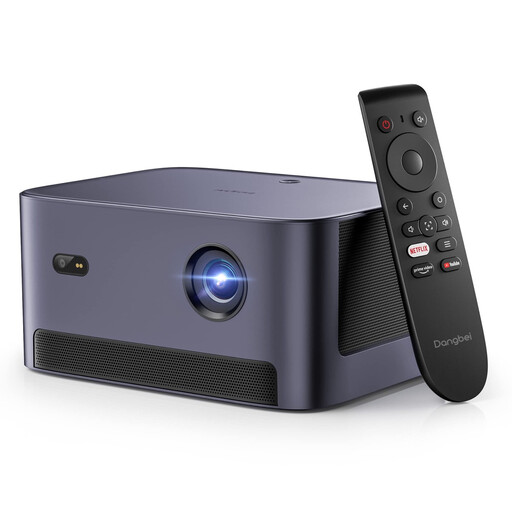
Dangbei Neo DLP Full HD projector
This model is worth considering for Full HD recordings if its playback and sound connections suit your existing devices.
The title states 1080p Full HD, autofocus, keystone correction, Wi-Fi and Bluetooth. Check the throw distance for your intended screen and the exact connections required by your sound system.
View on Joybuy
 No image available
Wimius K1 Full HD projector
Consider the K1 if you use a Full HD recording source and can position the projector for your intended image size.
The title states Full HD 1080p, 4K signal support and vertical and horizontal keystone correction; 4K support does not establish native 4K display resolution. Check its throw distance, HDR requirements and sound connections before buying.
View on Joybuy
Common questions
Do I need a particularly bright projector for opera recordings in a dark room?
Not solely for brightness: in a room you can keep dark, assess the exact model’s dark-scene and colour claims, resolution and placement alongside its brightness. If you also watch with ambient light, check whether the model is intended for that use; a lumen figure alone cannot settle the picture choice.
Should I choose a conventional or an ultra-short-throw projector?
Choose between them by the positions your room allows and the image size you want. A conventional model is an option when you can meet its specified throw distance; Epson lists motorised lens shift, zoom and focus for the EH-LS9000B. If the unit must sit near the wall, Epson states that its ultra-short-throw EH-LS800B can produce an 80-inch image from 2.3 cm away from it.
How can I connect sound for an opera recording?
Start with your playback device and intended speakers, then check the exact projector’s video inputs and audio options against both. If you plan to use wireless audio, confirm that the devices can connect and that sound-to-picture synchronisation is acceptable for your setup.


