For theatre recordings in a dark room, start with the recording and player: a 4K projector is worth considering when both can deliver 4K and fine stage detail matters to you, while Full HD is a reasonable route for Full HD playback. Then check whether the exact projector can produce your intended image size from the available position; an ultra-short-throw model addresses a different placement need, not a guaranteed improvement in picture quality.
Who is this setup for?
Image-first theatre viewers
If facial expressions, costumes, scenery and subtitles are the reason for projecting a recording, compare the exact model’s resolution and supported picture formats with the recording and player. A brightness figure alone cannot answer those questions.
Viewers with limited placement space
If a projector cannot sit far from the screen wall, an ultra-short-throw model may make the intended image size possible. Check the model’s specified distance and image size against the room before choosing.
Simple HDMI playback viewers
If the plan is to connect a laptop, media player or console for Full HD recordings, confirm that the projector has the connections and source-device compatibility the setup requires.
What matters when choosing?
Decide what the recording and player need to deliver, then measure the available projector position and check the connections for any external sound equipment. The concerns below reflect different primary needs among consumers choosing a projector for theatre recordings in a dark room.
| Concern | Buying checks | Who this matters to |
|---|
| Picture detail and formats |
Compare the exact model’s stated resolution and HDR formats with the recording and player. Check model-specific colour information rather than treating brightness as a picture-quality result. |
If costume textures, expressions and subtitles are my priority, I want the source and projector to preserve the detail they can actually deliver. Around 31% of consumers would put picture detail first. |
| Room fit and image size |
Measure the available projector-to-screen distance and check the exact model’s placement guidance for the intended image size. |
When my room limits where the projector can sit, I need the planned image to fit before other features matter. For around 31% of consumers, room fit would be the primary concern. |
| Playback and sound connections |
Check the intended player against the model’s HDMI and HDCP specifications; confirm audio-return support if the sound setup needs it. |
If I use an external player and sound system, I need the recording to reach both the screen and speakers through compatible connections. That would come first for around 23% of consumers. |
| Straightforward Full HD viewing |
Decide whether Full HD suits the recordings and intended image size, then confirm the input and placement requirements. |
If my recordings are mainly Full HD, I would rather establish a workable playback setup than prioritise 4K specifications. Around 15% of consumers would make simple Full HD viewing their main consideration. |
Buying pitfalls
-
Choosing on a lumen figure alone
A dark room does not make resolution, supported formats or source compatibility irrelevant. A brightness claim cannot establish how much detail a theatre recording will show.
Compare the exact projector’s picture-format and placement specifications with your recordings, player and room before using brightness as a deciding factor.
-
Assuming the available position will produce a large image
Throw distance and image size depend on the model. Ultra-short-throw placement does not mean a conventional projector will work from the same position.
Measure the proposed position and check the model’s placement information. ProjectorCentral cautions that calculator figures based on manufacturer information should be confirmed with the supplier.
A different stand, mount or screen position may be needed if the planned placement does not fit.
-
Relying entirely on built-in apps
Integrated playback does not settle whether a particular theatre-recording service will work or how long its software will be supported. BenQ lists 20 September 2026 as the guaranteed product-security-update date for the W2720i.
Check current app and security-update support for the exact model, and confirm an external playback option if you intend to use one.
-
Applying Great Britain guidance unchanged to Northern Ireland
GOV.UK’s Office for Product Safety and Standards says its electrical-equipment guidance covers goods supplied in or into Great Britain and that some provisions differ in Northern Ireland.
Check the guidance applicable to the delivery destination rather than assuming one set of provisions covers both.
Brands to consider
These examples help distinguish picture-format, placement and playback specifications; check the particular model rather than assuming every projector from a brand has the same features.
BenQ
The W2720i is a conventional home-cinema example for comparing 4K formats and external playback connections.
- BenQ specifies 4K UHD, HDR10, HDR10+ and HLG, HDMI ports with HDCP support, and eARC for the W2720i.
- Its placement still needs checking for the room. BenQ’s listed guaranteed product-security-update date for this model was 20 September 2026, so confirm current support if integrated features matter.
Epson
The CO-FH02 and EH-LS800W illustrate different Full HD and ultra-short-throw routes, rather than interchangeable room setups.
- Epson specifies Full HD 1080p, HDMI and keystone correction for the CO-FH02. For the EH-LS800W, Epson states that an 80-inch image is possible from 2.3 cm from the wall.
- Confirm the image size and placement for the exact model and your room; the close-wall figure for the EH-LS800W does not apply to the CO-FH02.
Optoma
The UHD38x offers a conventional-throw example for checking declared 4K, HDR and HDMI specifications.
- Optoma’s UHD38x datasheet lists 4K UHD, HDR and HLG compatibility, two HDMI 2.0 inputs and a 1.5:1–1.66:1 throw ratio.
- Those specifications do not establish the picture result for a particular recording or whether the intended image size fits a particular room.
Joybuy projector choices
These home and portable projector choices are relevant to dark-room theatre viewing. Compare each model’s stated resolution, intended playback connection and required placement; the listed features do not by themselves establish how a recording will look in your room.
 No image available
XBJ A5Pro Gray projector with touch tablet
Consider it for Full HD theatre recordings if its playback connections and intended image size suit your setup.
The listing names native 1080P, 4K input support, auto focus and keystone correction, and Wi-Fi 6; 4K support does not change the stated native resolution.
Confirm the required throw distance and your player’s connection before choosing.
View on Joybuy
 No image available
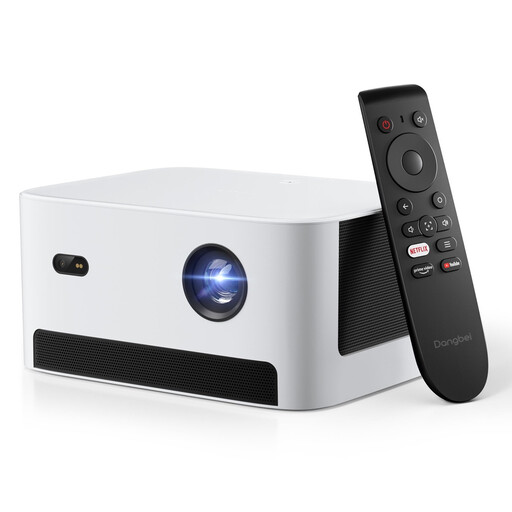
Dangbei Neo DLP Full HD projector
This is a Full HD option to assess if straightforward playback is more important to you than 4K resolution.
The title specifies 1080P, 540 ISO lumens, auto focus and keystone correction. Check the throw distance for your planned image size and whether your preferred playback service or external player works with the setup.
View on Joybuy
 No image available
XBJ 360° Full HD portable projector
Consider it if you need to change projection direction while watching Full HD recordings.
The title lists 1080P, 360° rotation, auto keystone correction and HDMI connectivity. Rotation does not establish the distance needed for a particular image size, so check the planned position separately.
View on Joybuy
 No image available
Soundcore Nebula Mars 3 Air with carry case
The carry-case bundle is worth considering if you expect to move the projector rather than keep a fixed theatre-viewing installation.
Before relying on it for a full recording, check the intended image size and placement, the connection for your player and whether the available power arrangement covers the session.
View on Joybuy
 No image available
Magcubic HY350Max native 1080P projector
Consider this Full HD model if an external HDMI player and a shorter projector-to-screen position are part of your plan.
The title lists native 1080P, 8K input support, HDMI compatibility, 180° rotation and auto keystone correction; 8K support is not its native resolution. Check what image size the proposed position produces, and confirm HDR-format support if your playback needs it.
View on Joybuy
Frequently asked questions
Do theatre recordings need a 4K projector?
No: Full HD remains a relevant choice for Full HD recordings or a simpler playback setup. Consider 4K when the recording and player can deliver it and fine detail on a large image is a priority; BenQ specifies 4K UHD for the W2720i, while Epson specifies Full HD 1080p for the CO-FH02.
How can I tell whether a projector will fit my room?
Measure the available projector-to-screen distance and choose an intended image size, then check both against the exact model’s placement information. ProjectorCentral cautions that its calculator uses manufacturer information and recommends confirming the result with the supplier.
Can I rely on built-in apps to play my recordings?
Only after checking that the service you use works on the particular projector and that its current support suits your plans. For an external player or sound system, also check the required HDMI, HDCP and audio-return connections; BenQ lists HDCP support and eARC for the W2720i.
Does the same electrical-equipment guidance apply throughout the UK?
No. GOV.UK’s Office for Product Safety and Standards says its Electrical Equipment (Safety) Regulations 2016 guidance covers equipment supplied in or into Great Britain, while some provisions differ in Northern Ireland. Check the guidance applicable to your delivery destination.


