Editor-first level builders
If you spend most of a session in a level editor, code editor or asset and UI tools, screen space for panels and fine detail may matter more to you than a high refresh rate.


For platform-level prototyping, prioritise a 4K monitor if most of your time goes into level-editor panels, code and detailed UI work; prioritise a high-refresh QHD monitor if repeated movement and camera playtests drive the decision. A 4K high-refresh model can address both needs, but check which resolution and refresh rate your computer can actually output, as well as the space and connections your home workstation requires.
If you spend most of a session in a level editor, code editor or asset and UI tools, screen space for panels and fine detail may matter more to you than a high refresh rate.
If you repeatedly assess jumps, character movement, animation and camera behaviour in real time, refresh rate and the video signal your computer can deliver become central checks.
If a laptop anchors your desk setup, consider its video output and charging needs alongside peripheral connections and how you can position the screen for longer work sessions.
Choose around the task that would decide the purchase if workspace detail, playtest motion and laptop setup pulled in different directions. The model specifications below come from BenQ UK, Dell UK and LG UK; your computer and connections still determine which display modes you can use.
Choose it when: editor windows, code and detailed 2D assets dominate your sessions.
Trade-off: BenQ UK specifies the PD2705U at 60Hz, so this example is less aligned with high-refresh playtesting.
Choose it when: you want 4K workspace, higher refresh and a monitor that can form part of a laptop-docking setup.
Trade-off: Dell UK specifies the U2725QE at 120Hz, but its charging and connection options still need to match your laptop.
Choose it when: frequent movement, animation and camera playtests take priority over fitting the most fine-detail content on screen.
Trade-off: at the same 27-inch size, QHD has fewer pixels than 4K. LG UK also requires DisplayPort 1.4 support from the graphics card and cable for the 27GS85Q-B’s 200Hz overclocked mode.
| Concern | What to check | Who this matters to |
|---|---|---|
| Editor detail | Compare native resolution at your preferred screen size, then check whether text and editor panels remain comfortable at your chosen display scaling. | I need room for scene views, scripts and UI detail without constantly rearranging windows; around 45% of consumers put workspace detail first. |
| Playtest motion | Check native versus overclocked refresh rates and whether your computer, port and cable can deliver the mode you want. | When I repeatedly judge jumps and camera movement, seeing those sequences at my intended refresh rate matters most; roughly 33% of consumers prioritise playtest motion. |
| Home-workstation setup | Match laptop video and charging capabilities to the monitor’s connections, and check stand adjustment or mounting against your desk arrangement. | I want a workable fixed laptop setup without treating one convenient connection as the whole workstation solution; around 22% of consumers make integration and positioning their primary concern. |
LG UK says the 27GS85Q-B needs a graphics card supporting DisplayPort 1.4 and a DisplayPort 1.4 cable for its 200Hz overclocked mode.
Check your computer’s external-display limits, the port and cable you will use, and whether the advertised rate is native or overclocked.
If your existing connection cannot carry the mode you want, you may need a compatible cable or dock.
A 4K screen offers more pixels for editor work than QHD at the same size, but the BenQ PD2705U is specified at 60Hz. That distinction matters if movement and animation occupy most of your sessions.
Decide whether editor detail or real-time playtesting is your primary task, then compare resolution and refresh rate together.
Screen adjustment helps with positioning, but the desk, chair, keyboard, other input devices and work routine also affect the setup. For applicable workers, the Health and Safety Executive says employers must assess display-screen-equipment workstation risks and reduce them.
Check how the screen fits into your full workstation. If you are an employee using display-screen equipment at home for daily continuous periods of an hour or more, ask your employer about its workstation assessment.
Colour coverage, refresh rates and power delivery differ by model. LG UK also notes that warranty conditions vary by product.
Keep the exact model and variant in view when checking manufacturer specifications and warranty terms before ordering.
BenQ’s PD2705U is a 27-inch 4K IPS example for an editor-first setup with USB-C connectivity and an adjustable stand.
Dell’s UltraSharp U2725QE is a 27-inch 4K example for someone combining detailed development work with higher refresh and laptop connectivity.
LG’s UltraGear 27GS85Q-B is a 27-inch QHD IPS example for a playtest-led choice.
These monitors cover different ways to balance detailed editor work, high-refresh playtesting and a home-desk setup. Check each display’s size and advertised modes against your space and computer before choosing.
 No image available
Consider this if you want one screen for detailed editing and frequent playtests. The listed Nano IPS model has dual-mode 240Hz/480Hz refresh, DisplayPort 2.1 and HDMI 2.1; check the resolution available in each mode and whether your computer and cable can deliver it.
 No image available
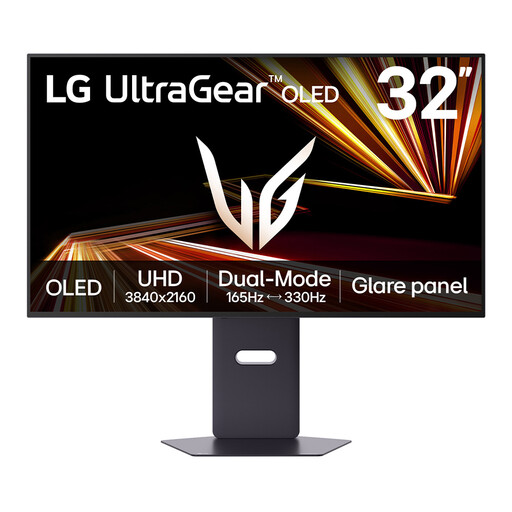
This larger dual-mode screen may suit a desk where editor space and playtesting both matter. Its title advertises a maximum 330Hz mode; check that mode’s resolution and your computer’s output before relying on it, and make sure the screen fits your desk.
 No image available
This is an option if you want a larger 4K screen with a stated 165Hz refresh rate and Type-C 65W connection. Check that the curved screen fits your desk, that your computer can output the desired display mode, and that its Type-C video and charging requirements match.
 No image available
Consider this 240Hz model if frequent playtesting and a wider screen format suit your work. Check the 34-inch screen against your desk and viewing position, and confirm that your computer can supply the WQHD refresh mode you intend to use.
 No image available
This 4K option is worth considering when level-editor panels, code and UI detail are the priority. If playtest motion or a laptop connection will decide your purchase, check its refresh rate and the video and charging capabilities you need.
Choose 4K if editor panels, scripts and fine UI detail dominate; choose high-refresh QHD if repeated motion-focused playtesting is the deciding task. At 27 inches, the 4K BenQ PD2705U and Dell U2725QE offer more pixels than LG’s QHD 27GS85Q-B, while their manufacturer-stated refresh rates differ, so compare the exact models rather than resolution alone.
No: its 200Hz overclocked mode has specific connection requirements. LG UK says the graphics card must support DisplayPort 1.4 and the cable must be DisplayPort 1.4; check the laptop’s video output and any dock in the connection path.
No: the laptop and connection must support the relevant video and charging modes. BenQ UK specifies up to 65W USB-C power delivery for the PD2705U, while Dell UK lists 90W to 140W options for the U2725QE; compare the particular connection and power requirement with your laptop before buying.
If you are an employee who uses display-screen equipment daily for continuous periods of an hour or more, the Health and Safety Executive says the rules can apply to home working. Employers must assess workstation risks and reduce them; an adjustable monitor is one part of the setup, not a substitute for assessing the whole workstation.
Check the terms for the exact model you plan to order. LG UK lists a 24-month parts-and-labour manufacturer warranty for monitors but notes that conditions can vary by product; check the applicable terms alongside the seller’s terms.