Frequent proceeds-entry organisers
If you repeatedly record payments, prizes, expenses and totals, a keyboard with a number pad—or a separate numeric keypad for an otherwise suitable laptop—addresses the number-entry part of the job.


For a fixed shared desk where staff regularly record ticket payments and totals, choose a keyboard with a suitable number pad, and check its key layout before ordering. A quiet wired model suits a desk that stays connected to one computer; a multi-device wireless model makes more sense when authorised staff need to switch between compatible devices. If the existing laptop keyboard works well apart from number entry, a separate USB numeric keypad may be enough.
If you repeatedly record payments, prizes, expenses and totals, a keyboard with a number pad—or a separate numeric keypad for an otherwise suitable laptop—addresses the number-entry part of the job.
If colleagues use the same fixed workstation, quiet keys and a connection that is ready for the next authorised user may matter more than the ability to move the keyboard.
If your work moves between approved devices, check whether the exact keyboard supports the switching method, ports and operating systems you use.
For recording raffle proceeds at a shared desk, decide whether number entry, quiet operation at a fixed workstation or flexibility across shared equipment is your primary need.
| Concern | What to check | Who this matters to |
|---|---|---|
| Number entry | Check for a number pad on the exact keyboard variant, or a compatible separate keypad; confirm the required key layout. | If I enter payments and totals repeatedly, I want a straightforward way to use digits without compromising the rest of my typing. Around 42% of consumers put number entry first. |
| Quiet, ready-to-use typing | Check the model's stated key design and whether a wired connection suits the workstation's available port. | At a desk beside colleagues, I want keys that will not be unnecessarily disruptive and a connection ready for the next user. For around 33% of consumers, that shared-desk need comes first. |
| Flexible shared equipment | Check device-switching compatibility or the exact model's cleaning instructions, depending on which you need. | If I change between approved devices or manage a shared peripheral, I need its connection or cleaning arrangements to fit our routine. This is the primary concern for around 25% of consumers. |
A compact layout may omit the number pad you want for repeated amounts and totals.
Before ordering, decide whether the proceeds-entry desk needs an integrated number pad or whether a separate keypad will fit beside an existing laptop.
A wireless keyboard may add charging, receiver or pairing tasks even when it rarely moves between computers.
For a fixed computer, compare those tasks with a wired connection. If staff need wireless switching, check device compatibility and who will manage the connection.
HP's statement about select household wipes applies to the HP 655 Wireless Keyboard & Mouse Combo under its specified cleaning conditions, not to every office keyboard.
Follow the cleaning instructions for the exact model and the wipe manufacturer's directions.
A keyboard helps with recording figures, but the equipment choice does not determine whether a raffle qualifies as a work lottery. The Gambling Commission says everyone taking part in a work lottery must work at the same physical location.
Check the Gambling Commission's applicable guidance for the raffle before relying on the work-lottery route.
The wired STREAM KEYBOARD is relevant to a fixed office workstation.
MX Keys for Business and MX Keys S offer model-specific options for work across devices.
The HP 655 Wireless Keyboard & Mouse Combo is an option when a desk needs both peripherals.
The Xalas USB numeric keypad adds number-entry keys to an existing laptop setup.
These keyboards cover a wired option for a fixed proceeds-entry desk, a tri-mode keyboard and a wireless keyboard-and-mouse set. Check the exact layout and number-entry arrangement against your office needs.
 No image available
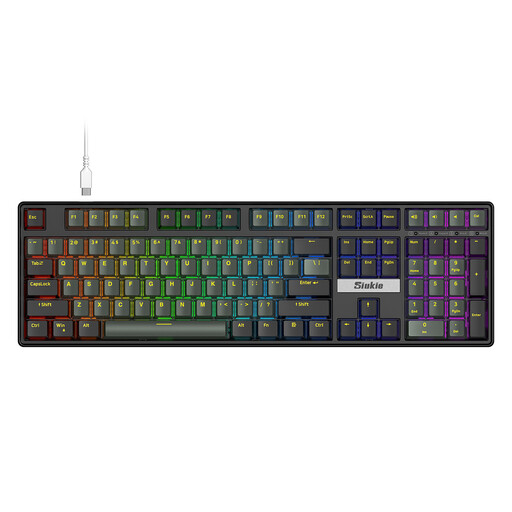
Consider this wired keyboard for a fixed proceeds-entry desk. It has 108 keys and detachable switches; confirm the exact key layout, number-pad arrangement and switch noise for your shared office.
 No image available
Consider this model if the desk needs more than one connection mode. Its title specifies a US layout, 108 keys, Silent Tactile switches and an 8000 mAh battery; check the number pad, host-device compatibility and whether the switches suit nearby colleagues.
 No image available
Consider this set if the shared desk needs both a keyboard and mouse. Its title specifies a full-size US-layout keyboard and 2.4 GHz wireless operation; confirm the number pad, receiver compatibility, power requirements and cleaning instructions before use.
Choose a keyboard with an integrated number pad if the shared desk regularly handles amounts alongside names and notes. If an existing laptop keyboard otherwise suits the job, a compatible separate numeric keypad may address the missing number-entry keys without replacing it.
Check the instructions for the exact model before using wipes. HP says select household wipes can be used on its HP 655 Wireless Keyboard & Mouse Combo up to 1,000 times when HP's cleaning guidance and the wipe manufacturer's instructions are followed; that statement does not apply to other keyboards.
Yes, if the particular keyboard supports it and the computers are compatible and authorised for shared use. Logitech states that MX Keys for Business can switch between up to three computers using its Easy-Switch keys; check its stated connection and operating-system requirements before setup.
The rules concern the raffle rather than the keyboard. For a UK work lottery, the Gambling Commission says everyone taking part must work at the same physical location; check its applicable guidance for the activity before selling tickets.