
24/7 Customer Support

Free returns

Same-day & Next-day Delivery

Quality Guaranteed

Unlock Your Welcome Offers: FREE Delivery | Up to 80% OFF | Free 30-day JoyPlus trial
Download the APP
As a Joybuy Product Recommendation Officer, my role is to help you navigate the crowded market of gaming accessories. With the Nintendo Switch 2 now a staple in many UK homes, the familiar problem of keeping multiple Joy-Con 2 controllers charged and ready for action has returned. A dedicated charging dock seems like the obvious solution, but not all are created equal.
Before you buy, it's worth knowing the common pitfalls that can turn a promising accessory into a piece of plastic gathering dust. Many buyers find themselves disappointed by docks with flimsy connectors that fail after a few months, unstable power delivery that barely charges controllers or flashy designs that prioritise looks over function. This guide will help you identify the key features that matter, ensuring your next game night starts without a hitch.
A low price can be tempting, but it often conceals design flaws that lead to frustration. Here are two major issues to watch out for:
To avoid buyer's remorse, focus on these essential technical specifications. They are far more important than marketing buzzwords.
The most significant innovation in recent Nintendo Switch 2 accessories is the move towards magnetic charging. A magnetic Switch 2 controller dock uses small magnetic contacts to guide the Joy-Con 2 into the perfect charging position. There is no sliding or clicking involved, which dramatically reduces mechanical stress and makes docking effortless. For families or anyone who enjoys multiplayer games, a 4-controller charger for Nintendo Switch 2 is a practical minimum. It ensures you always have a full set of controllers ready to go.
A reliable charging dock should be powered by a dedicated USB-C cable and wall adapter. While some docks can draw power from the Switch 2 console's USB ports, this can lead to slower charging, especially when all four slots are occupied. A separate power source guarantees consistent and stable voltage. Always check the product specifications for safety features like over-current, over-voltage and short-circuit protection. This is a non-negotiable feature for protecting your controllers.
While aesthetics are subjective, a good design should also be functional. A vertical "tower" style RGB charging stand for Switch 2 can be a great space-saver on a crowded media unit or desk. However, if you opt for a model with lighting, ensure it offers customisation. The ability to change colours, dim the lights or turn them off completely prevents it from becoming a distraction in a dark room. Also, look for a sturdy build with a non-slip base to prevent it from being knocked over easily.
Instead of a generic list, we have matched our recommendations to specific types of gamers. This helps you find a product that truly fits your needs and avoids the common traps.
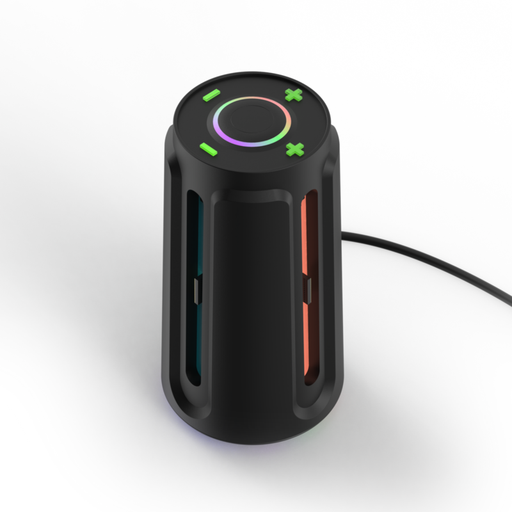
Why This Fits Their Persona: This user wants their gaming space to look as good as it performs. The Power Beacon's customisable RGB lighting turns a utility item into a centrepiece, complementing a modern gaming setup.
It uses a secure magnetic mounting system, completely avoiding the flimsy slide-in rail problem. The dedicated power adapter ensures stable charging for all four controllers.
Charges four Joy-Con 2 controllers simultaneously. Features 8 distinct RGB lighting modes that can be customised to match your setup's aesthetic.
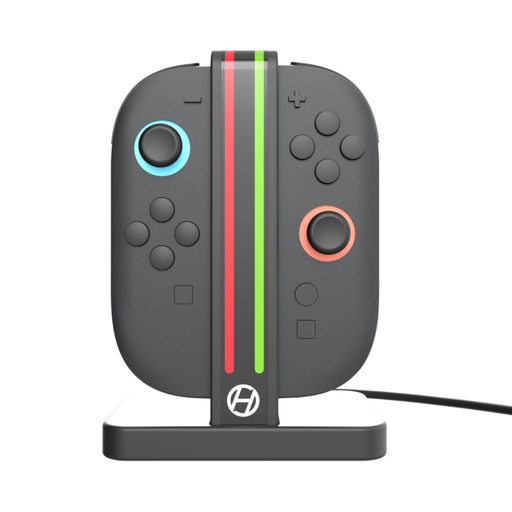
Why This Fits Their Persona: This user values function over flair. They need a reliable, space-saving solution for a family living room that keeps controllers organised and ready for an impromptu game of Mario Kart, without any fuss.
It focuses on the core essentials: a durable magnetic connection and clear LED indicators. By stripping away extra features, it offers a robust and dependable charging experience.
Its minimalist, vertical design has a very small footprint. The effortless magnetic docking is simple enough for anyone in the family to use correctly every time.
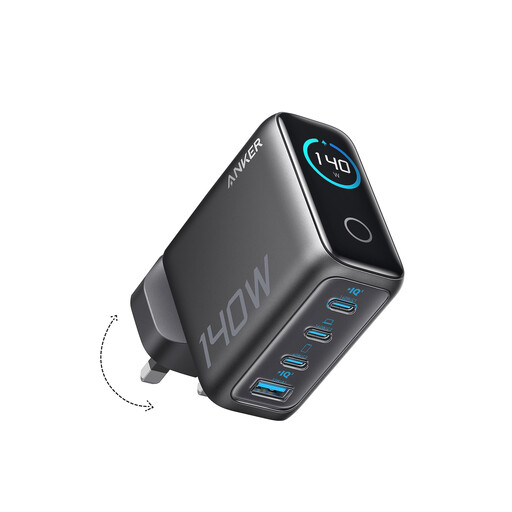
Why This Fits Their Persona: This user's desk is a hub for tech. They need a single, powerful solution to charge their Joy-Con dock, Pro Controller, smartphone and tablet without a mess of cables and plugs.
It tackles the "unstable power" problem at the source. This high-wattage GaN charger provides clean, regulated power to a Joy-Con dock and three other devices simultaneously.
Consolidates four separate chargers into one compact unit, freeing up plug sockets. The smart display provides real-time information on power output for each port.
We have compiled a complete, real-time list of products that fully satisfy these strict selection criteria and UK safety regulations.
Yes, provided you are using a quality dock with built-in safety features. A reputable Nintendo Switch 2 charging dock will include over-charge protection, which automatically stops sending power to a controller once its battery is full. This prevents damage to the battery and is a key feature to look for.
No, quite the opposite. A well-designed magnetic Switch 2 controller dock is gentler on the controllers than a traditional slide-in rail system. Because there is no physical friction or force required to connect them, the risk of wearing down the controller's casing or charging contacts is significantly reduced.
This depends on the power output of the dock and its adapter. Most dedicated 4-controller chargers powered by their own USB-C wall adapter can fully charge four depleted Joy-Con 2 controllers in approximately 2.5 to 3.5 hours. Docks that draw power from the console's USB port may take longer.