
24/7 Customer Support

Free returns

Same-day & Next-day Delivery

Quality Guaranteed

Unlock Your Welcome Offers: FREE Delivery | Up to 80% OFF | Free 30-day JoyPlus trial
Download the APP
There's nothing more frustrating than gathering the family for a round of your favourite multiplayer game, only to find half the Joy-Con controllers are out of battery. The scramble for charging cables begins, and your organised gaming setup suddenly looks like a tangled mess. For many Nintendo Switch 2 owners, especially in households with multiple players, keeping every controller ready for action is a constant challenge.
A dedicated Switch 2 Joy-Con charging dock is a simple and effective solution. It not only ensures your controllers are always powered up but also provides a neat, central home for them, tidying up your entertainment centre. As your Joybuy Product Recommendation Officer, my role is to help you find practical solutions that fit your needs. This guide will walk you through key features to consider and highlight a few standout options to keep your gaming sessions seamless.
Choosing the right Switch 2 charging station comes down to a few key factors. Considering these points will help you select a device that suits your gaming habits and space.
How many controllers do you need to charge at once? While the Switch 2 console can charge two Joy-Cons, this is often not enough for families or those who host game nights. A 4-port Joy-Con charger is a popular choice, allowing you to power up two full pairs simultaneously. This ensures you always have a fresh set ready to go, eliminating downtime between sessions.
A good Switch 2 controller charger should complement your setup, not complicate it. Vertical tower designs are excellent for saving desk or shelf space. Another feature to look for is the connection method. A magnetic charging dock for Switch 2 offers great convenience, as the controllers snap into place effortlessly without fumbling with ports, reducing potential wear on the connectors over time.
While the primary function is charging, many modern Nintendo Switch 2 accessories offer more. Some docks include customisable RGB lighting to add a bit of flair to your gaming rig. Others might offer extra USB ports or serve as a multi-functional hub. Consider whether these extras add value for you or if a more straightforward, function-focused device is a better fit.
Here are a few recommendations that address the common need for reliable, organised charging for the Nintendo Switch 2.
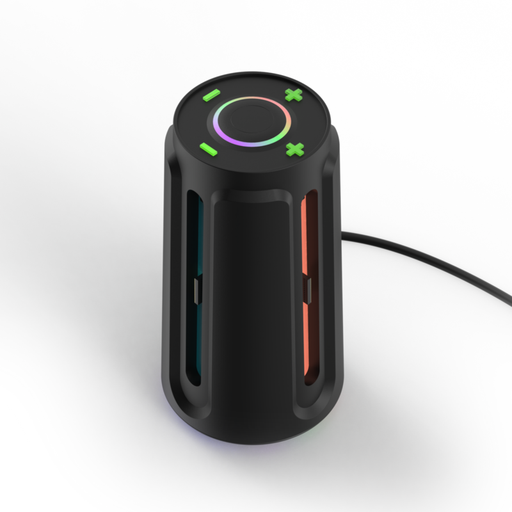
Why It Stands Out: The Power Beacon combines practical charging with striking aesthetics. It’s more than just a utility; it’s a centrepiece for your gaming station. The magnetic docking system makes charging incredibly simple and the vibrant RGB lighting tower can be customised to match your mood or setup.
Pros:
Who is it for? This is for the gamer who appreciates both form and function. If you want a reliable charger that also enhances the visual appeal of your gaming setup, the Power Beacon is an excellent choice.
View the Hyperkin Power Beacon at Joybuy
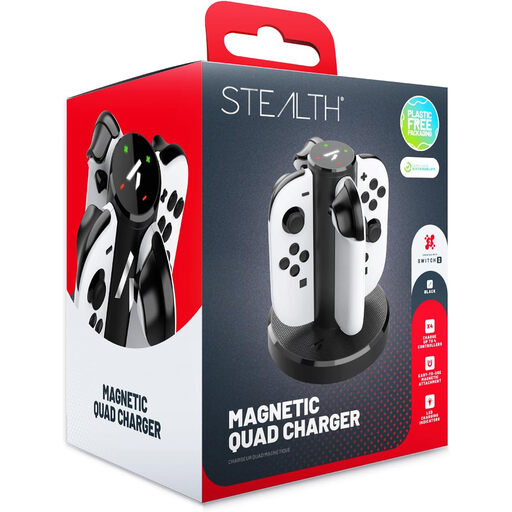
Why It Stands Out: The Stealth Quad Charging Dock is the definition of practical efficiency. It does one job—charging four Joy-Cons at once—and does it well, with a clean, minimalist design that blends into any setup without drawing attention.
Pros:
Who is it for? Ideal for families and gamers who prioritise functionality and organisation. If you need a no-fuss, reliable 4-port Joy-Con charger that keeps things neat, this is a solid option.
Check out the Stealth Quad Charging Dock
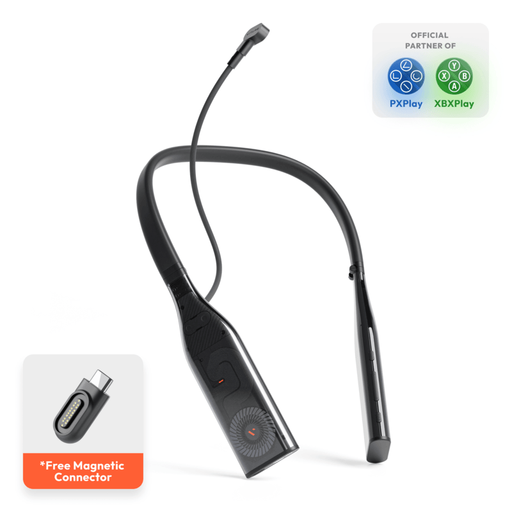
Why It Stands Out: This device goes far beyond a typical Joy-Con 2 charger. The VITURE Pro Mobile Dock is a multi-functional hub for the serious tech enthusiast. It acts as a power bank to extend your playtime on the go and allows you to connect your Switch 2 to other displays, including XR/AR glasses for a massive virtual screen experience.
Pros:
Who is it for? This is for the gamer who wants the ultimate portable and versatile accessory. If you frequently play away from home or are invested in the world of XR gaming and portable displays, the VITURE Pro Mobile Dock offers a suite of features that a standard charging dock cannot match.
Explore the VITURE Pro Mobile Dock
These recommendations cover a range of needs, from aesthetic enhancement to pure functionality. However, every gamer's setup is unique. If you're still exploring different styles or features, you can browse our full collection of gaming accessories.
Discover a wider variety of solutions on our charging docking station category page.
Q: Can I charge Switch 2 Joy-Cons without a dock? A: Yes, you can charge Joy-Cons by attaching them directly to the Switch 2 console while it is powered or in its main dock. However, a separate Switch 2 Joy-Con charging dock is necessary if you want to charge more than two controllers at once or prefer to keep your console area free of clutter.
Q: Are third-party Switch 2 charging stations safe for my controllers? A: Reputable third-party accessories are designed with safety features to protect your equipment. Look for products that mention over-charging and short-circuit protection. Docks from established accessory brands are generally built to be fully compatible and provide a safe, reliable charge.
Q: Do magnetic charging docks wear out the Joy-Con 2 controllers? A: A magnetic charging dock for Switch 2 is designed to be both convenient and durable. The magnets help guide the controller into the correct position, which can actually reduce the wear and tear associated with repeatedly inserting a physical connector. They use external contact points for charging, which is a gentle and reliable method.