Light-packing coach traveller
You expect to hold your tablet during the journey and want it to fit easily in your bag. For a compact reference point, Apple lists the Wi-Fi iPad mini at 293 g with an 8.3-inch display.


Choose a compact 8–9-inch tablet if carrying and holding it through a coach journey matters most; consider an 11-inch model if you would rather have more display space and can accommodate the larger device. Before choosing Wi-Fi only or cellular, check whether the particular game needs a connection during play and complete any required downloads before travelling.
You expect to hold your tablet during the journey and want it to fit easily in your bag. For a compact reference point, Apple lists the Wi-Fi iPad mini at 293 g with an 8.3-inch display.
You would trade some packing space for a roomier view of the game board. Lenovo lists an 11-inch, 1920 × 1200 display for the Tab M11 configuration discussed here.
You want to compare compact tablets for games and other entertainment without assuming every version has the same capacity. Samsung lists Galaxy Tab A11 WiFi configurations with 4 GB RAM and 64 GB storage or 8 GB RAM and 128 GB storage.
Decide how much tablet you want to carry and hold, then check the exact configuration and your game’s connection requirements.
| Concern | What to check | Who this matters to |
|---|---|---|
| Portability and holding comfort | Compare the exact model’s weight and dimensions, especially if you will hold it rather than prop it up. | I want to take the tablet out on the coach without carrying a bulky device or tiring of holding it. Around 33% of consumers put portability and holding comfort first. |
| Capacity and everyday use | Check the RAM and storage of the specific variant; confirm whether your intended apps can use any expandable storage. | If I install several games alongside other apps, I need to know what capacity I am getting. Roughly 27% of consumers make capacity and everyday use their primary concern. |
| Screen and touch comfort | Compare display sizes with the space available in your bag and at your seat; do not use refresh rate alone as a measure of game performance. | I would rather have more physical display space for viewing and tapping the board, even if the tablet takes up more room. For about 20% of consumers, screen comfort comes first. |
| Connection away from Wi-Fi | Check the exact game’s offline, sign-in and download requirements before deciding whether you need a cellular-capable variant. | When a journey takes me away from dependable Wi-Fi, I need to know whether my game or other travel use requires mobile data. Around 20% of consumers prioritise that connection. |
Offline play, sign-in and downloads depend on the particular game. A cellular tablet may be unnecessary for one title, while another may need a connection during your journey.
Check the game’s current listing and support information. If it supports offline play, install it and complete required downloads before leaving.
An 11-inch display offers more physical screen space than an 8–9-inch display, but the device also takes up more room when you carry it.
Consider whether you will hold the tablet, rest it on your lap or use a case to prop it up, then compare the exact model’s dimensions and weight.
Samsung lists Galaxy Tab A11 WiFi versions with 4 GB RAM and 64 GB storage or 8 GB RAM and 128 GB storage. The family name alone does not identify which one you are buying.
Match the configuration in the product listing to the variant you select.
GOV.UK advises against putting batteries and electrical waste in household rubbish.
Take an old tablet to an appropriate electrical-waste recycling collection point.
The iPad mini represents the compact route; the 11-inch iPad provides a larger-display route with separate Wi-Fi and Wi-Fi + Cellular versions.
The Galaxy Tab A11 WiFi is an 8.7-inch Android option for consumers considering a compact screen.
The Tab M11 represents a larger-screen Android route for consumers who can give a tablet more bag space.
These tablets cover compact travel formats and larger displays, including models with SIM options. Check the particular game before treating a mobile-data option as necessary.
 No image available
Consider this compact iPad if you expect to hold your tablet while playing on the coach.
Apple lists an 8.3-inch display for the iPad mini; this product is the 128 GB Space Grey variant. Check your game’s connection requirements before relying on play away from Wi-Fi.
 No image available
Consider this larger format if display space and a mobile-data option matter more to you than carrying a compact tablet.
The product title lists dual 4G SIM support and 256 GB storage. Confirm the installed Android version and your game’s compatibility before buying; a SIM option does not establish that the game needs mobile data.
 No image available
This is another 11-inch choice for consumers who prefer more display space and want to consider a SIM-equipped tablet.
The product title lists a SIM card slot, 256 GB storage and an 8,000 mAh battery. Check whether your chosen game needs a connection while you travel.
 No image available
Consider this children’s tablet if its compact screen, protective case and child-lock feature suit the person who will use it.
The product title lists Android 15, 3 GB RAM and 32 GB storage, and says no power adapter is included. Check its weight if you plan to hold it throughout a journey, as well as the chosen game’s requirements.
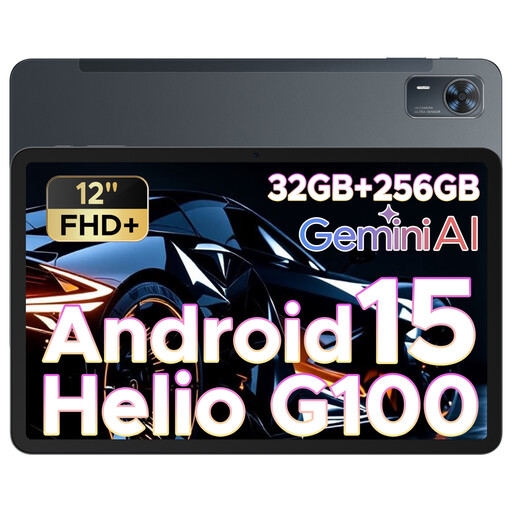 No image available
Consider this 12-inch option if you can accommodate a larger device and want to check whether mobile data would help on your journeys.
The product title lists Android 15, a 90 Hz display and an 8,800 mAh battery. Confirm the exact RAM and storage configuration before buying, and check whether your game needs a connection away from Wi-Fi.
Not if your chosen game works offline after installation and any required downloads. Check its current play and sign-in requirements before travelling; if you do need mobile data, choose a cellular-capable variant and arrange a suitable connection.
Choose an 8–9-inch tablet when carrying and holding it matters most; consider 11 inches when you prefer more physical display space and can accept a larger device. Apple lists an 8.3-inch display for the iPad mini, Samsung lists 8.7 inches for the Galaxy Tab A11, and Lenovo lists 11 inches for the Tab M11 configuration discussed here.
Take it to an appropriate electrical-waste recycling collection point rather than putting it in household rubbish, as GOV.UK advises for batteries and electrical products.