Handheld bedtime readers
If you hold a tablet while lying down, its size and weight may matter more to you than having a spacious page.


Choose a compact tablet if you expect to hold it through a chapter; consider a larger screen if enlarged text or notes matter more and you can prop the device up. Before buying, check that your book-club edition is available through your chosen service, that its app works on the tablet, and that the screen and text controls suit you.
If you hold a tablet while lying down, its size and weight may matter more to you than having a spacious page.
If you enlarge text or use spoken feedback, check both the tablet's accessibility settings and the controls in your reading app.
If you move between the book, highlights and discussion material, confirm that the club's chosen edition and your reading service work on the device.
Decide whether you will hold the tablet or prop it up, then check your ebook source and the text controls you will actually use.
| Concern | What to check | Who this matters to |
|---|---|---|
| Comfort while holding it | Compare stated device weight and dimensions, then consider the case and whether you will use a stand. | If I hold the tablet through a chapter, I want it to remain manageable rather than choosing by screen size alone. Around 36% of consumers put comfortable handling first. |
| Readable, accessible text | Try the intended app's font, margin, brightness and background controls, along with any screen-reader features you need. | When I enlarge text or rely on spoken feedback, the page and controls must work for me in the reading app. Roughly 36% of consumers prioritise readable or accessible text. |
| Book and app access | Confirm the club's edition and service, your library access if relevant, and the app's current OS requirement. | I need to open the assigned edition and return to my notes for the discussion, not merely install an ebook app. For about 28% of consumers, that reading workflow is the primary concern. |
A larger page can leave more room for enlarged text, but it changes what you have to hold. Apple lists its 8.3-inch iPad mini Wi-Fi model at 293 g, its 11-inch iPad Air Wi-Fi model at 464 g and its 13-inch iPad Air Wi-Fi model at 616 g.
Decide whether you will read handheld or with support, and consider the case as well as the tablet.
A larger setup may also require a stable stand that works where you read.
Being able to install Libby or Kindle does not establish that the assigned edition is available through your library or that service.
Ask which edition the club uses and confirm access through your own account before choosing a tablet around one app.
Samsung says its UK Galaxy Tab S10 FE and S10 FE+ packages do not include a travel adapter.
Check the in-box list for the exact model and bundle, and whether a compatible adapter you already own meets its requirements.
Samsung describes an eye-comfort feature on the Galaxy Tab S10 FE, but that claim does not establish that the tablet prevents eye strain. Text and accessibility controls may be more relevant to your reading needs.
Try suitable brightness, text-size, contrast and spoken-feedback settings. If reading remains difficult, seek appropriate professional advice.
The iPad mini is a compact tablet to consider for handheld reading; the iPad Air offers larger screen options.
The Galaxy Tab S10 FE line is relevant if you want a larger Android page for reading and notes.
The Tab M11 is an 11-inch Android option for readers who want a larger page.
These choices span compact handheld tablets, larger screens and an E-Ink notebook. Match the device to how you will hold it and to the app or book format your club uses.
 No image available
Consider this compact model if you expect to hold the tablet while reading in bed.
Apple specifies an 8.3-inch display for the iPad mini; that smaller page gives enlarged text and side-by-side material less room. Check the installed iPadOS version against your reading app's requirements.
 No image available
Consider this digital notebook if reading supported files and making handwritten notes matter more than a conventional tablet display.
Its title specifies a 10.65-inch E-Ink screen. It has no reading light, so bedside use needs sufficient ambient light; check your club's file format and any required reading app before buying.
 No image available
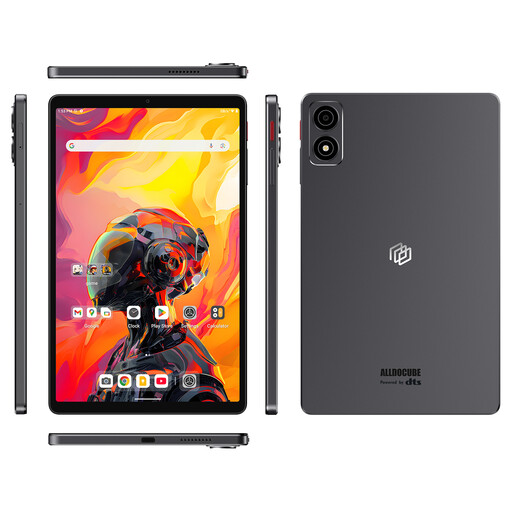
The 8.8-inch format is worth considering if you want a compact reading screen.
The title specifies Android 14 and a 7300 mAh battery, and says no charger is included. If you plan to hold it for long periods, confirm its weight; also check your chosen reading app and library service.
 No image available
Consider its larger page if you expect to prop the tablet up while reading or consulting discussion material.
The tablet is listed with an 11.2-inch display and a stated weight of 485 g. Think through how you will support it in bed, and check that your ebook service works on the exact device.
 No image available
This larger-screen option suits a reading setup where you can support the tablet rather than hold it throughout a chapter.
It is listed with an 11-inch display and a stated weight of 480 g. Confirm that your intended ebook app, library service and assigned title are accessible on the device.
Choose a tablet if you need reading, library and discussion apps on the same device. If you mainly want uninterrupted reading, compare how you will hold or support each option rather than assuming the extra apps will help.
Yes, on devices that meet Libby's platform requirements. Libby lists iOS 10 or later and Android 7.1 or later; you still need a participating library account and access to the assigned title.
Yes, if the tablet supports the Kindle app and you can access the book you need. Amazon lists iOS 17.0 or later for Kindle for iOS and Android 10.0 or later for Kindle for Android, so check the device's installed OS and the club's edition.
Check the exact tablet and bundle rather than assuming an adapter is included. Samsung says its UK Galaxy Tab S10 FE and S10 FE+ packages omit the travel adapter; other models' box contents should be checked individually.