For bill tracking mainly at home, start with a Wi-Fi tablet whose screen you can read comfortably, whose required finance apps work on its software and whose remaining update support you can confirm. Consider cellular connectivity if you regularly check accounts away from reliable Wi-Fi; keyboard or pen accessories make more sense when the tablet will also handle broader household administration.
Who is this tablet for?
Security-first household bill manager
If you use banking, utility or budgeting services, check that the tablet can keep receiving the software updates those tasks call for. The National Cyber Security Centre advises keeping devices and software up to date to address known vulnerabilities.
Visual recurring-bill organiser
A tablet gives you space to review bills, statements and budget categories together. MoneyHelper recommends working through income and spending by category and notes that a visual, manageable routine can help some people keep up with budgeting.
Away-from-home account checker
If you regularly need to review due dates or account details away from reliable Wi-Fi, a cellular model is worth comparing with a Wi-Fi tablet and phone tethering. Check the connectivity of the exact variant before choosing.
What matters when choosing?
Check update support and finance-app compatibility before comparing screens and storage. Then decide whether you need the tablet to connect independently when you are away from Wi-Fi.
| Concern |
What to check |
Who this matters to |
| Updates and account security |
Confirm the exact variant's remaining update support and whether your required finance apps work with its operating system. |
If I use the tablet for banking and bills, I want to know it can receive updates before relying on it for account access. Roughly 36% of consumers put update assurance first. |
| Readable bills and visual planning |
Choose a screen you can read comfortably and check how you will move between statements and your budgeting tool. |
Comparing a bill with my budget is easier to manage when the figures and categories are clear on one screen. For around 29% of consumers, that viewing and planning need comes first. |
| A focused household-admin device |
Compare the storage and accessories in the exact configuration; pay for extras only if you will use them beyond bill tracking. |
If I mainly check payments and keep statements, I would rather meet those needs than choose features for unrelated tasks. Keeping the device focused is the primary concern for roughly 21% of consumers. |
| Connectivity away from home |
Check whether Wi-Fi or phone tethering covers your usual locations before considering a cellular variant and data plan. |
When I need to check an account while travelling or between homes, I cannot always count on Wi-Fi. Independent connectivity comes first for around 14% of consumers. |
Buying pitfalls
-
Choosing an older tablet without checking update support
A tablet used for finance apps needs more than a suitable screen. The National Cyber Security Centre says software updates address known vulnerabilities that attackers can exploit.
Before buying, confirm the exact model's remaining support and the operating-system requirements of the banking and budgeting apps you use. Set up device, browser and app updates after purchase.
-
Entering an irregular bill as a fixed monthly amount
A changing annual expense can distort a monthly budget if you treat one payment as the usual monthly figure.
Where your budgeting tool allows it, enter the annual amount and use its monthly average. Revisit the entry when the bill changes.
-
Choosing 5G for occasional use away from home
A cellular connection is useful when you need the tablet online independently, but it adds little to bill checks that nearly always happen on home Wi-Fi.
Think through where you normally review accounts. Compare phone tethering with a cellular tablet if access away from Wi-Fi is a regular need.
A cellular setup may also require an ongoing mobile-data plan.
Relevant brands to consider
Apple
The iPad 11-inch (A16) is a route to consider if bill tracking will sit alongside note-taking or other household administration.
- Apple lists an 11-inch display, 128GB starting storage and Touch ID; Wi-Fi + Cellular variants offer mobile connectivity.
- Check whether you would use optional keyboard or pencil accessories enough to justify adding them. Confirm update support and compatibility with your finance apps for the variant you choose.
Samsung
The Galaxy Tab S10 FE 5G is relevant when independent connectivity and uses beyond bill tracking are part of the plan.
- Samsung lists a 10.9-inch screen for the cited 5G model.
- If you usually review bills on home Wi-Fi, check whether you would use cellular access often enough to warrant that configuration. Verify support for the exact model.
Lenovo
The Tab M11 4GB/128GB configuration is a full-size Android route for reviewing bills primarily at home.
- Lenovo lists an 11-inch 1920 × 1200 anti-glare display and 128GB storage for the cited configuration.
- Its listing describes Android 13 or later; confirm the exact variant's remaining security support and compatibility with your finance apps.
Joybuy tablets for bill tracking
These Wi-Fi tablets are options to consider for viewing bills and budgeting information at home. Check update support and your required apps for the exact variant before choosing one for financial accounts.
 No image available
Samsung Galaxy Tab A11+ 11-inch 128GB Wi-Fi, Grey
Consider this configuration for reviewing bills on home Wi-Fi. Check that the support date shown on the listing applies to the exact regional variant and that your finance apps work on it.
View on Joybuy
 No image available
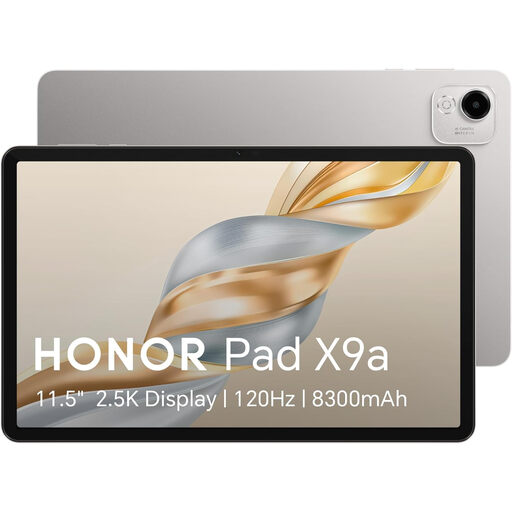
HONOR Pad X9a 11.45-inch Wi-Fi 128GB, Grey
The 11.45-inch screen is worth considering if you want more room to read statements at home. Confirm the installed Android version, remaining update support and compatibility with your finance apps.
View on Joybuy
 No image available
Samsung Galaxy Tab A11+ 8GB/256GB Wi-Fi, Grey
This variant is worth comparing if you plan to keep documents on a home-use tablet. Check update support for this 256GB configuration rather than assuming another Galaxy Tab A11+ variant has the same support period.
View on Joybuy
 No image available
Xiaomi Pad 8 8GB/128GB Wi-Fi, Grey
Consider this Wi-Fi variant for keeping budgeting apps and statements on a tablet used mainly at home. Confirm its remaining update support and whether your required finance apps are compatible.
View on Joybuy
 No image available
DOOGEE U11 Pro 11-inch 256GB, Black
This 11-inch model is an option for storing statements and checking bills at home. Check whether its 1280 × 800 display is comfortable for reading your documents, alongside its remaining update support and finance-app compatibility.
View on Joybuy
Frequently asked questions
Do I need a cellular tablet to track recurring bills?
Not if you normally review bills using reliable home Wi-Fi. Consider a cellular variant when you regularly need the tablet to connect independently away from Wi-Fi; compare it with phone tethering and check any data-plan terms before deciding.
What should I have ready before setting up a bill tracker?
Have your bills, bank statements and banking-app information to hand so you can work through income and spending categories. MoneyHelper's budget planner uses those categories; if a cost varies, check whether your chosen tool can turn an annual amount into a monthly average, and update it when the bill changes.
How should I maintain a tablet used for banking and bills?
Keep its operating system, browser and finance apps updated, and enable automatic updates where appropriate. The National Cyber Security Centre explains that updates address known vulnerabilities; before purchase, also check the exact model's remaining support and your apps' operating-system requirements.


