Who this setup suits
How often you need an up-to-date route matters more than the tablet category alone. A connection for live information, a workable offline plan and enough room to read the map serve different travel habits.
Travellers checking live routes
If departures, connections or alternative trams may change while you are on the coach, you need a dependable way to get current information. A cellular-capable tablet can connect without a phone hotspot, provided its variant and mobile service are suitable.
Occasional coach passengers
If you usually look up stops and planned routes, a Wi-Fi tablet may be enough when you can connect through a phone hotspot or Wi-Fi as needed. Check what your chosen map app can actually do offline before relying on downloaded maps.
Passengers short on space
An 8.7-inch tablet may be easier to handle in a coach seat or pack in a small bag than an 11-inch model. The trade-off is less screen space for a map and stop list.
What matters when choosing
Start with how you will get current tram information, then check the app’s offline features and the screen size you can comfortably use in a coach seat. Screen size alone does not tell you whether a tablet has cellular connectivity.
| Concern |
What to check |
Who this matters to |
| Live tram information |
Check the exact tablet variant’s connectivity and whether your tram app shows current departures and route changes. |
If my connection changes during the journey, I need current departures without depending on coach Wi-Fi or a phone hotspot. Around 42% of consumers put independent access to live information first. |
| Route access offline |
Check local tram coverage and the offline features of the app you intend to use; allow storage for any maps you download. |
When reception drops, I still want the route information I saved, but I cannot assume a downloaded map includes tram directions. For roughly 33% of consumers, that offline fallback is the primary concern. |
| Handling in a coach seat |
Compare an 8.7-inch and an 11-inch display in the way you expect to hold, place or pack the tablet. |
If I will hold the tablet or carry it in a small bag, I may accept a smaller map view for easier handling. Around 25% of consumers place that trade-off first. |
Offline capability depends on the mapping service as well as the tablet. Google Maps Help says transit directions are unavailable in Google Maps offline. Apple Support describes downloaded Maps on iPad, including transit directions where available, but notes that offline maps and public-transport information vary by region. Test the intended app against your actual tram stops and routes before making offline use the basis of your choice.
Mistakes to avoid
-
Assuming every offline map includes tram directions
A saved map is not necessarily an offline journey planner. Google Maps Help says its transit directions are unavailable offline; Apple’s offline Maps and transit information are subject to regional availability.
Check the exact tram route and stops in your preferred app, then test the features you expect to use without a connection.
-
Choosing Wi-Fi when live updates must work independently
A Wi-Fi-only tablet needs Wi-Fi or a phone hotspot for current departures and disruptions. Cellular connectivity is specific to the tablet variant, not something to infer from its screen size or model family.
If you regularly need live updates away from dependable Wi-Fi, check the cellular variant, a suitable mobile service and coverage along your journeys. Otherwise, plan and test a hotspot fallback.
-
Picking a screen size without thinking about the seat
An 11-inch display gives a larger map workspace but takes more room to hold or place on a coach tray table. An 8.7-inch display is more compact, with less space for route detail.
Decide whether you will usually hold the tablet, set it down or pack it away between stops before comparing sizes.
-
Treating passenger and driver use alike
Checking a route as a passenger is different from using a device while driving. GOV.UK says it is illegal to hold and use a tablet or another data-capable device while driving or riding a motorcycle.
If you are driving, do not hold and use the tablet while the vehicle is moving; follow the applicable hands-free and safe-control rules.
Relevant brands to consider
These brand examples illustrate different sizes and connectivity variants. Check the precise model rather than assuming a feature applies across a brand’s tablets.
Apple
The 11-inch iPad (A16) is a reference point for buyers comparing Wi-Fi and Wi-Fi + Cellular variants and considering Apple Maps on iPad.
- Apple lists Wi-Fi 6 for the iPad (A16), with 5G and eSIM on its Wi-Fi + Cellular versions.
- Apple Support says offline maps are not available in every country or region, and public-transport information varies by region. Check your local tram coverage in Maps.
Samsung
Samsung provides an 8.7-inch Galaxy Tab A11 Wi-Fi example and a larger, 11-inch Galaxy Tab A9+ 5G example for comparing handling with connectivity.
- Samsung lists 64GB and 128GB storage options for the cited Galaxy Tab A11 Wi-Fi model, with microSD expansion up to 2TB.
- For the cited Galaxy Tab A9+ 5G, Samsung says actual 5G performance depends on the carrier, country and user environment.
Lenovo
The cited UK Tab M11 configuration is an 11-inch Wi-Fi tablet to consider when a larger map view matters and you have another way to connect for live information.
- Lenovo lists an 11-inch, 1920 × 1200 anti-glare display and 128GB storage for this configuration.
- This Wi-Fi configuration needs a suitable connection, such as a phone hotspot, for live tram services away from Wi-Fi.
Tablets to consider on Joybuy
These tablets offer different approaches to checking tram routes on a coach: a model advertising dual 4G SIM connectivity, compact and larger Wi-Fi choices, and a 10.1-inch option whose exact connectivity needs checking. Match the variant to your connection plan and confirm local tram-app coverage before choosing.
 No image available
TABWEE W90 11-inch tablet, dual 4G SIM, 256GB
Consider this model if you want to check live routes without relying solely on onboard Wi-Fi: its title specifies dual 4G SIM connectivity alongside 5G Wi-Fi. Confirm compatibility with your intended mobile service and coverage on your journeys before depending on it.
The title also specifies an 11-inch display and 256GB storage. Check that your tram app covers the routes you use, and confirm the supplied software version if app compatibility matters.
View on Joybuy
 No image available
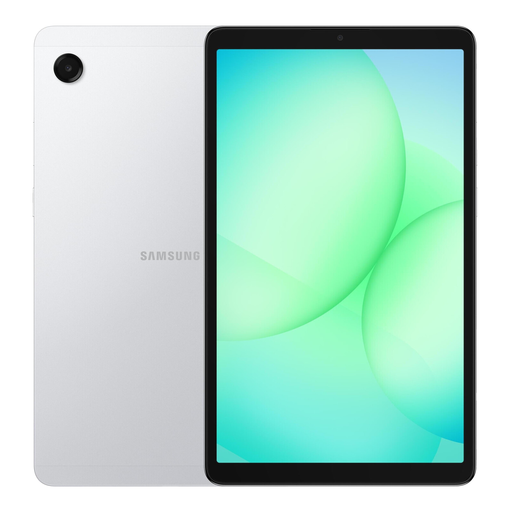
Samsung Galaxy Tab A11 X130 8.7-inch Wi-Fi, 4GB/64GB, Silver
The 8.7-inch display is worth considering if you expect to hold the tablet in a coach seat or pack it in a small bag, accepting less room for map detail.
This is a Wi-Fi model, so plan on Wi-Fi or a phone hotspot for live departures. Check your chosen app’s coverage of local stops and routes.
View on Joybuy
 No image available
Apple 11-inch iPad Air (2026, M4) Wi-Fi 128GB, Starlight
This Wi-Fi iPad Air offers an 11-inch map workspace if you can use Wi-Fi or a phone hotspot for live checks. It is a different model from the iPad (A16) described in the brand examples.
Apple Support describes offline Maps on iPad, but offline and transit availability vary by region. Check your local tram routes in the app before relying on downloaded directions, and check the tablet’s weight if you expect to hold it for long periods.
View on Joybuy
 No image available
Samsung Galaxy Tab A11+ 11-inch Wi-Fi 128GB, Grey
Consider this 11-inch option if you want more room to read a map and can connect through Wi-Fi or a phone hotspot when route information changes.
The product name specifies 128GB storage and Wi-Fi connectivity. Check that your intended tram app covers your routes; do not assume this variant can connect independently to mobile data.
View on Joybuy
 No image available
TABWEE T20 10.1-inch 256GB tablet with keyboard, mouse and stylus
The 10.1-inch display offers another size to consider if an 8.7-inch screen feels cramped but an 11-inch tablet takes too much room in your seat.
The title specifies 256GB storage and a keyboard, mouse and stylus. If independent live access matters, confirm the exact connectivity variant before buying; also check tram-app coverage and the supplied software version.
View on Joybuy
Frequently asked questions
Is a Wi-Fi tablet enough to check tram routes on a coach?
A Wi-Fi tablet can be enough if you have a connection when you need current departures or changes. Google Maps Help says transit directions are unavailable offline; Apple Support describes offline transit directions on iPad where its offline Maps and public-transport information are available. Check your local routes in the app you intend to use.
Should I choose an 8.7-inch or an 11-inch tablet?
Choose the size around how you will use the tablet in your seat: an 8.7-inch model is more compact, while an 11-inch model gives a larger map workspace. Check connectivity separately, because either screen size can be sold in different variants.
What should I prepare before the coach journey?
Check that your local tram app or map app shows the stops and routes you need, then download any maps you plan to use offline. Test what remains available without a connection: Google Maps Help says its offline mode does not provide transit directions, so downloaded map areas alone may not cover your journey-planning needs.
Does the advice change if I am driving rather than travelling as a passenger?
Yes. GOV.UK says it is illegal to hold and use a tablet or another data-capable device while driving or riding a motorcycle. A driver must follow the applicable hands-free rules, keep a clear view of the road and remain in full control.


