
24/7 Customer Support

Free returns

Same-day & Next-day Delivery

Quality Guaranteed

Unlock Your Welcome Offers: FREE Delivery | Up to 80% OFF | Free 30-day JoyPlus trial
Download the APP
Navigating the world of tablets can be a challenge. You need a device that can handle everything from work and study to streaming your favourite shows, but you don't want to be tied to a premium price tag. This is where many UK shoppers find themselves looking for a powerful, yet affordable, alternative.
As a Joybuy Product Recommendation Officer, my role is to help you find products that offer genuine value. This guide is designed to cut through the clutter and focus on what matters: features, performance and suitability for your specific needs. We will explore the TECLAST Android tablet range, a brand that has gained attention for packing impressive specifications into affordable devices.
Before diving into specific models, let's cover a few key considerations to help you make an informed choice.
The first thing to consider is how you plan to use your tablet. A large screen tablet, such as one with a 14-inch display, is excellent for media consumption, multitasking with split-screen apps or as a laptop substitute for productivity tasks. Conversely, a more compact 11-inch model offers greater portability for use on your daily commute or for casual browsing on the sofa.
The processor is the engine of your tablet. A capable chip like the MediaTek Helio G99 ensures smooth performance when gaming, editing documents or switching between multiple apps. Also, pay attention to RAM—many TECLAST models boost their physical RAM with virtual RAM for better multitasking. For true on-the-go functionality, a 4G LTE tablet with a SIM card slot is essential, allowing you to stay connected to the internet without relying on Wi-Fi. This is a particularly useful feature for students and remote workers.
One of the standout benefits of TECLAST is the value offered through bundled accessories. Finding a tablet with a keyboard and protective case included can save you a significant amount of money and effort. For creatives, a drawing tablet with a pen is a must. Finally, opting for a device with the latest Android 15 operating system ensures you have access to the newest features, security updates and app compatibility for years to come.
Here are our recommendations from the current TECLAST lineup, selected to meet a variety of needs and budgets.
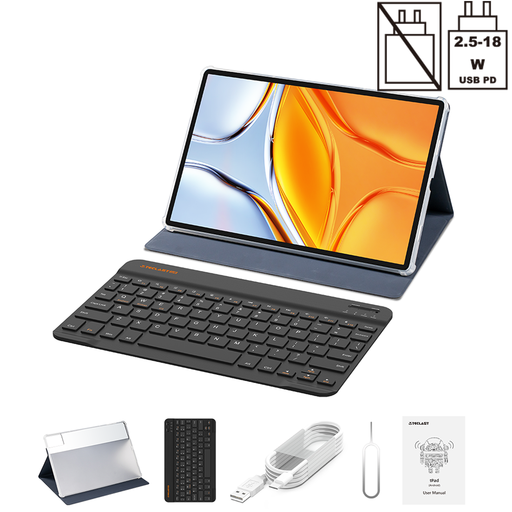
Why It Stands Out: The TECLAST T70 is built around its immense 14-inch 1920x1200 display, making it an exceptional device for both work and play. It comes as a complete package with a protective case and an English Bluetooth keyboard, transforming it into a capable laptop alternative straight out of the box.
Pros:
Who is it for?: This model is ideal for students looking for a device for research and writing, professionals who need a large portable screen for documents and spreadsheets and families wanting a shared tablet for streaming movies.
View details for the TECLAST T70
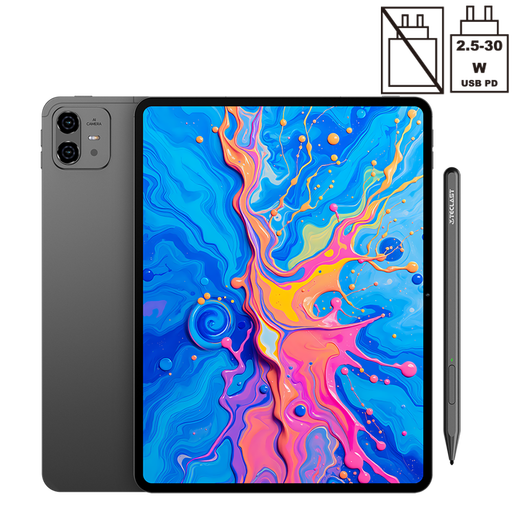
Why It Stands Out: The ArtPad Pro is tailored for creativity. Its main draw is the high-resolution 12.7-inch 2K display combined with an included T-Pen stylus that supports 4096 levels of pressure sensitivity. This makes it a fantastic and affordable entry into the world of digital art.
Pros:
Who is it for?: This is the perfect choice for digital art hobbyists, design students or anyone who prefers to take handwritten notes. It offers specialised features without the high cost of professional-grade drawing tablets.
Explore the TECLAST ArtPad Pro
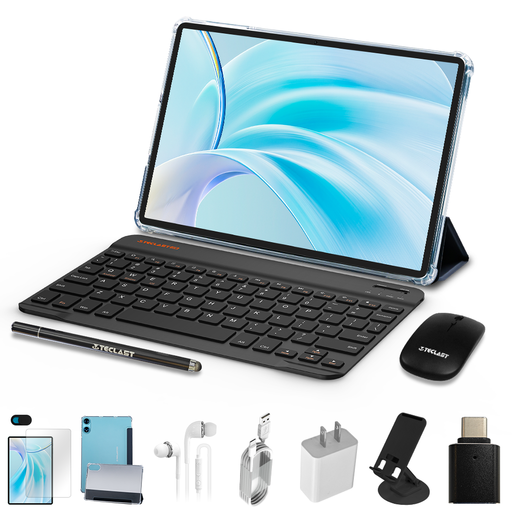
Why It Stands Out: The TECLAST P50 bundle represents outstanding value, making it a top contender for anyone searching for a cheap tablet in the UK. For its current price, you get not just the tablet but also a protective case, a Bluetooth keyboard and a mouse. It’s a complete setup for a remarkably low price.
Pros:
Who is it for?: This is an excellent option for those on a tight budget, parents seeking a first tablet for their children or users who need a secondary device for light tasks like browsing, emails and watching videos.
Check out the TECLAST P50 bundle
The models highlighted here are just a snapshot of what is available. The ability to insert a SIM card for mobile data is a game-changer for many users, offering freedom from Wi-Fi hotspots.
If you need a tablet that keeps you connected wherever you are, browse our full collection of Android tablets with a SIM card slot to find the perfect match for your mobile lifestyle.
Yes, they can be a very practical choice for students. They offer a strong balance of performance and affordability. Models that come with an included keyboard are particularly useful for taking notes in lectures and writing assignments, providing a cost-effective alternative to a traditional laptop.
Certainly. Specific models like the TECLAST ArtPad Pro are designed with artists in mind. They feature high-resolution displays and come with pressure-sensitive styluses, making them a suitable and accessible tool for digital art hobbyists and design students.
Widevine L1 is a security certification required by many streaming services. Having this certification means the tablet is authorised to play video content from platforms like Netflix, Prime Video and Disney+ in high definition (HD). A tablet with Widevine L1 will provide a significantly better and sharper viewing experience.