
24/7 Customer Support

Free returns

Same-day & Next-day Delivery

Quality Guaranteed

Unlock Your Welcome Offers: FREE Delivery | Up to 80% OFF | Free 30-day JoyPlus trial
Download the APP
Is your internet connection struggling to keep up? Buffering during a 4K film, frustrating lag in the middle of an online game and Wi-Fi dead zones in the back bedroom are common complaints. Often, the basic router supplied by your internet service provider (ISP) is the bottleneck. Upgrading to a dedicated TP-Link Wi-Fi router can transform your home network, delivering the speed, stability and coverage you need for modern life.
This guide is designed to help you navigate the options. We will break down the key technologies and offer practical advice to help you select a router that fits your home, your devices and your budget.
Choosing a new router can feel technical, but it comes down to a few key considerations. By understanding these, you can confidently pick the right model for your needs.
The technology behind Wi-Fi is constantly evolving. The latest standards offer significant improvements in speed, capacity and efficiency.
Wi-Fi 6 router is an excellent upgrade for most UK households. It is designed to handle a multitude of connected devices—from laptops and phones to smart lights and thermostats—without slowing down. It uses technologies like OFDMA and MU-MIMO to manage traffic more efficiently, which is ideal for busy family homes.Wi-Fi 6E router can provide an incredibly low latency router experience, making it a superb choice for competitive online gaming, AR/VR applications and 8K streaming.Wi-Fi 7 router introduces features like Multi-Link Operation (MLO), which allows a single device to connect to the router using multiple frequency bands simultaneously. This boosts speed, cuts latency and improves reliability. It is the ultimate choice for users with multi-gigabit internet plans and a desire to future-proof their home network.A single, powerful router might be sufficient for a flat or a small house. However, for larger, multi-storey homes or properties with thick internal walls, you may still encounter dead spots. This is where mesh technology comes in. TP-Link OneMesh is a flexible solution that allows you to build a seamless whole-home Wi-Fi network by adding compatible range extenders to your main TP-Link Archer router. This creates one unified network, so you can move around your home without your connection dropping or needing to switch networks manually.
While Wi-Fi is key, wired connections are still important for certain devices. A PC used as a router for gaming, a network-attached storage (NAS) drive or a smart TV can all benefit from a stable Ethernet connection. Look at the number and type of LAN ports. Most modern routers offer Gigabit ports (1 Gbps), but high-end models now feature 2.5 Gbpsmulti-gigabit ports to unlock the full potential of high-speed internet plans and devices.
Based on features, performance and user needs, here are our recommendations from the TP-Link Archer router lineup.
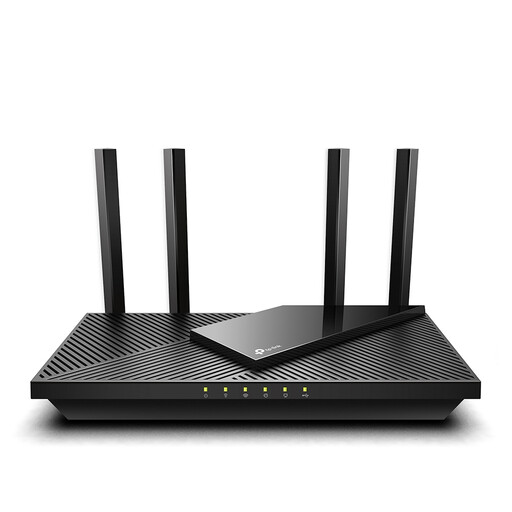
Why It Stands Out: The Archer AX55 is the ideal first step away from a basic ISP router. It delivers the full benefits of Wi-Fi 6 technology at an accessible price point. With AX3000 dual-band speeds and support for the HE160 channel on the 5 GHz band, it doubles the bandwidth to ensure smooth 8K streaming and fast downloads.
Pros:
Who is it for? This is the perfect best TP-Link router for home use in small to medium-sized properties. It is for families and individuals who want a significant and reliable performance boost for everyday streaming, browsing and managing a growing number of smart home devices.

Why It Stands Out: The Archer AXE75 opens up the exclusive 6 GHz band, making it a true tri-band router for the modern, device-heavy home. This new band is free from interference from older devices, providing a clean, high-speed lane for your Wi-Fi 6E-compatible gadgets. This results in exceptionally low latency, which is a game-changer for competitive online gaming and immersive VR.
Pros:
Who is it for? This router is aimed at tech enthusiasts, serious gamers and households with numerous connected devices all competing for bandwidth. If you own a new-generation smartphone, laptop or VR headset that supports Wi-Fi 6E, the Archer AXE75 will unlock its full wireless potential.

Why It Stands Out: The BE9300 is a glimpse into the future of home networking. As a Wi-Fi 7 router, it delivers unprecedented speed and reliability. Its headline feature, Multi-Link Operation (MLO), allows devices to use multiple bands at once, creating a more robust and faster connection than ever before. This is complemented by a full suite of 2.5 Gbps ports, breaking through the old 1 Gbps bottleneck for truly fast wired and wireless performance.
Pros:
Who is it for? This is for the early adopter, the content creator working with massive files and the user with a multi-gigabit internet connection who refuses to compromise on performance. The BE9300 is an investment in a network that will handle anything you can throw at it, today and for years to come.
If these specific models aren't quite what you're looking for or you'd like to compare them with other configurations, we have a wider selection available. A different TP-Link Archer router or another brand might be the perfect solution for your unique setup.
Explore our full range of Network devices to find the perfect fit for your home network.
1. Do I need to replace my ISP's router to use a TP-Link router? You will still need the box from your ISP, as it functions as a modem to bring the internet into your home. However, you connect your new TP-Link Wi-Fi router to it via an Ethernet cable. For the best performance, you can often log into your ISP hub's settings and enable "modem mode." This turns off its Wi-Fi and routing functions, allowing your more powerful TP-Link router to manage your entire home network.
2. What is the difference between a TP-Link Archer router and other TP-Link series? The 'Archer' series is TP-Link's flagship line for high-performance home and small office routers. It's where you'll typically find the latest technologies like Wi-Fi 6E and Wi-Fi 7. Other series, like 'Deco', are specifically designed for creating whole-home mesh systems from the ground up, while other ranges may focus on more affordable or portable solutions.
3. Is a tri-band router worth it? A tri-band router is highly beneficial in a busy household. A standard dual-band router has two "lanes" for traffic (2.4 GHz and 5 GHz). A tri-band model adds a third lane (either a second 5 GHz band or a new 6 GHz band). This drastically reduces network congestion when multiple people are simultaneously streaming, gaming and on video calls, ensuring a smoother experience for everyone.