
24/7 Customer Support

Free returns

Same-day & Next-day Delivery

Quality Guaranteed

Unlock Your Welcome Offers: FREE Delivery | Up to 80% OFF | Free 30-day JoyPlus trial
Download the APP
A stable and fast internet connection is no longer a luxury; it's an essential utility for work, entertainment and staying in touch. Yet, navigating the world of networking hardware can be confusing. With so many models and technical terms, choosing the right router can feel overwhelming.
As a Joybuy Product Recommendation Officer, my role is to help you find the right product for your specific situation. This guide cuts through the jargon to help you understand which TP-Link router is the right fit for your home, business or travel needs, ensuring you get the reliable connectivity you depend on.
Before looking at specific models, it's helpful to understand what features matter most. Consider these points to narrow down your options.
First, identify your internet source. Most UK homes use a fixed-line service (like fibre or ADSL), which connects to a router via a cable. However, if you live in an area with poor wired infrastructure, or need a flexible solution for a temporary site, a TP-Link 4G router that uses a SIM card might be a more practical choice. These devices provide a reliable internet connection using mobile data networks, freeing you from the need for a landline.
The number of devices and the size of your property are key factors. A household with multiple people streaming 4K video, gaming online and working from home will need a high-performance router. Look for models supporting the latest Wi-Fi standards, such as Wi-Fi 6E. A TP-Link Wi-Fi 6E router offers access to the exclusive 6 GHz band, which means less interference from neighbours' networks and significantly faster, more stable speeds for compatible devices. For larger homes, consider a router that supports Mesh technology, like TP-Link's OneMesh, which allows you to add extenders to create a seamless network without dead zones.
If you need internet while travelling, commuting or working from different locations, a standard home router won't do. In this case, a portable Wi-Fi hotspot UK device, often called a mobile Wi-Fi or TP-Link MiFi, is the ideal solution. These compact, battery-powered gadgets use a router with a SIM card slot to create a personal Wi-Fi network wherever you have a mobile signal.
Based on different user needs, here are our recommendations from the TP-Link range.

Why It Stands Out: The TP-Link Archer AXE75 is built for the future. Its standout feature is Tri-Band Wi-Fi 6E, which adds a 6 GHz band to the standard 2.4 GHz and 5 GHz bands. This new, uncongested band provides a super-fast lane for your newest devices, dramatically reducing latency and interference. Powered by a 1.7 GHz Quad-Core CPU, it can handle dozens of connected devices simultaneously without slowing down.
Pros:
Who is it for? This router is for homeowners and tech enthusiasts with high-speed fibre broadband who want to eliminate bottlenecks. It's perfect for large families or shared houses where multiple users are gaming, streaming and working online at the same time.
View the TP-Link Archer AXE75 on Joybuy
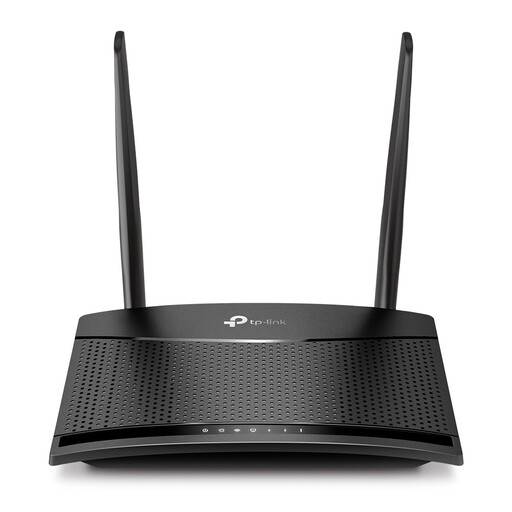
Why It Stands Out: The TL-MR100 offers a simple and effective solution for getting online without a fixed-line connection. As a TP-Link 4G router, it uses a Nano-SIM card to tap into a 4G mobile network, providing instant Wi-Fi for up to 32 devices. It's a plug-and-play device that is incredibly easy to set up, making it ideal for holiday homes, temporary worksites or rural areas with unreliable broadband.
Pros:
Who is it for? This is for anyone who needs a reliable internet connection where fixed-line broadband is unavailable, expensive or impractical. It's a great fit for renters, students in temporary accommodation or as a failover backup for a small business.
View the TP-LINK TL-MR100 on Joybuy
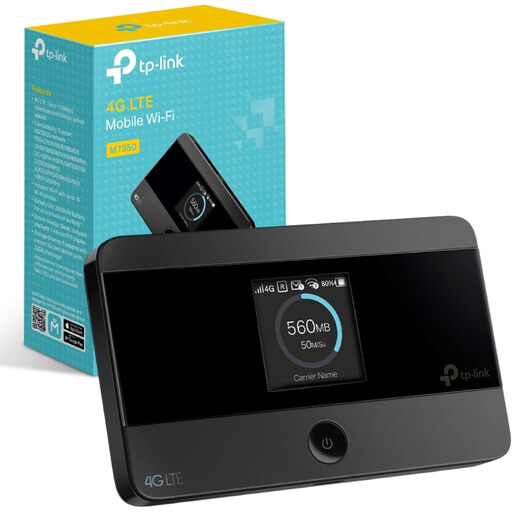
Why It Stands Out: The TP-Link M7350 is the definition of a portable Wi-Fi hotspot. This compact device fits in your pocket and houses a 2000mAh battery for up to 8 hours of use. It supports 4G LTE networks and can share a connection with up to 10 devices simultaneously. The handy screen displays important information like signal strength, battery life and data usage at a glance, giving you full control over your mobile Wi-Fi.
Pros:
Who is it for? This TP-Link MiFi device is perfect for frequent travellers, remote workers, commuters or anyone who needs a reliable internet connection for their laptop or tablet while away from home or the office.
View the TP-Link M7350 on Joybuy
If your connectivity needs are more specialised, such as for an off-grid location or a large worksite that requires a self-sustaining power source, you might be interested in more robust solutions. For these scenarios, it's worth exploring devices that combine mobile data with independent power.
Explore our range of [LTE solar router] options for more advanced, independent setups.
1. What is the difference between a 4G router and a mobile Wi-Fi hotspot? A TP-Link 4G router like the TL-MR100 is designed for stationary use in a home or office. It needs to be plugged into a power outlet but offers a more robust connection with Ethernet ports. A mobile Wi-Fi hotspot like the M7350 is battery-powered and designed for portability, making it ideal for use on the move.
2. Is a TP-Link Wi-Fi 6E router worth it in the UK? If you have many new devices (laptops, smartphones, etc.) that support Wi-Fi 6E and a fast fibre broadband plan (over 500 Mbps), then yes. A TP-Link Wi-Fi 6E router provides a noticeable performance improvement by using the less crowded 6 GHz frequency, which is especially beneficial in dense urban areas with lots of network congestion. For those with slower connections or older devices, a standard Wi-Fi 6 router may be sufficient.
3. How do I set up a TP-Link router? TP-Link routers are known for their user-friendly setup process. Most models can be configured in minutes using the TP-Link Tether app on your smartphone. The app guides you through connecting the hardware, setting a network name (SSID) and creating a password. For 4G models, the process is even simpler: insert your SIM card, power on the device, and it will typically connect automatically.