What matters when choosing
For viewing that is consistently dark, assess black level and screen fit before treating bright-room features as a priority. Make the audio decision separately: a TV with built-in sound features and a TV connected to an external system meet different setup needs.
| Concern |
What to check |
Who this matters to |
| Dark-scene contrast |
Check the exact panel type and the HDR formats used by your concert films or services. |
If I watch black stages lit by sharp spotlights, I want the background to stay dark without losing performers in shadow. Around 37% of consumers put dark-scene contrast first. |
| Music and external audio |
Compare the exact TV’s speaker features; for a soundbar or AV receiver, check eARC and format compatibility on both devices. |
When vocals, instruments and the crowd drive the film, I need to decide whether built-in sound is enough or I want separate speakers. Music and an audio upgrade are the first concern for around 27% of consumers. |
| Screen and furniture fit |
Measure the viewing space and compare the model’s width, height and depth with and without its stand. |
Before choosing a larger picture, I need to know that the TV fits my cabinet or wall and makes sense from my seat. Around 18% of consumers place that physical fit first. |
| Sources and room lighting |
Confirm your apps or external inputs, relevant HDR formats and how the screen handles reflections at your usual viewing time. |
If I switch between streaming sources or sometimes leave a lamp on, I want the TV to work with both the content and the room. Compatibility and changing light come first for around 18% of consumers. |
TV choices on Joybuy
These TVs offer different screen sizes for a dark-room concert-film setup. Compare their exact dimensions and audio connections before deciding whether built-in sound or a separate system suits you.
 No image available
Samsung S85F QE83S85FAE 83-inch 4K Smart TV
Consider this 83-inch model only if a large screen suits your seating position and the available space.
Check the exact panel type, HDR support and audio connections against your concert-film sources and any planned sound system.
View on Joybuy
 No image available
Sony BRAVIA A90 XR42A90K 42-inch OLED 4K TV
The 42-inch OLED format is worth considering where a larger concert-film screen would be difficult to accommodate.
The product name states Dolby Vision and Dolby Atmos support. If you plan to add a soundbar or AV receiver, check eARC on this exact variant; compare its full dimensions with your space.
View on Joybuy
 No image available
Sony BRAVIA A90 XR48A90K 48-inch OLED 4K TV
This 48-inch OLED is another size to assess if you want concert-film viewing without choosing a 55-inch screen.
The product name states Dolby Vision and Dolby Atmos support. Confirm the full dimensions for your furniture and check eARC on the exact TV before planning an external audio setup.
View on Joybuy
 No image available
Sony BRAVIA 8 K65XR80BP 65-inch OLED 4K TV
Consider the 65-inch size if it fits both your viewing position and the intended wall or cabinet.
The product name states Dolby Vision and Dolby Atmos support. Check this variant’s mounting dimensions and eARC connection if you intend to add separate speakers.
View on Joybuy
 No image available
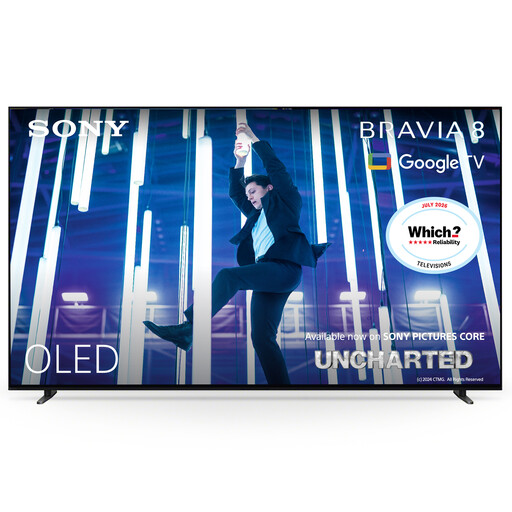
Sony BRAVIA 8 K55XR80BP 55-inch OLED 4K TV
The 55-inch size offers a different fit from the 65-inch BRAVIA 8; measure your space rather than assuming either will suit it.
The product name states Dolby Vision and Dolby Atmos support. Check the exact dimensions, mounting requirements and eARC connection if external audio is part of your plan.
View on Joybuy
Common questions
Is OLED or Mini LED a better starting point for a dark concert-film room?
Start with OLED if the room stays dark and deep blacks around stage lighting are your priority: LG UK and Sony UK describe individually controlled OLED pixels that support this kind of contrast. If lamps or windows regularly reflect in the screen, compare reflection handling on the exact OLED and Mini LED models you are considering rather than assuming either technology solves that problem.
Is Dolby Atmos on a TV enough for concert films?
A Dolby Atmos logo alone cannot tell you whether the TV’s built-in sound will meet your expectations for music. If you want a soundbar or AV receiver, check the supported formats and eARC connection on the exact TV and audio device; HDMI Licensing Administrator describes eARC as a connection for higher-bandwidth audio.
How can I tell whether a TV will fit my room?
Measure the intended wall or cabinet space and your usual viewing position, then compare the exact TV’s full width, height and stand depth. Philips UK notes that the frame and stand add to a screen’s dimensions, so its diagonal measurement is not enough for a fit check.
Do I need a TV Licence to stream concert films in the UK?
According to TV Licensing, you need licence coverage to watch live TV, including live programmes on streaming services, or to use BBC iPlayer. If you only watch on-demand programmes on other services and never watch live TV, TV Licensing says you do not need a licence for that activity.


