
24/7 Customer Support

Free returns

Same-day & Next-day Delivery

Quality Guaranteed
Download the APP
Categories
Stepping up your gaming setup often means looking beyond the standard 16:9 screen. If you find yourself wanting a wider field of view for greater immersion or a competitive edge, you are likely considering an ultrawide gaming monitor. The expanded screen real estate can transform your experience, but navigating the market of different panel types, refresh rates and features can be a challenge.
As the Joybuy Product Recommendation Officer, my role is to help you understand the key specifications that matter. This guide cuts through the marketing jargon to provide clear, practical advice, helping you find a monitor that genuinely enhances your gaming.
Before diving into specific models, it's useful to understand the core features that will define your experience. Focusing on these three areas will help you make a more informed decision.
For any gamer, particularly those playing fast-paced titles, smoothness is paramount. The refresh rate, measured in Hertz (Hz), indicates how many times per second the screen updates the image. A higher number, such as 240Hz, results in noticeably smoother motion. The response time measures how quickly a pixel can change colour. A low response time (e.g., 1ms or less) reduces motion blur and ghosting, keeping the action sharp. Also, look for adaptive sync technologies like G-SYNC Compatible or AMD FreeSync Premium, which synchronise the monitor's refresh rate with your graphics card's output to prevent screen tearing.
The panel is the heart of the monitor. The main types you'll encounter are:
The most common resolution for this category is the 1440p ultrawide monitor, which has a resolution of 3440x1440. This provides a significant upgrade in sharpness over 1080p without being as graphically demanding as 4K, striking a great balance for performance and visual quality. A 34 inch ultrawide is a popular size, offering an immersive experience without overwhelming your desk space. The 21:9 aspect ratio provides a panoramic view that can be a real advantage in strategy and open-world games.
Here are our recommendations, selected to meet the needs of different types of gamers.
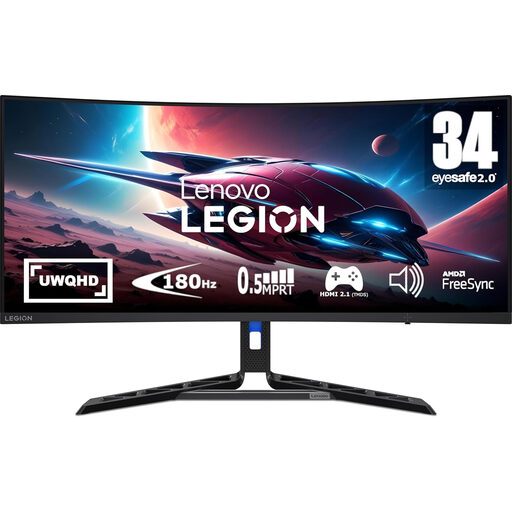
Why It Stands Out: The Lenovo Legion R34w-30 offers a compelling package that balances immersive features with smooth performance. Its 34-inch curved VA panel and sharp UWQHD resolution create an expansive and detailed view, while the high refresh rate ensures gameplay remains fluid.
Pros:
Who is it for? This monitor is an excellent choice for gamers looking for a high-performance, immersive ultrawide experience that offers great value. It's well-suited for a wide range of genres, from sprawling RPGs to fast-paced shooters.
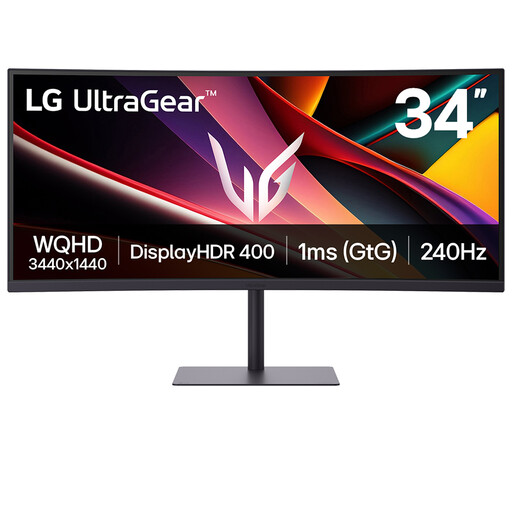
Why It Stands Out: As part of the renowned LG UltraGear lineup, this monitor is built for speed. It combines a 240Hz refresh rate with a 1ms response time, making it a formidable tool for competitive players who demand maximum responsiveness.
Pros:
Who is it for? This is a fantastic monitor for competitive gaming. Players of FPS, racing and fighting games who prioritise refresh rate and response time above all else will find its performance exceptional.
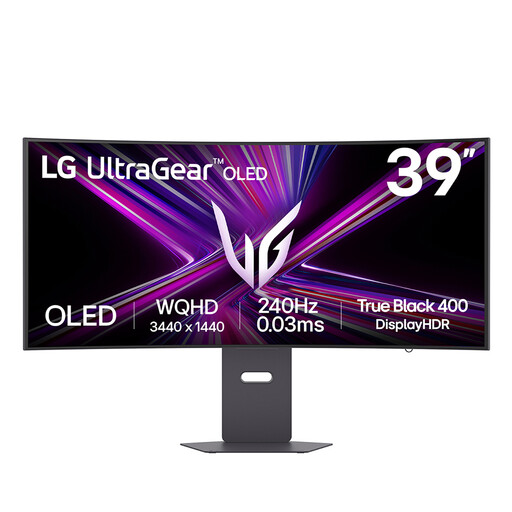
Why It Stands Out: This monitor represents the pinnacle of visual fidelity and performance. Its massive 39-inch OLED panel delivers the perfect blacks and infinite contrast that only OLED can, combined with an aggressive 800R curve and a top-tier 240Hz refresh rate.
Pros:
Who is it for? This is for the gaming enthusiast who wants the absolute best in visual immersion and performance. If you play cinematic, story-driven games and also demand elite speed for competitive titles, this OLED monitor delivers an uncompromising experience.
These three recommendations cover a range of needs, but the world of ultrawide monitors is vast. If you're interested in exploring different screen sizes, panel technologies or feature sets, we invite you to browse our full collection of curved computer monitors to find the perfect fit for your setup.
Is an ultrawide gaming monitor worth it for gaming? For many players, yes. The wider 21:9 aspect ratio enhances immersion by filling more of your peripheral vision, which is especially noticeable in open-world, racing and simulation games. In some titles, the expanded field of view can also provide a tactical advantage by letting you see more of the battlefield.
Do all games support ultrawide resolutions? The vast majority of modern PC games support 21:9 resolutions natively. However, some older titles or highly competitive e-sports games may restrict the aspect ratio to 16:9 to ensure fairness, resulting in black bars on the sides of the screen. Console support for ultrawide is more limited, so it is important to check compatibility for your specific platform and favourite games.
What is the difference between a 1440p ultrawide monitor and a 4K monitor? A 1440p ultrawide monitor typically has a resolution of 3440x1440 pixels (a 21:9 aspect ratio), while a standard 4K monitor has a resolution of 3840x2160 (a 16:9 aspect ratio). The 4K monitor has a higher pixel density for a sharper image, but the ultrawide monitor provides a wider, more panoramic view. Ultrawide is also generally less demanding on your graphics card, making it easier to achieve high frame rates.