What should you check before buying?
Confirm course compatibility before comparing capacity and carrying convenience. If a tablet, desktop or remote service is part of your plan, establish which assessed tasks it can actually complete.
| Concern |
What to check |
Who this matters to |
| Course compatibility |
Ask for the current application list and any operating-system, processor or hardware-interface requirements. Confirm whether remote access covers assessed work. |
If my modules require specialist software, I need a computer that runs it and connects to any required equipment. Around 36% of consumers would put course compatibility first. |
| Campus portability |
Compare the exact configuration’s weight, charger, ports and independently tested battery runtime alongside its screen size. |
When I carry my laptop between accommodation, teaching rooms and the library, a manageable device matters more to me than extra screen space. Around 29% of consumers would prioritise that daily portability. |
| Coursework capacity |
Check whether demanding applications run locally, in labs or remotely; match RAM, storage and graphics requirements to that arrangement. |
If I run demanding projects or keep substantial files locally, I need capacity for that work rather than specifications chosen for ordinary browsing. Around 21% of consumers would make local workload their primary concern. |
| Tablet and supporting kit |
Check whether a tablet can handle required files and submissions, whether remote access is available, and whether chargers and backup devices meet your equipment needs. |
I may prefer handwritten notes or remote access, but I need to know that the arrangement will not leave an assessed task unfinished. Around 14% of consumers would put this device-and-accessory decision first. |
Laptops for primary study use on Joybuy
These Windows laptop configurations offer different screen formats and stated memory and storage capacities for coursework. Match any candidate to your department’s requirements before deciding whether its size and connections suit daily campus use.
 No image available
ASUS Vivobook 15 X1504VA, Core 5 120U, 24GB RAM, 1TB SSD
Consider this configuration if you need substantial local storage for coursework and prefer a 15.6-inch screen.
Intel Core 5 120U processor; 24GB RAM; 1TB SSD; Cool Silver.
Check course-software compatibility and independently tested battery runtime for this configuration before relying on it throughout a campus day.
Joybuy
 No image available
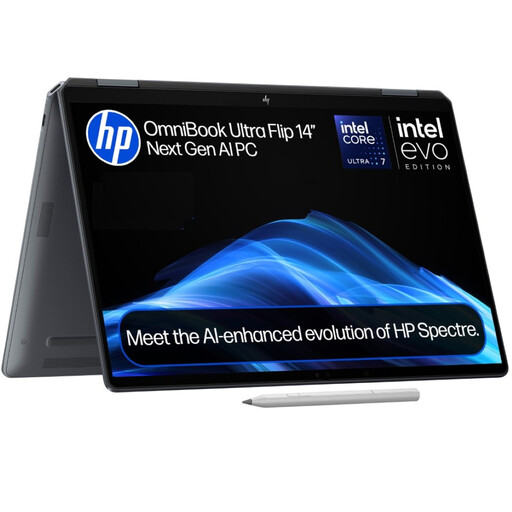
HP OmniBook Ultra Flip 14-fh0006na 2-in-1, 16GB RAM, 1TB SSD
Consider the convertible format if you want a primary laptop that can also be used in a folded-back arrangement.
16GB RAM; 1TB SSD; Windows 11 Home.
Confirm required software and check battery testing for the exact configuration before choosing it for long days away from a socket.
Joybuy
 No image available
Lenovo IdeaPad Slim 3 83K7009MUK, Ryzen 5 7535HS, 24GB RAM
Consider this 15.3-inch laptop if coursework involves multitasking and you want to compare a larger screen with your carrying needs.
WUXGA display; 24GB DDR5 RAM; 512GB PCIe SSD; Windows 11 Home; Wi-Fi 6.
Check the ports your course equipment needs and battery testing for this configuration.
Joybuy
 No image available
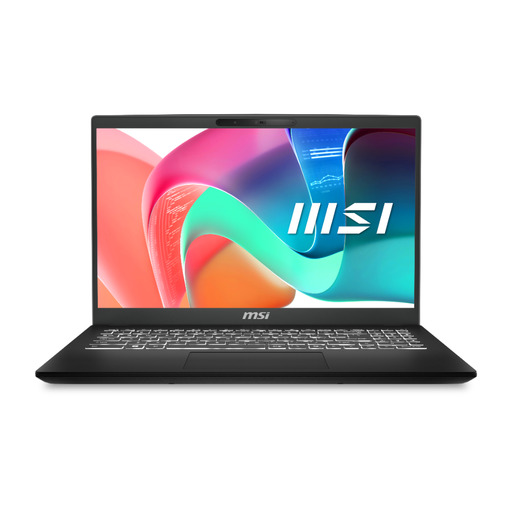
MSI Modern C2RMG-282UK, Core 5, 16GB RAM, 512GB SSD
Consider this configuration for document work and other coursework that calls for a full laptop rather than a tablet-only setup.
15-inch FHD display; Intel Core 5 processor; 16GB DDR IV RAM; 512GB SSD.
Confirm course compatibility and independently tested battery runtime before planning to use it away from charging points.
Joybuy
 No image available
HP OmniBook X Flip 16-as0004na, Core Ultra 5 226V, 16GB RAM
Consider this 16-inch 2-in-1 if you want a larger touchscreen for study and can accommodate that format in your daily setup.
Intel Core Ultra 5 226V processor; 16GB RAM; 512GB SSD; Windows 11 Home.
Check its weight, battery runtime and ports against your journey and any course peripherals, as well as software compatibility.
Joybuy
University laptop questions
Can a tablet replace a laptop for university coursework?
Use a tablet as your only study device only if your department confirms that it can complete every required application, file workflow and assessment. University of Bristol and University of Warwick guidance cautions against tablets as primary computers; note-taking suitability does not establish suitability for assessed work.
Does an engineering or computing student need Windows?
Choose Windows when your current course requirements call for Windows applications or hardware interfaces. Loughborough University recommends a Windows PC for engineering, while the University of Nottingham identifies standard Intel or AMD Windows systems as the more reliable route for its electrical and electronic engineering work; requirements should not be assumed to apply to every technical course.
Is 8GB RAM enough for a university laptop?
8GB RAM can be a starting point for general coursework: the University of Hertfordshire recommends at least that amount for most students. Consider 16GB if your department requires it or your local work involves more demanding applications; the course software list takes precedence over a general baseline.
Can a university computer lab or remote desktop reduce the laptop specifications I need?
It can for tasks the university explicitly supports through those services. University of Bristol and University of Nottingham guidance describes access to some specialist software this way, but remote use depends on suitable internet and may not cover hardware-connected work. Confirm access and assessment arrangements before relying on it.
How should I choose a replacement laptop charger?
Match the replacement to your laptop manufacturer’s charging requirements, including voltage, wattage and connector or USB Power Delivery support, and check its UK-market safety information. Charger quality matters: an Office for Product Safety and Standards report dated 15 September 2026 identified unsafe plug pins and fire and electric-shock risks in a reported laptop charger.


